This digest compiles the latest from Engadget.
Today’s Engadget Roundup
Spotify debuts SeatGeek integration for concert ticket sales
18 Feb 2026, 4:22 pm by Andre Revilla
Ticketing marketplace SeatGeek has announced a partnership with Spotify that will direct an artist's fans to its platform from the Spotify app. The integration is currently limited to a few participating venues for which SeatGeek is the primary ticket seller.
While SeatGeek is one of the largest online marketplaces for the secondary ticketing market, the company's announcement makes clear that this Spotify integration only applies to venues where it's the primary ticketing company. For now, that's just 15 US partner venues, primarily professional sports arenas like AT&T Stadium in Arlington, Texas.
Spotify has experimented with direct ticket sales in the past, but now focuses on signing on partners to integrate into the streaming experience. The company currently lists 46 ticketing partners, including Ticketmaster, AXS and others. The app also allows users to follow specific venues to be notified about upcoming concerts and events.
The world's largest music streaming service has added a glut of new features recently. One helps listeners learn more about a song, while another new addition finally added group messaging. The platform, which now boasts some 750 million monthly users, has also been trying to address AI slop in its library, although not very hard by the looks of it.
This article originally appeared on Engadget at https://www.engadget.com/entertainment/streaming/spotify-debuts-seatgeek-integration-for-concert-ticket-sales-162248870.html?src=rss
Pixel 10a hands-on: Google locks down the midrange phone game
18 Feb 2026, 3:00 pm by Sam Rutherford
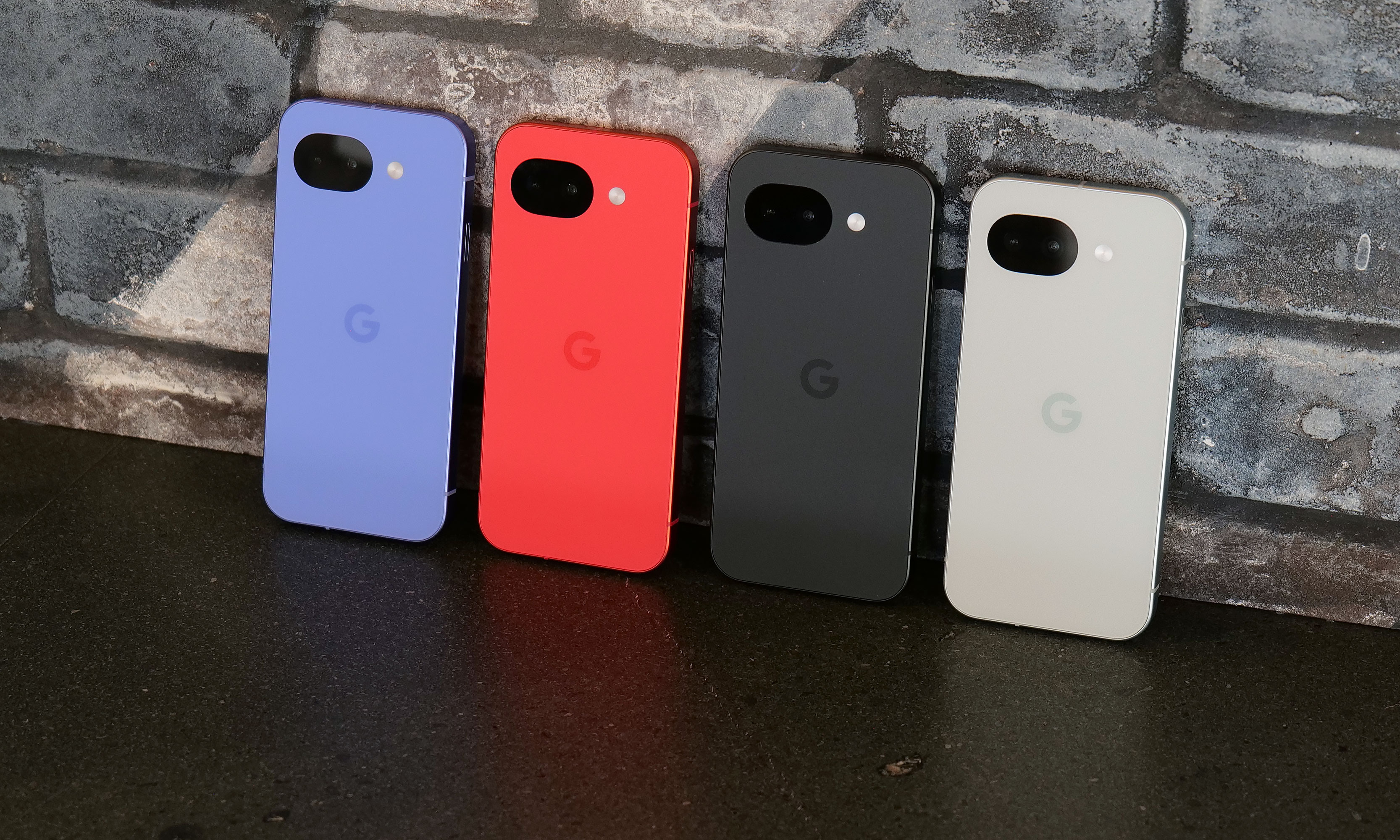
Google's A-series phones have offered some of the best value among midrange handsets for years, and after checking out the new Pixel 10a, I don't see that trend stopping anytime soon.
Let's start with the specs. Starting at just $499, you get a vivid 6.3-inch OLED screen with a 120Hz refresh rate and 3,000 nits of peak brightness, 8GB of RAM and either 128GB or 256GB of onboard storage. The phone also features a durable aluminum frame along with a stronger Corning Gorilla Glass 7i panel in front and a composite plastic back with a lovely matte finish. As a nod towards sustainability, Google says the P10a's chassis is made from 100 percent recycled material, while the rear panel comes in at 81 percent. And just like its predecessor, you still get an IP68 rating for dust and water resistance and the same battery capacity (5,100mAh) — except now it charges even faster, both wired (30 watts, up from 23) and wirelessly (10 watts, up from 5).
The one place where the Pixel 10a might come up a touch short is that unlike its more expensive siblings, it features an older Tensor G4 processor instead of the Tensor G5 chip used on the main Pixel 10 line. Google says the decision to go with an older SoC is due to budget constraints. While it might not be the first choice for gamers or power users, I've never really had an issue with the day-to-day performance of Google's recent homegrown silicon.
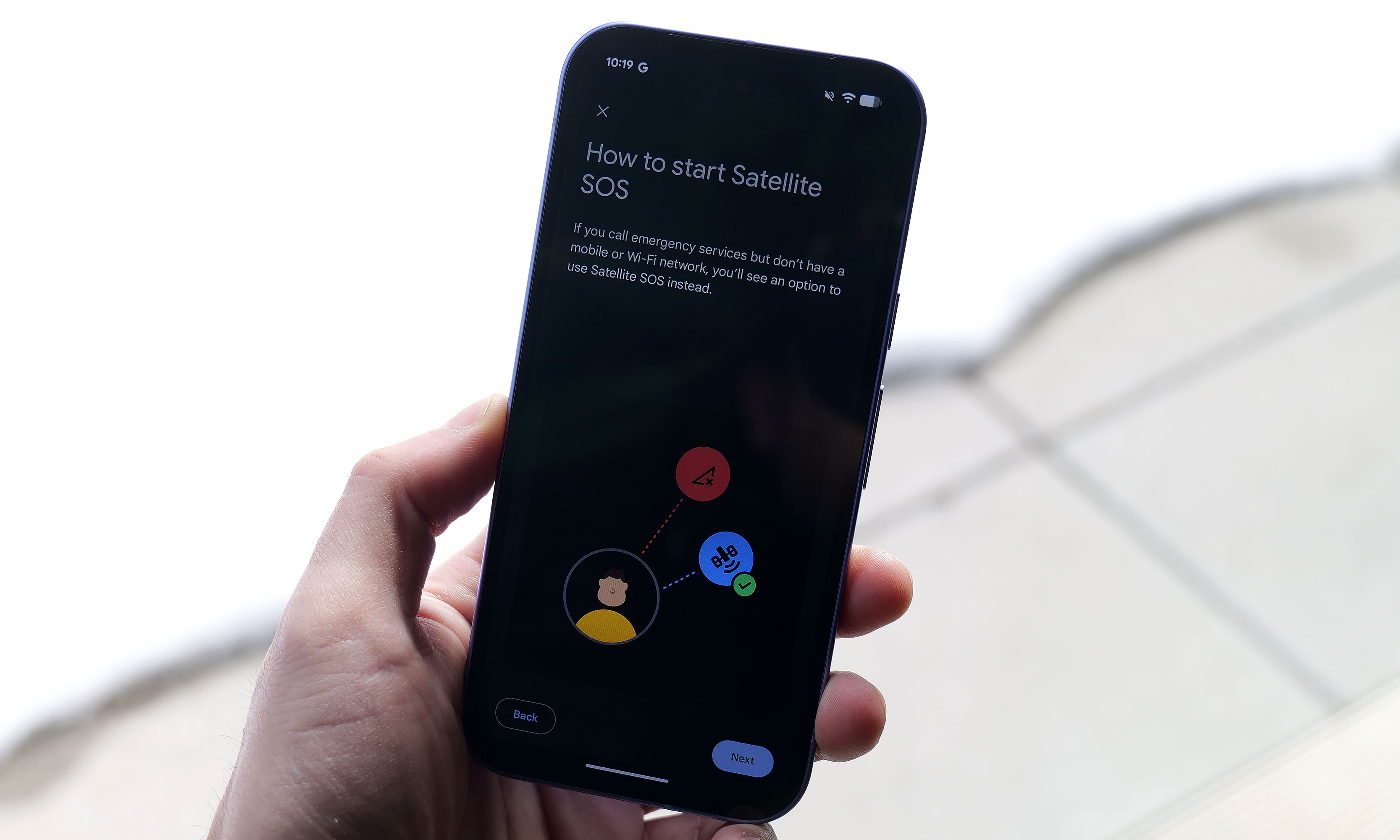
However, even with a one-year-old chip, Google found a way to port over three flagship features to the Pixel A series for the first time. Camera Coach uses AI to help you compose and come up with more interesting shots. Meanwhile, Auto Best Take is designed to ensure that everyone in a group shot ends up with their finest expression. Finally, Satellite SOS allows you to call for help during emergencies, even when you don't have proper cell service.
As for its cameras, the P10a looks to be using the same sensors as before, including a 48MP main camera, a 13MP ultra-wide and a 13MP selfie shooter in front. That might be a bummer for some, but considering that the Pixel 9a offered by far the best image quality of any phone in its price bracket, I'm not that bothered. Also, it's quite likely that if Google had opted for new hardware, it may have pushed the phone above $500.
After seeing the positive response to the barely-there camera bump on its predecessor, Google leaned in and made the Pixel 10a’s rear camera module completely flat, and it’s my favorite thing about the phone. There's no hump or protrusions to speak of, and when combined with the rest of the phone's design, it results in a really sleek, minimalist look. Plus, after almost a decade of big and bulky camera warts on the back of phones, it's just nice seeing the Pixel 10a go the opposite direction.
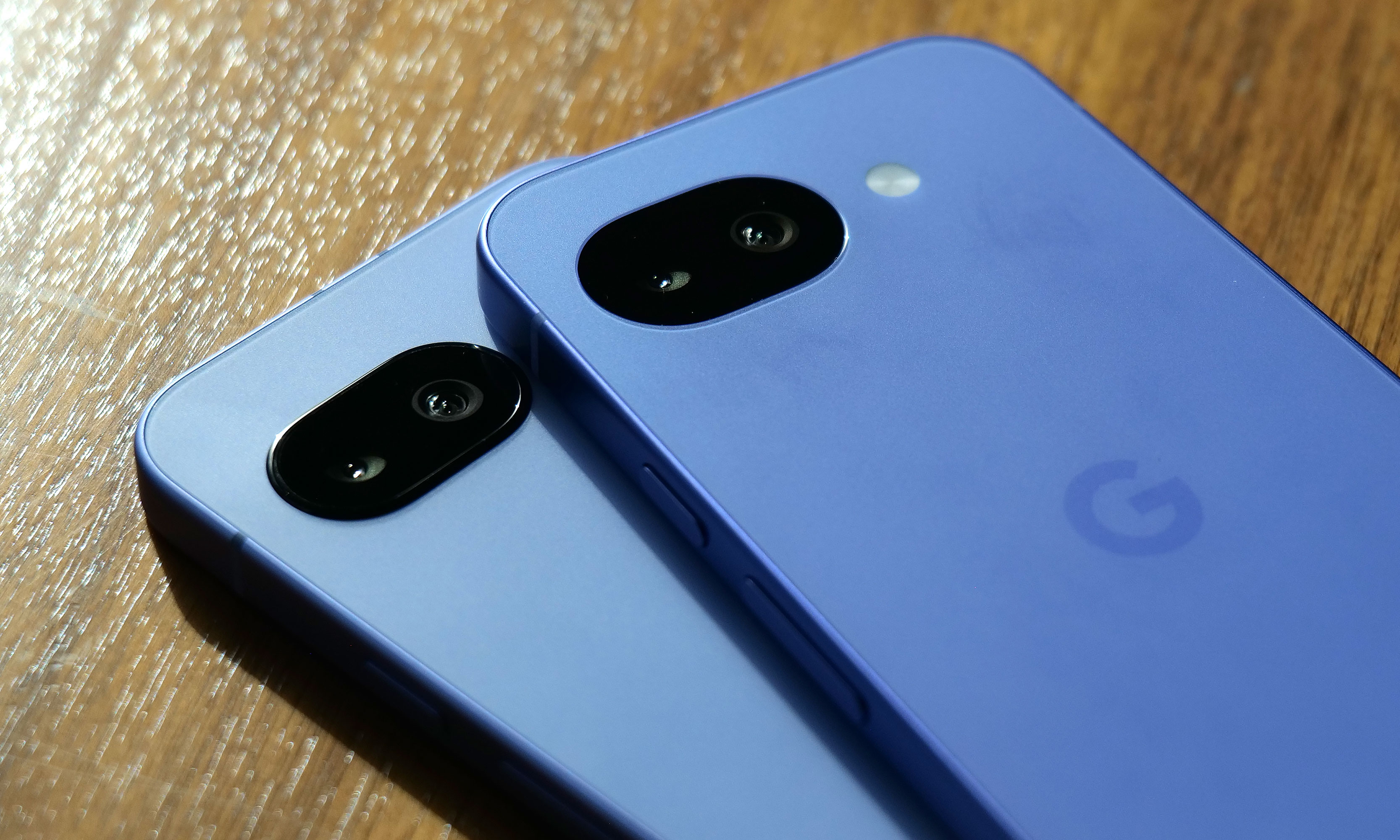
On the flipside, my biggest complaint about the P10a is that Google didn't include Pixelsnap support (aka magnetic Qi2 compatibility). It's another feature that got cut due to cost and it's a real bummer because after introducing it on last year's main Pixel 10 line, I was hoping that it would become a standard inclusion on all Google phones going forward. Thankfully, when I asked about the lack of Pixelsnap support, Google representatives were able to confirm that there will be third-party accessory makers such as Casefinite, Dbrand and Spigen that will offer cases with built-in magnetic rings, so anyone hoping to attach magnetic peripherals will still have an avenue to do so.
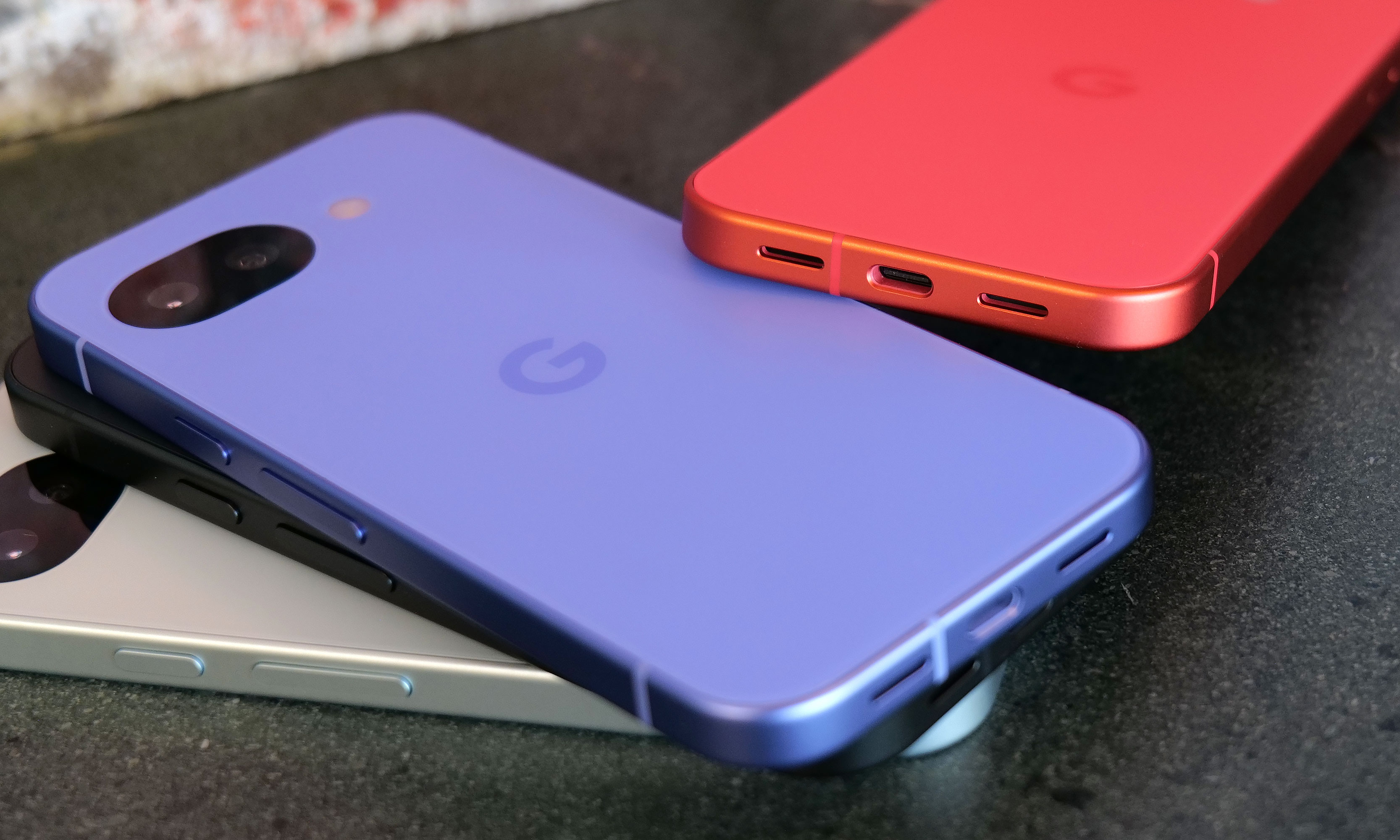
Regardless, for Android phone owners who are in the market for a simple, no-nonsense upgrade that covers all the basics without breaking the bank, the Pixel 10a is looking like another top contender.
The Pixel 10a is available for pre-order today in lavender, berry, fog and obsidian with official sales slated for March 5.
This article originally appeared on Engadget at https://www.engadget.com/mobile/smartphones/pixel-10a-hands-on-google-locks-down-the-midrange-phone-game-150000513.html?src=rss
Google's $500 Pixel 10a smartphone arrives on March 5
18 Feb 2026, 3:00 pm by Anna Washenko
Google debuted the Pixel 10a phone today. Pre-orders are open now and the smartphone will be available starting March 5. Although it's the new 2026 addition to the A series lineup, the Pixel 10a invites many comparisons with last year's Pixel 9a. For starters, the price is identical at $499.
Design-wise, not much as changed. The back of the phone can lay flat, which has become a hallmark of the Pixel A collection, rather than wobbling around on a bulky camera housing. The screen is still 6.3 inches with an Actua display. The phone's insides are also the same; the 10a comes with the same Tensor G4 chip and 8GB of RAM as its predecessor, and buyers have the option to upgrade to either 128GB or 256GB of storage. The phone has an IP68 rating for dust and water resistance and its display uses Corning Gorilla Glass 7i.
One of the few areas where the 10a is getting a marked upgrade is on its battery. This version claims more than 30 hours of battery life, or up to 120 under the Extra Battery Saver mode. The 10a also brings the welcome addition of proper fast charging, where a compatible charger can get the device to 50 percent battery in about 30 minutes. This addresses one of the few complaints we had about the 9a.
For the photo buffs, the Pixel 10a has a 48MP main camera and a 13MP ultrawide lens; again unchanged from the specs in the 9a. AI is also present in the new model's photography suite, with the addition of the Camera Coach resource for the first time on the A series lineup. Camera Coach uses Gemini AI models to read the scene and offer tips on getting the desired shot. The 10a also has the Auto Best Take feature for getting everyone's best side in a group shot and the Add Me tool that lets you insert yourself into a photo after the fact.
This article originally appeared on Engadget at https://www.engadget.com/mobile/smartphones/googles-500-pixel-10a-smartphone-arrives-on-march-5-150000489.html?src=rss
Google Pixel 10a vs. Pixel 9a: What's changed and which one should you buy?
18 Feb 2026, 3:00 pm by Georgie Peru
Now that pre-orders are open for the Google Pixel 10a, it’s time to see how it stacks up against last year’s Pixel 9a. At first glance, the two phones look very similar, and that’s not a bad thing. Google hasn’t tried to reinvent its budget-friendly formula this year, sticking to the same compact design, clean software experience and camera-first approach that made the 9a such a good value.
Both phones share a lot in common, including 120Hz OLED displays, Google’s Tensor G4 chip, strong computational photography and seven years of OS and security updates. The actual differences are more incremental, including a moderately brighter, tougher display, improved Extreme Battery Saver longevity, slightly faster wireless charging and the addition of Satellite SOS. Importantly, Google is keeping the starting price the same as before, with both phones coming in at $499.
On paper, the Pixel 10a doesn’t dramatically rethink what an affordable Pixel should be, but it does offer meaningful upgrades for the same price. While we wait for a review unit to evaluate the Pixel 10a's day-to-day performance, here's a quick comparison of the spec sheets of the two devices to see what the new model brings.
Pixel 10a vs Pixel 9a: Design and display
There’s very little separating these two on performance. Both the Pixel 9a and Pixel 10a run Google’s Tensor G4 chip with 8GB of RAM and the same storage options, so day-to-day speed should feel virtually identical. The Pixel 10a ships with Android 16 out of the box, though the 9a can be updated to the same version.
Off the bat, the Pixel 10a doesn’t look dramatically different from the Pixel 9a, and that appears to be intentional. Google is sticking with the same compact, no-frills approach from the last few A-series Pixels, so you’re still getting a 6.3-inch OLED panel with a smooth 60–120Hz refresh rate and a clean, understated aesthetic.
The meaningful changes show up once you dig into the display specs. The Pixel 10a upgrades the cover glass from Corning Gorilla Glass 3 to Gorilla Glass 7i, which should offer better durability against drops and scratches over time. Brightness also gets a noticeable bump. The 9a topped out at 1,800 nits for HDR content and 2,700 nits at peak, while the 10a pushes that to 2,000 nits for HDR and up to 3,000 nits at peak brightness. In practice, that should make the Pixel 10a easier to read outdoors and a bit punchier when watching HDR video.
Contrast is improved as well. The Pixel 10a’s panel is rated at a contrast ratio of more than 2,000,000:1, doubling the already respectable figure on the Pixel 9a. That won’t radically change how the phone looks day to day, but it should translate to deeper blacks and slightly more depth in darker scenes, especially when streaming video or browsing photos at night.
Pixel 10a vs Pixel 9a: Cameras
On paper, the Pixel 10a’s camera hardware looks very familiar. Like the Pixel 9a, it uses a 48-megapixel main camera paired with a 13MP ultra-wide, and there’s no dedicated telephoto lens. Image quality, color science and low-light performance should therefore be similar between the two.
Where the Pixel 10a pulls ahead is in software features. Google has added a few camera tools that aren’t available on the Pixel 9a, even though the underlying hardware hasn’t changed much. One of those is Camera Coach, which debuted on last year’s Pixel 10 series and offers on-screen tips to help you frame shots better or adjust how you’re holding the phone. The Pixel 10a also gains Macro Focus, allowing you to get much closer to small subjects like plants or textures. In our Pixel 9a review, we found the phone could capture solid close-up detail, but locking focus could be finicky at times, so a more dedicated macro mode should make those shots easier to nail.
Finally, there’s Auto Best Take, which automatically picks the best expressions from a burst of photos and combines them into a single image. The feature debuted on Google’s Pixel 10 lineup last year, and it’s especially handy for group shots where someone always seems to blink at the wrong moment. By bringing it to the 10a, Google is extending one of its more genuinely practical AI camera tricks to a cheaper phone.
Battery life and charging
Both the Pixel 9a and Pixel 10a use a 5,100mAh battery and support the same 23W wired charging speeds. Where the Pixel 10a does pull ahead slightly is wireless charging. The Pixel 9a tops out at 7.5W, while the Pixel 10a supports wireless charging at up to 10W when used with Qi-certified Extended Power Profile (EPP) chargers, which are designed to deliver faster wireless power than basic Qi pads. The difference isn’t dramatic, but the Pixel 10a should charge a bit quicker on a compatible wireless stand when you’re in a pinch.
You’ll also get some extra hours in dire situations. When you activate Extreme Battery Saver, the Pixel 9a is rated for up to 100 hours, while the Pixel 10a extends that to up to 120 hours.
The Pixel 10a gets Satellite SOS
The biggest safety-related upgrade on the Pixel 10a is the addition of Satellite SOS. Because it uses a newer modem compared to the Pixel 9a’s Exynos Modem 5300, it is capable of tapping satellite networks when necessary. This allows the phone to contact emergency services when you’re outside of cellular or Wi-Fi coverage, which can be genuinely useful if you spend time hiking, traveling or driving in remote areas.
If you already own a Pixel 9a, there doesn’t appear to be a huge reason to upgrade. Day-to-day performance may feel almost identical, since both phones use the same Tensor G4 chip, the same amount of RAM and very similar camera hardware.
That said, the Pixel 10a does make a stronger case for first-time buyers or anyone upgrading from an older Pixel. The biggest differentiator, though, is Satellite SOS — it’s the one feature the Pixel 9a simply can’t match due to hardware limitations. At the same $499 starting price, the Pixel 10a is, on paper, the better long-term buy if you’re choosing between the two today.
Google Pixel 10a vs. Google Pixel 9a: Specs at a glance
|
Spec |
Google Pixel 10a |
Google Pixel 9a |
|
Price |
$499 |
$499 |
|
Processor |
Google Tensor G4, Titan M2 coprocessor |
Google Tensor G4, Titan M2 coprocessor |
|
Display |
6.3-inch Actua display, 1080 x 2424 pOLED at 422.2 PPI, Gorilla Glass 7i |
6.3-inch Actua display, 1080 x 2424 pOLED at 422.2 PPI, Corning Gorilla Glass 3 |
|
RAM |
8GB |
8GB |
|
Storage |
128GB, 256GB |
128GB, 256GB |
|
Battery |
5,100mAh |
5,100mAh |
|
Wireless charging |
Up to 10W |
Up to 7.5W |
|
Rear camera |
48MP wide, 13MP ultrawide, Super Res Zoom up to 8x |
48MP wide, 13MP ultrawide, Super Res Zoom up to 8x |
|
Front camera |
13MP selfie cam |
13MP selfie cam |
|
SIM |
Dual SIM (single nano SIM, eSIM) |
Dual SIM (single nano SIM, eSIM) |
|
Connectivity |
Wi-Fi 6E, Bluetooth v6, NFC |
Wi-Fi 6E, Bluetooth v5.3, NFC |
|
OS |
Launch with Android 16 |
Launch with Android 15 |
This article originally appeared on Engadget at https://www.engadget.com/mobile/smartphones/google-pixel-10a-vs-pixel-9a-whats-changed-and-which-one-should-you-buy-150000786.html?src=rss
Polestar unveils a station wagon version of the 4
18 Feb 2026, 2:40 pm by Steve Dent
Polestar is gearing up to launch three new models in the next two years, including a station wagon (estate or shooting brake) version of the Polestar 4 that harkens back to the company's Volvo roots. The Geely-owned Swedish company sold a record 61,000 EVs in 2025, but hopes that the new models will help it take an even bigger bite out of the market. "We want to get more volume out of a bigger cake," CEO Michael Lohscheller said.
Polestar currently offers two models in the US, the Polestar 3 and Polestar 4, both SUVs. However, the new Polestar 4 will come in two variants, one a traditional SUV as before and the other a four-door wagon-type version that combines "the space of an estate and the versatility of an SUV," Loscheller said. "It's all the good things from the current car, but it's a bit more practical." This new model is due later this year and will be built in Busan, South Korea in order to avoid US tariffs on cars built in China.
The automaker is also planning to release a new version of the Polestar 2 targeted at young buyers, though that one is unlikely to come to the US. It will be slightly longer for more passenger space and be produced in China like the current model 2.
Finally, the Polestar 7 will be a compact SUV in the same family as Volvo's EX60, set to arrive in Europe to address the fast-growing compact SUV segment. "We are convinced that we can offer customers a progressive performance-driven car for a very attractive price point, built in Europe," Lohscheller said.
The new models are designed to help Polestar hit its goal of 60 percent of EV sales worldwide by "targeting the big profit pools of the BEV segment," Lohscheller stated. Following Polestar's withdrawal from the hyper-competitive Chinese market, Europe accounts for 78 percent of its sales and the US most of the rest — but the company hopes to boost its fortunes in the latter. "People forget that the U.S. is a big EV market, especially on the east and west coasts," the CEO added. "And it will stay a big market."
This article originally appeared on Engadget at https://www.engadget.com/transportation/evs/polestar-unveils-a-station-wagon-version-of-the-4-144025505.html?src=rss
NordVPN deal: Get two years of the Complete plan for 70 percent off
18 Feb 2026, 2:05 pm by Rob Webb
NordVPN is offering a significant discount on its two-year plans, with 70 percent off its Complete tier and up to 74 percent off overall. For the Complete tier, the deal brings the total cost down to $130 for 24 months.
NordVPN regularly appears on Engadget’s list of the best VPN services thanks to its wide server network, strong security tools and consistent performance across devices. NordVPN’s latest promotion puts one of its most comprehensive plans at a price that undercuts many competing premium VPN subscriptions.
The Complete tier includes full access to NordVPN’s core VPN service, which encrypts internet traffic and masks a user’s IP address to help protect online activity on public Wi-Fi networks and at home. Subscribers can use the service on multiple devices, including phones, tablets, laptops and smart TVs, with apps available for major operating systems. It also includes access to NordPass (more on that below), an ad blocker and 1TB of cloud storage. You’ll find similar discounts on all of NordVPN’s other plans: Basic, Plus and Prime.
Beyond the basics, NordVPN offers features like threat protection to help block malicious websites and trackers, as well as specialty servers designed for added privacy or faster performance in specific scenarios. In our NordVPN review, the service was praised for its evolving feature set and overall reliability, even as the VPN market becomes increasingly competitive.
Engadget regularly tracks VPN pricing trends and this offer compares favorably with other current promotions. It also appears alongside NordVPN deals featured in Engadget’s ongoing roundup of the best VPN discounts available right now, which compares offers from multiple major providers.
Those looking for additional security tools may also want to note that NordVPN’s Complete plan bundles in extra services beyond the VPN itself. One of those is NordPass, the company’s password management app. NordPass is also discounted as part of a separate promotion, if you’re primarily looking for a password manager rather than a VPN. The Premium tier is currently 50 percent off, bringing the price down to $36 for two years. NordPass Premium adds features such as cross-device password syncing, secure password sharing and breach monitoring, which alerts users if stored credentials appear in known data leaks.
Both offers are available for a limited time, though Nord has not specified an end date for the promotion. If you’re still unsure whether NordVPN is right for you, it offers a 30-day money-back guarantee, so you can change your mind and get a full refund.
This article originally appeared on Engadget at https://www.engadget.com/deals/nordvpn-deal-get-two-years-of-the-complete-plan-for-70-percent-off-123000517.html?src=rss
New users can get one year of access to Monarch Money for 50 percent off
18 Feb 2026, 1:25 pm by Georgie Peru
A good budgeting app can make it much easier to see where your money is actually going, and one of our top picks is 50 percent off right now. Monarch Money is running a deal for new users that cuts the price of its annual plan in half. With the code MONARCHVIP, you’ll pay $50 for one year of access instead of the usual $100.
We’ve recommended Monarch before for its deep customization options and robust financial planning tools. It supports unlimited account connections, investment tracking and shared budgets, making it a solid option if you want a detailed look at your finances or plan alongside a partner. It also features prominently in our roundup of the best budgeting apps, where it stood out for its depth and flexibility.
Monarch Money is the kind of budgeting app that can feel a little overwhelming at first, especially when you’re setting up categories, rules and recurring transactions. There’s a bit of a learning curve, and some of the finer details are easier to manage on the web than in the mobile app. But once you’re past that initial setup, it starts to make a lot more sense and becomes a powerful tool for keeping tabs on your finances.
Where Monarch Money really shines is in the level of detail it offers. It’s built for people who want a clear, structured view of their money, not just a running list of transactions. In the budgeting section, you can see budgets versus actual spending by category, along with forecasts by month or by year. Recurring expenses can also be defined using more than just merchant names, which helps keep things accurate with less manual cleanup.
Beyond day-to-day budgeting, Monarch does a good job of showing the bigger picture. It includes visual reports and charts that make it easier to spot trends over time, plus tools for tracking net worth, investments and financial goals. Monarch can even factor in non-cash assets like your home or vehicle, pulling in estimates automatically so they appear alongside your accounts.
All of that depth won’t be for everyone, but if you’re willing to spend a little time getting set up, Monarch Money offers a lot of control and insight. With the current deal bringing the price down to $50 for a full year, it’s a solid opportunity to try one of our favorite budgeting apps at a discount of 50 percent off and see if it fits how you like to manage your money.
This article originally appeared on Engadget at https://www.engadget.com/deals/new-users-can-get-one-year-of-access-to-monarch-money-for-50-percent-off-120000143.html?src=rss
Federal court rules that OpenAI must stop using the term 'Cameo'
18 Feb 2026, 12:45 pm by Andre Revilla
Cameo, the platform where celebrities sell short, personalized videos, has scored a preliminary win in a trademark lawsuit against OpenAI. A California judge has ruled that the AI company's video generation tool Sora cannot use the term 'cameo' or any variation likely to cause confusion. A temporary restraining order in the case was originally granted in November of last year.
The suit was first brought in response to a feature available within the Sora app at launch called 'Cameo' that allowed users to add any likeness to videos they generated. Cameo claimed the use of the term in this setting was likely to cause confusion and could dilute their brand. OpenAI then carried on with the feature despite the suit.
U.S. District Judge Eumi Lee ruled on Saturday that Cameo's lawsuit was likely to succeed and granted a preliminary injunction, blocking OpenAI from continuing to use the name. An OpenAI spokesperson responded to the ruling saying, "We disagree with the complaint's assertion that anyone can claim exclusive ownership over the word ‘cameo,’ and we look forward to continuing to make our case," according to Reuters.
This is just the latest in a string of intellectual property cases against AI companies that have accelerated as video generation capabilities have improved across the board. Rights holders of all kinds from authors and music publishers to major movie studios have taken the likes of OpenAI, Anthropic, Perplexity and others to court, seeking to protect their IP.
This article originally appeared on Engadget at https://www.engadget.com/ai/federal-court-rules-that-openai-must-stop-using-the-term-cameo-124559072.html?src=rss
Tesla stops using 'Autopilot' to promote its EVs in California
18 Feb 2026, 11:25 am by Mariella Moon
Tesla has stopped using the term “Autopilot” to sell its cars in California, thereby avoiding a 30-day sales and manufacturing ban in the state. If you’ll recall, a California administrative law judge ruled in December that the automaker misled consumers by using the terms “Autopilot” and “Full Self-Driving.” The judge recommended the suspension, but the California DMV gave Tesla 60 days to remove any untrue and misleading language in its marketing materials. In its announcement, the DMV said Tesla has taken corrective action and has stopped using Autopilot for marketing. Prior to that, the automaker has already clarified that driver supervision is still needed with Full Self-Driving.
The judge was ruling on a complaint the DMV made back in 2022, wherein the agency accused Tesla of making and disseminating misleading statements. It argued that starting in May 2021, Tesla used deceptive marketing materials with the labels “Autopilot” and “Full Self-Driving Capability,” as well as claimed that the “system is designed to be able to conduct short and long-distance trips with no action required by the person in the driver’s seat.” In reality, the vehicles equipped with those features “could not at the time of those advertisements, and cannot now, operate as autonomous vehicles,” the DMV said.
A ban in California could have had a huge effect on the company, seeing as the state accounts for nearly a third of its sales in the country. Tesla also recently announced that it will stop the production of its Model S and X cars to turn its Fremont, California factory where they were being manufactured into a space for the production of its Optimus humanoid robots. Tesla has huge plans for Optimus and intends to start selling the robot to the public by the end of 2027.
This article originally appeared on Engadget at https://www.engadget.com/transportation/evs/tesla-stops-using-autopilot-to-promote-its-evs-in-california-112533060.html?src=rss
Meta will run AI in WhatsApp through NVIDIA's 'confidential computing'
18 Feb 2026, 11:00 am by Steve Dent
Meta just announced a deal to buy "millions" of NVIDIA Blackwell and Rubin GPUs in a new long-term partnership. As part of that, the social media giant will deploy NVIDIA's Confidential Computing for WhatsApp, "enabling AI-powered capabilities across the messaging platform while ensuring user data confidentiality and integrity."
As part of the deal, Meta committed to using NVIDIA's Confidential Computing for WhatsApp messaging to allow AI inside the app while guaranteeing user data confidentiality. That technology will let Meta secure data during computation, not just when it's being shuttled to a server. It also allows software creators like Meta or third-party AI agent providers "to preserve their intellectual property," NVIDIA wrote on a blog about the technology.
Meta will also be the first to deploy NVIDIA's Grace CPUs in a standalone way, instead of incorporating them with GPUs. They're designed to run inference and agentic workloads when running in this fashion. Meta will also be using NVIDIA's Spectrum-X Ethernet switches.
Meta announced earlier this year that it would spend up to $135 billion on AI in 2026, so it's not a surprise that a big chunk of that is going toward NVIDIA. However the numbers involved, likely in the "tens of billions" according to analysts, represent a significant expansion of the partnership between the two companies. Meta plans to build up to 30 data centers, including 26 in the US, by 2028 as part of a $600 billion commitment.
This article originally appeared on Engadget at https://www.engadget.com/ai/meta-will-run-ai-in-whatsapp-through-nvidias-confidential-computing-110002283.html?src=rss
The best wireless workout headphones for 2026
18 Feb 2026, 10:01 am by Dana Wollman,Valentina Palladino
Whether you’re lifting, running or squeezing in a quick session between errands, the last thing you want is a cable getting in the way or earbuds that won’t stay put. The best wireless headphones make it easier to focus on your workout, but not every pair is built to handle sweat, motion and long sessions.
Fitness-focused headphones put different demands on design and performance. Secure fit, water resistance and dependable battery life matter just as much as sound quality, especially if you plan to use them outside the gym as well. Some are tuned for awareness during outdoor runs, while others aim to block distractions during intense training.
We’ve tested a wide range of wireless headphones and wireless earbuds that are suited for exercise, narrowing the list down to options that hold up during workouts and still work well for everyday listening. Below, you’ll find our top picks, along with guidance to help you choose the right pair for how you train.
Best workout headphones for 2026
Others wireless workout headphones we tested
Apple AirPods Pro 3
When it comes to running and working out, the edge that the AirPods Pro 3 have over the Pro 2, or even the top picks on our list, is built-in heart rate monitoring. That means you could go out with just your Pro 3 earbuds and your iPhone and still get heart rate information for your entire training session. But otherwise, the Pro 3 buds are just as capable as the Pro 2 when it comes to exercise. Some may prefer the soft-touch finish on our top picks to the AirPods' slick texture.
Beats Powerbeats Pro 2
The Powerbeats Pro 2 are a good alternative to the Beats Fit Pro if you’re a stickler for a hook design. However, they cost $50 more than the Powerbeats Fit, and the main added advantage here is built-in heart rate sensors.
Anker Soundcore AeroFit Pro
The Soundcore AeroFit Pro is Anker’s version of the Shokz OpenFit, but I found the fit to be less secure and not as comfortable. The actual earbuds on the AeroFit Pro are noticeably bulkier than those on the OpenFit and that caused them to shift and move much more during exercise. They never fell off of my ears completely, but I spent more time adjusting them than I did enjoying them.
JBL Endurance Peak 3
The most noteworthy thing about the Endurance Peak 3 is that they have the same IP68 rating as the Jabra Elite 8 Active, except they only cost $100. But, while you get the same protection here, you’ll have to sacrifice in other areas. The Endurance Peak 3 didn’t blow me away when it came to sound quality or comfort (its hook is more rigid than those on my favorite similarly designed buds) and their charging case is massive compared to most competitors.
What to look for in workout headphones
Design
Before diving in, it’s worth mentioning that this guide focuses on wireless earbuds. While you could wear over-ear or on-ear headphones during a workout, most of the best headphones available now do not have the same level of durability. Water and dust resistance, particularly the former, is important for any audio gear you plan on sweating with or taking outdoors, and that’s more prevalent in the wireless earbuds world.
Most earbuds have one of three designs: in-ear, in-ear with hook or open-ear. The first two are the most popular. In-ears are arguably the most common, while those with hooks promise better security and fit since they have an appendage that curls around the top of your ear. Open-ear designs don’t stick into your ear canal, but rather sit just outside of it. This makes it easier to hear the world around you while also listening to audio, and could be more comfortable for those who don’t like the intrusiveness of in-ear buds.
Water resistance and dust protection
Even if a pair of headphones for working out aren’t marketed specifically as exercise headphones, a sturdy, water-resistant design will, by default, make them suitable for exercise. To avoid repetition, here’s a quick primer on durability, or ingression protection (IP) ratings. The first digit you’ll see after the “IP” refers to protection from dust and other potential intrusions, measured on a scale from 1 to 6. The second refers to water resistance or even waterproofing, in the best cases. The ratings for water resistance are ranked on a scale of 1 to 9; higher numbers mean more protection, while the letter “X” means the device is not rated for protection in that regard.
All of the earbuds we tested for this guide have at least an IPX4 rating, which means there’s no dust protection, but the buds can withstand splashes from any direction and are sweat resistant, but probably shouldn't be submerged. For a detailed breakdown of all the possible permutations, check out this guide published by a supplier called The Enclosure Company.
Active noise cancellation and transparency mode
Active noise cancellation (ANC) is becoming standard on wireless earbuds, at least those above a certain price point. If you’re looking for a pair of buds that can be your workout companion and serve you outside of the gym, too, noise cancelation is a good feature to have. It makes the buds more versatile, allowing you to block out the dull roar of your home or office so you can focus, or give you some solitude during a busy commute.
But an earbud’s ability to block out the world goes hand-in-hand with its ability to open things back up should you need it. Many ANC earbuds also support some sort of “transparency mode,” or various levels of noise reduction. This is important for running headphones because exercising outdoors, alongside busy streets, can be dangerous. You probably don’t want to be totally oblivious to what’s going on around you when you’re running outside; adjusting noise cancelation levels to increase your awareness will help with that. Stronger noise cancelation might be more appealing to those doing more indoor training if they want to block out the dull roar of a gym or the guy exaggeratingly lifting weights next to you.
Battery life
All of the Bluetooth earbuds we tested have a battery life of six to eight hours. In general, that’s what you can expect from this space, with a few outliers that can get up to 15 hours of life on a charge. Even the low end of the spectrum should be good enough for most athletes and gym junkies, but it’ll be handy to keep the buds’ charging case on you if you think you’ll get close to using up all their juice during a single session.
You’ll get an average of 20 to 28 extra hours of battery out of most charging cases and all of the earbuds we tested had holders that provided at least an extra 15 hours. This will dictate how often you actually have to charge the device — as in physically connect the case with earbuds inside to a charging cable, or set it on a wireless charger to power up.
How we test workout headphones
In testing wireless workout headphones, I wear them during every bit of exercise I do — be it a casual walk around the block, a brisk morning run or a challenging weight-lifting session. I’m looking for comfort arguably most of all, because you should never be fussing with your earbuds when you should be focusing on working out. In the same vein, I’m cognizant of if they get loose during fast movements or slippery when I’m sweating. I also use the earbuds when not exercising to take calls and listen to music throughout the day. Many people will want just one pair of earbuds that they can use while exercising and just doing everyday things, so I evaluate each pair on their ability to be comfortable and provide a good listening experience in multiple different activities.
While I am also evaluating sound quality, I’m admittedly not an audio expert. My colleague Billy Steele holds that title at Engadget, and you’ll find much more detailed information about audio quality for some of our top picks in his reviews and buying guides. With these headphones for working out, however, I will make note of related issues if they stood out (i.e. if a pair of earbuds had noticeably strong bass out of the box, weak highs, etc). Most of the wireless workout headphones we tested work with companion apps that have adjustable EQ settings, so you’ll be able to tweak sound profiles to your liking in most cases.
This article originally appeared on Engadget at https://www.engadget.com/audio/headphones/best-wireless-workout-headphones-191517835.html?src=rss
The best drone for 2026
18 Feb 2026, 8:01 am by Steve Dent
Drones are no longer just niche toys for enthusiasts. Today’s models are compact, increasingly affordable and capable of capturing sharp aerial photos and video with minimal effort. Whether you’re curious about flying for the first time or looking to upgrade to a more advanced camera drone, the options available in 2026 are broader and more approachable than ever.
Entry-level drones now offer features like GPS-assisted flight, return-to-home safety systems and automated shooting modes that take much of the stress out of learning to fly. Step up to more advanced models and you’ll find foldable designs that travel easily, longer flight times and stabilized 4K video that holds up well beyond social media clips.
We’ve tested a range of drones to identify the best options across different skill levels and budgets. Whether your priority is learning the basics, capturing polished aerial footage or packing light for travel, these picks highlight the drones that offer the best balance of performance, reliability and ease of use.
Best drones for 2026
What to look for in a drone
Camera features
For this guide, we're looking only at drones that are basically flying cameras, so you want the best video and photo features possible. Bigger devices like DJI’s Mavic 3 Pro or Air 3S carry relatively large sensors, offering superior camera quality for nighttime cityscapes or other low-light scenes. Smaller models like the Mini 4 Pro and HoverAir X1 Max use smaller camera sensors, so they aren’t as good in dim light.
Field of view and minimum aperture are also important, with most drones typically having a wide-angle focal length, though a few others like the HoverAir X1 Max carry an ultrawide lens. Some models have multiple cameras including a wide and a zoom. As for aperture, lower numbers are better and allow for shooting in dim light. Most DJI models are solid in this regard, while the HoverAir models don’t perform as well.
Video resolution and slow-mo are also essential camera capabilities. Most drones these days can shoot at 4K with a frame rate of at least 30 fps, though some offer 6K or even 8K at up to 30 fps. Higher-end models can shoot 4K at up to 120 fps, allowing you to slow down the action dramatically to create a cinematic look.
Other noteworthy features include log or HDR video that supports higher dynamic range, particularly in bright and sunny conditions. Finally, the camera’s gimbal and stabilization are important factors to keep your footage looking as smooth as possible. Some drones have gimbals that can rotate the camera 90 degrees to give social media creators the maximum resolution for vertical formats.
Drone features: Speed, range, safety, battery life and obstacle detection
By and large, there are two types of camera drones to consider. The first are standard drones (usually with open propellers but not always) designed to fly outside and take scenic shots. Often there’s nothing to stop the props from striking skin or objects, so they can’t really be used indoors or around people. Some models like the DJI Neo and Flip have prop guards that better protect bystanders and property, as well as the drone itself.
Then there's first-person-view (FPV) camera drones, which often have propeller guards and are meant to be used both indoors or outside to capture exciting footage. Standard models don’t need to go particularly fast as they’re mainly used to shoot fun videos for social media, but FPV drones need to move at high speeds to create excitement. Because of that speed, they’re also better in breezy conditions thanks to stronger wind resistance, and they can fight gusts and return home more quickly. Acrobatic abilities (often promoted by the manufacturer in ads or packaging) are also important for FPV drones, as it allows the user to perform tricks and zip around obstacles.
Battery life is another important factor. The best drones boast a battery endurance of up to 45 minutes, while FPV drones like the Avata 2 can only fly for about half that time as they tend to be heavier and carry smaller batteries to reduce weight. As a general rule, a single battery isn’t enough for any serious shooting so you’d do well to buy your drone in a kit with a few batteries and a charger.
As for range, DJI tends to dominate in this area, with its latest models able to maintain a video signal at a distance up to 20km (12.4 miles). HoverAir’s models are weaker with the top-end X1 Max model limited to just 1km (0.6 miles) when using the optional beacon system. DJI also offers multiple ways to control its drones including headsets, joystick-type controllers, motion detection controllers and smartphones.
The best drones have sensors to detect obstacles in all directions. Others are limited to only avoiding obstructions coming at them from the front and some only rely on the main camera to prevent crashes. Finally, if you want to have your drone follow you around automatically, you’ll need it to be able to track you around when you’re vlogging, riding a bike or skiing, while also avoiding obstacles. Smooth takeoff and return-to-home features are especially valuable here for both beginners and experienced drone pilots as well.
Best drone FAQs
What are the rules for owning a drone?
Anyone can buy any drone, but once purchased, all drones between 250g and 25 kg must be registered with the FAA and marked with the FAA registration number. Recreational pilots with drones over 249g must pass the recreational UAS safety "TRUST" exam and carry proof of TRUST completion when flying a drone. Commercial pilots must obtain a Remote Pilot Certificate from the FAA. You must be aware of and avoid any areas with airspace restrictions, particularly around airports.
Are drones safe to fly in the city?
In general, it is not legal to fly a drone within city limits over populations, as a crash from a high altitude could injure or kill someone. However, they can be flown over adjacent, non-populated areas in many cases. Here is a guide to where: https://uavcoach.com/where-to-fly-drone/
What is the average flight time of a drone?
Most drones can fly for around 20-30 minutes, though some advanced models like DJI's Mavic 4 can fly up to 40 minutes or more.
This article originally appeared on Engadget at https://www.engadget.com/cameras/best-drone-120046775.html?src=rss
YouTube was down for thousands of users in the US
18 Feb 2026, 3:27 am by Mariella Moon
YouTube is experiencing an outage across the United States, with users in other countries like Canada, India, the Philippines, Australia and Russia also having problems with accessing the website. The issue seems to have started at around 8 PM Eastern time and reached 338,000 reports on Downdetector before starting to taper down. More users reported having issues accessing the app, but I personally lost access to the web homepage first.
As of 9:22 PM, users are still reporting being unable to access YouTube on Reddit. As of 9:33 PM, users are complaining that they still can’t access the service, though others say it’s back up for them. Some people are reporting partial restoration of service, with the homepage now being accessible but not seeing any recommended videos.
Downdetector also got thousands of reports of Google being down at around 8 PM Eastern time. As of 9:53 PM, Engadget Managing Editor Cherlynn Low reports that both YouTube and Google Home Assistant are still inaccessible for her. As of 10:12PM Eastern, Team YouTube posted on X that the issue has been completely fixed. While it didn’t say why YouTube went down, the team acknowledged the problem before 9PM and posted an update 20 minutes later that its recommendation system was having issues, even though its homepage was back.
Update, February 17, 2026, 10:27 PM ET: YouTube says the issue has been completely fixed.
Update, February 17, 2026, 10:08 PM ET: Updated with reports that certain Google services are also down for some users.
Update, February 17, 2026, 9:34 PM ET: Updated with reports from users.
Update, February 17, 2026, 9:26 PM ET: Updated to correct time of outage, added new countries where it’s out and added new reports of YouTube still being inaccessible.
This article originally appeared on Engadget at https://www.engadget.com/big-tech/youtube-was-down-for-thousands-of-users-in-the-us-020718788.html?src=rss
End of today’s Engadget roundup.