This digest compiles the latest from Engadget.
Today’s Engadget Roundup
Rhythm Heaven Groove comes to Switch on July 2
9 Apr 2026, 3:57 pm by Matt Tate
A large chunk of Nintendo’s 2026 plans remain a mystery (that is, unless you take the insiders and leakers at their word), but we have been waiting on release dates for a couple of previously announced first-party titles, including Rhythm Heaven Groove, which officially arrives July 2.
Seemingly announced first on the Nintendo Today! app before making its way to the company’s various social channels, the first new entry in the Rhythm Heaven series in more than a decade is technically launching on the original Switch, but should also be fully playable on Switch 2. Currently the game’s Switch 2 compatibility status is listed as “Untested” on its official store page, but it’s hard to imagine there being any issues there.
🍅🍅🫑🥦🥦🥦🎵
Did you catch all that? #RhythmHeavenGroove comes to #NintendoSwitch on July 2! pic.twitter.com/WrWiyC7Yqn
— Nintendo of America (@NintendoAmerica) April 9, 2026
If you’ve never played a Rhythm Heaven game before, the series is a bit like a (slightly) less wacky WarioWare, but all the minigames are based around rhythm and beat-matching. The challenges are rarely especially complex in terms of what's required of you, leaving you free to enjoy the always excellent original pop and electronic music.
Rhythm Heaven is one of Nintendo’s less prolific series’, with the upcoming Groove being only the fifth entry in two decades. The series debuted on the Game Boy Advance in 2006 in Japan as Rhythm Tengoku, with Rhythm Heaven arriving on the DS two years later in the US. That was followed by Rhythm Heaven Fever on the Wii, and the most recent entry was 2015’s Rhythm Heaven Megamix for the 3DS, which was something of a best-of collection.
Rhythm Heaven Groove is notable not only for being the first Rhythm Heaven game of the Switch generation, but also likely one of the console’s last games, as Nintendo prepares to shift its full focus to the Switch 2. Before then we’re also getting the typically charming Yoshi and the Mysterious Book (Switch 2-only) on May 21 and Tomodachi Life: Living the Dream, which launches on both platforms next week, April 16.
Rhythm Heaven Groove is available to pre-order now for $40.
This article originally appeared on Engadget at https://www.engadget.com/gaming/nintendo/rhythm-heaven-groove-comes-to-switch-on-july-2-155715068.html?src=rss
Roku will stream Savannah Bananas games, along with the entire Banana Ball Championship League
9 Apr 2026, 3:33 pm by Lawrence Bonk
The Banana Ball World Tour is coming to Roku. The platform has signed a deal to stream free content from the Banana Ball Championship League. This, of course, includes Savannah Bananas games.
If that last paragraph didn’t make a lick of sense to you, here’s a primer. The Savannah Bananas are a wacky baseball team, playing something called Banana Ball. The team has been called the Harlem Globetrotters of baseball, and that’s a fairly apt name. Players dress in funny costumes, step into ridiculously tall stilts, perform dance routines and do all kinds of things that could frustrate traditional baseball fans but tend to delight those looking for a unique night out.
To that end, Savannah Bananas games have become massive events. They’ve been traveling around the country the past few years doing exhibition matches, but the team’s success led to the creation of the Banana Ball Championship League and the Banana Ball World Tour. There are now six teams involved and Roku will be streaming games from later this month until September.
First up, the Savannah Bananas face the Party Animals on April 26 at Yankee Stadium, which streams live at 3PM ET on the Roku Sports Channel. The Party Animals are Savannah’s main rivals, making them the Washington Generals of Banana Ball.
Roku has published a calendar of streamed matches, but it doesn’t include the actual championship game. This inaugural Banana Bowl is scheduled for October 10. Engadget has reached out to the platform to see what their plans are for the final game of the season. Many games are also available to stream on ESPN via Disney+.
The company also says it’s working on some kind of “interactive platform” for Banana Ball fans. The matches have a lot of audience participation, so this could be some kind of riff on that. Roku promises to share more details at a later time.
This article originally appeared on Engadget at https://www.engadget.com/entertainment/roku-will-stream-savannah-bananas-games-along-with-the-entire-banana-ball-championship-league-153329667.html?src=rss
Google introduces AI-generated avatars to YouTube Shorts
9 Apr 2026, 2:02 pm by Matt Tate
A new feature that lets you create an AI avatar with your likeness is now live on YouTube. First announced in a blog post earlier this year, avatars are designed to be used in Shorts (provided you still allow them to show up), allowing you to insert yourself into video content in a way that YouTube deems to be safe and secure.
YouTube’s approach to combatting the AI sloppification of the internet and the proliferation of deepfakes appears to be adding more and more AI features to its platform, framing this latest addition as a tool that gives creators more control of their digital identities. Any video generated using an avatar will feature YouTube’s AI disclosure and include visible watermarks and labels like SynthID and C2PA.
YouTube has published a pretty in-depth explainer on how to create and use an avatar in either the YouTube or YouTube Create app, but here’s a brief summary of how to do it using the former. Once you’ve opened AI Playground, you’ll be taking a "live selfie" that also records your voice. You can then preview your photorealistic virtual self and either proceed with it or redo the process if you’re unhappy with anything. Creating an avatar in the YouTube Create app is broadly similar, but you have to navigate to the My Avatar homepage first.
YouTube recommends that you hold your phone at eye level and keep yourself centered as much as possible. Lighting is also important, as is ensuring your whole face is visible, you’re in a quiet area, and there’s nobody else in the background. You also have to be the account owner to create an avatar, and over the age of 18.
Once you have an avatar you like, you simply type in a prompt and wait for the AI to generate a video, which according to 9to5Google can be up to eight seconds long. Alternatively, YouTube will also let you add an avatar to existing "eligible" Shorts by tapping "Remix" and then "Reimagine" with your avatar selected.
Avatars can be deleted or retaken whenever you like, as can any video with your avatar in it. You can also limit who’s able to remix your videos, but deleting a video with your avatar in it won’t also delete the original video, or that avatar from your account. YouTube will automatically delete any avatar that hasn’t been used to create new video content for three years.
The new avatar feature will roll out gradually, and is the latest in a long line of AI-centric tools and updates YouTube has added to the platform in the last year, including automatic upscaling for low-res videos, automatic editing for creators and an AI-generated carousel for search results.
This article originally appeared on Engadget at https://www.engadget.com/social-media/google-introduces-ai-generated-avatars-to-youtube-shorts-140222368.html?src=rss
Spotify now lets you turn off all video
9 Apr 2026, 1:00 pm by Will Shanklin
Sometimes, you just want your dang music streaming app to play music. Spotify, which has increasingly incorporated video features through the years, is finally giving us the option to turn that mess off. Behold: universal video toggles.
Spotify's video settings control several areas. First, the old Canvas toggle (videos on the Now Playing screen) is still there. But now you'll find two additional switches alongside it. One lets you control whether the app plays music videos. The other, "all other videos," covers video podcasts, vertically scrolling videos and artist clips.
You'll find the controls under Settings > Content and display. Once you choose your preferences, they'll apply universally across all platforms. And if you're a family account manager, you can toggle video settings for all members on your plan.
Spotify has increasingly leaned on video in recent years. The Canvas video loops arrived back in 2018. Then came video podcasts in 2020, as the format was enjoying a pandemic-era boom. The platform added music videos in 2024 (though they didn't arrive in the US until late last year). Then there are artist clips, the 30-second vertical videos where creators can send intimate (promotional) messages to their fans.
The company claims that over 70 percent of its users say more video content would enhance their experience. So, don't be surprised if more video features arrive in the future. Fortunately, Spotify recognized that certain (perhaps older?) users don't want or need a TikTok-ified music app.
This article originally appeared on Engadget at https://www.engadget.com/entertainment/music/spotify-now-lets-you-turn-off-all-video-130000034.html?src=rss
JBL Live 780NC and 680NC review: Great leaps, greater missteps
9 Apr 2026, 12:00 pm by Rami Tabari
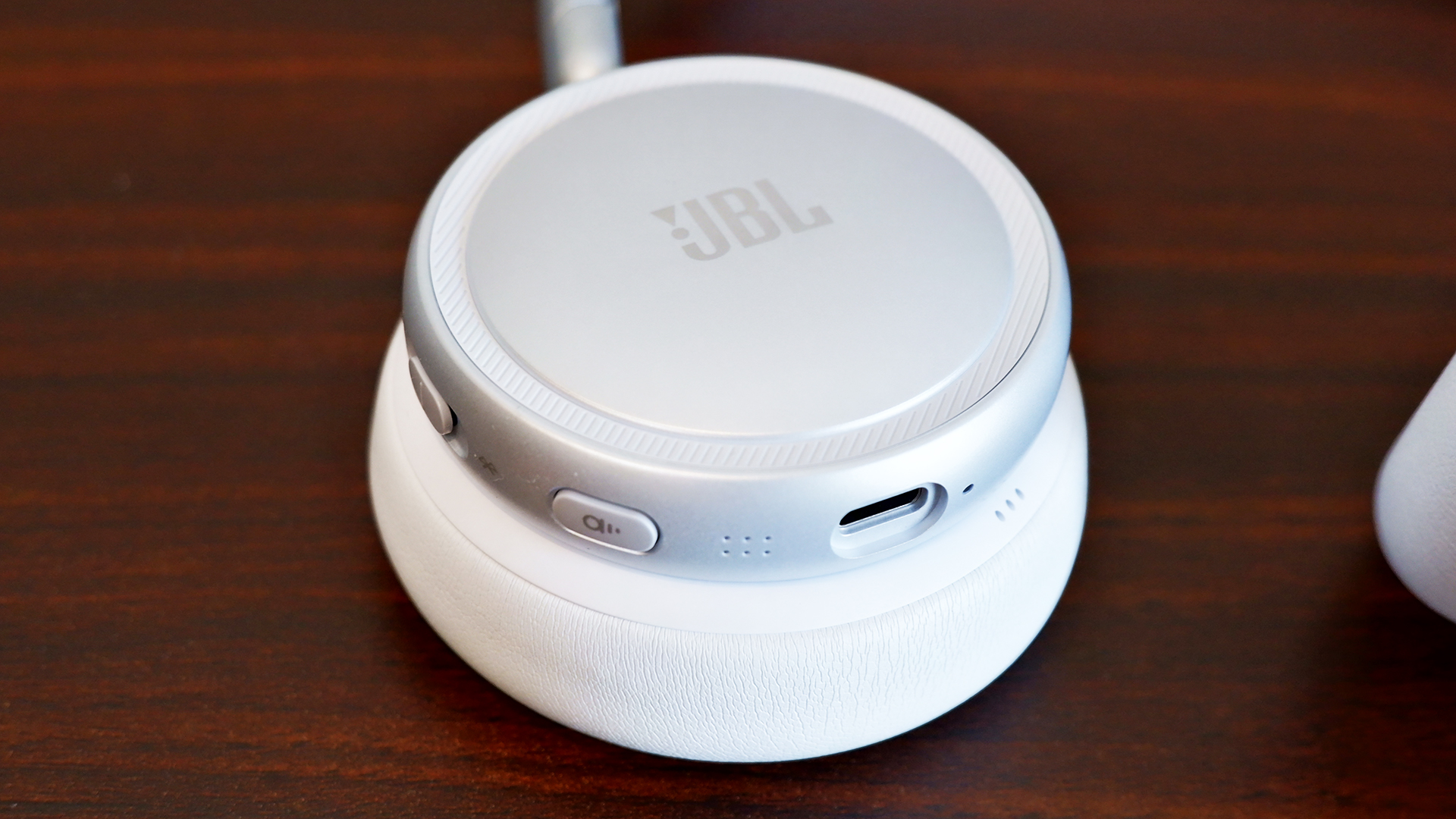
JBL introduced two new headphones to its Live series lineup and both are fighting to live up to expectations. Don’t get me wrong, the JBL Live 780NC and 680NC are both a solid set of cans, but in a sea of noise-cancelling headphones, one of them definitely has more appeal. The biggest differences between these two headphones are the over-ear and on-ear cups, and surprisingly, their audio quality. Let’s get into what does and doesn’t make them so special.
Design and comfort
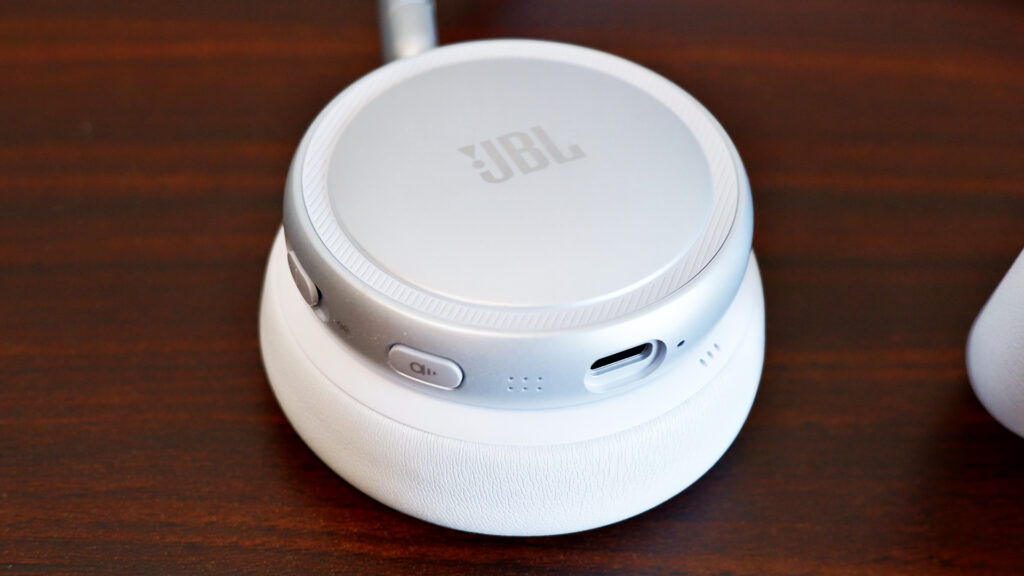
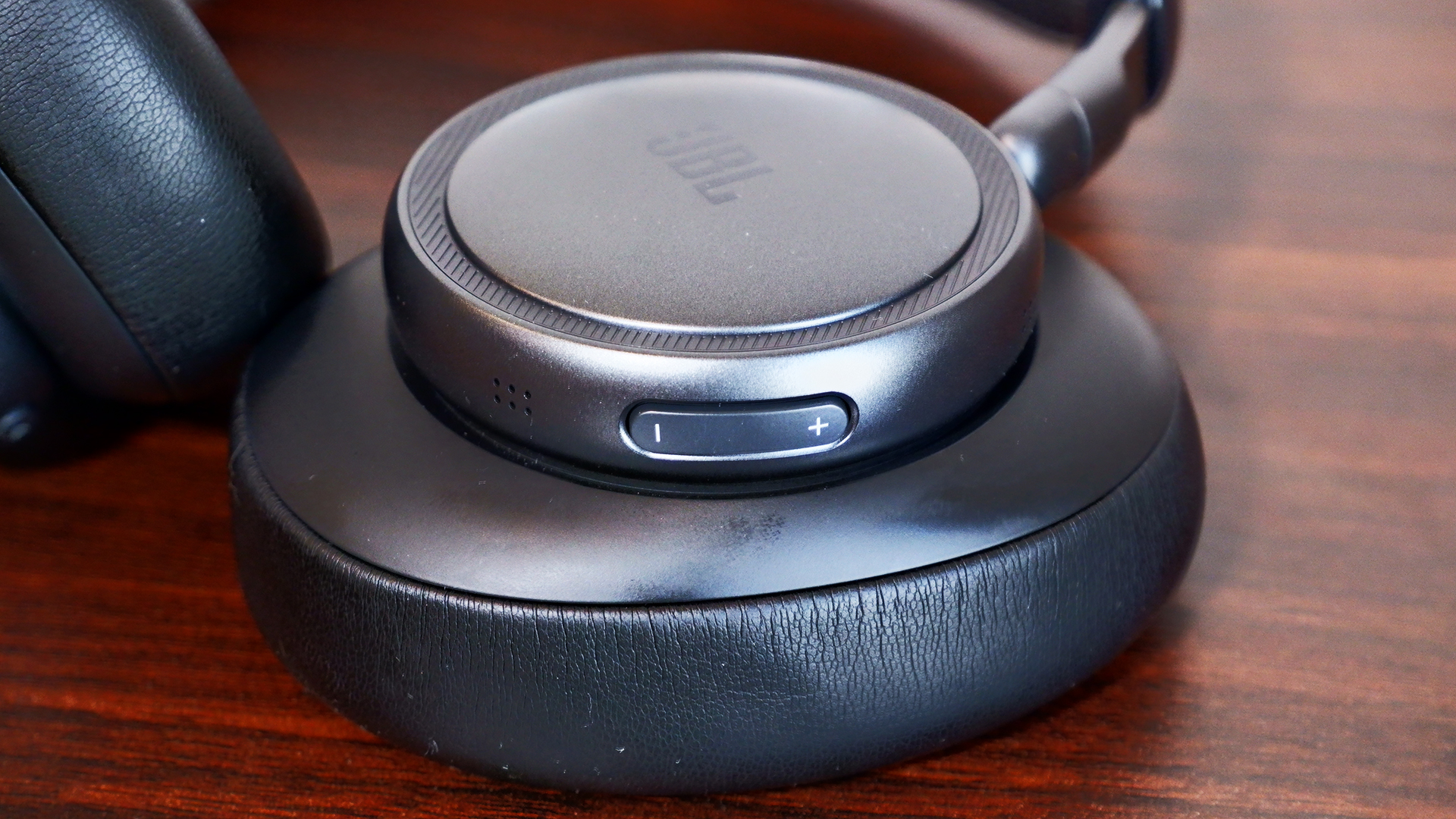
Outside of varying colors and cup sizes, the JBL Live 780NC and 680NC look practically identical. They have these hockey puck-looking ear cups that are divided from the leatherette pads. The design looks like someone’s idea of headphones from 10 years ago. It’s not necessarily a bad thing, but it feels a bit clunky. Despite that, the metal hinge and leatherette band are more pleasantly minimalist. The cups also fold up neatly in a heart shape so you can slot them easily in the included bag.
There’s a dedicated volume rocker on the left ear cup while the right holds room for a USB Type-C port, the active noise cancelling (ANC) button and a combo power/Bluetooth switch (yes, it’s a switch, not a button). Meanwhile, you get all of the touch controls available on the right cup of each set of headphones.
Both headphones felt a little uncomfortable to wear at first, but it usually takes time for me to get used to new cans. After spending several hours each with them, they eventually grew on me. They’re both a bit snug, but neither one left me aching at the end of the day. I felt more relief when taking off the 680NC because of the added pressure of on-ear cups, but I’m also not used to the on-ear design.
Seamless customizable features
Despite the near $100 price gap, you get the same set of features for the JBL Live 780NC and 680NC, all wrapped up in the JBL Headphones app. It’s easy to set up and you don’t even need to make an account.
The first thing you might want to do is hop over to the settings and add the “disable ANC” function to the rotation. Out of the box, you can either switch between ANC or Ambient mode on the headphones, which is super frustrating — I shouldn’t need an app to enable a basic action. Most headphones these days allow you to cycle between ANC, Ambient mode and off (neither).
At the very least, the app offers a thorough suite of features. You can adjust the strength of the ANC and Ambient modes. Enabling Adaptive ANC allows automatic noise cancellation changes based on the surrounding noise level, while Personal Sound Amplification makes everything around you sound louder than normal. The latter was incredibly helpful in writing this very headphone review, ironically, as I had to keep an ear out for my child potentially committing a crime (kidding… mostly).
The JBL Live 780NC and 680NC are packed with the features I’d expect from a pair of premium headphones. They offer 360-degree spatial sound, an adaptive EQ, Auracast, automatic pausing and simultaneous Bluetooth connections with automatic switching.
You can also customize all of the controls, from the ANC Button to the Touch Panel, which includes two call shortcuts and four general shortcuts, one of which is already dedicated to native voice assistants like Bixby and Siri. You do need to put a little more pressure than you might expect in order for the touch controls to activate, though. This is a bit of a learning curve, so it would’ve been nice if it was more sensitive.
Sound quality

The JBL Live 780NC and 680NC both feature 40mm neodymium drivers, but they offer completely different soundstages. With the 680NC, I noticed the bass hit a lot harder during the DanDaDan soundtrack, but vocals and string instruments weren’t as crisp or bright as they were with the 780NC. I had a similar experience while schmoozing my way through everyday objects in Date Everything!, where vocals seemed more distant with the 680NC. However, when playing Helldivers 2, 680NC captured the bassy intensity of an explosive-intergalactic space war.
Continuing to run through tracks like JVKE’s “her” and “Radio” by Bershy, I noticed a common theme amongst the headphones. The 680NC’s soundstage was narrow and bassy, while the 780NC was wide and hollow. Both reproduced one half of a great couple, but unfortunately, they’re currently separated and seeking lives of their own. No, but seriously, the audio quality on both of them is still decent individually. I can distinguish each instrument from each other, so they aren’t getting muddied in the mix. But I don’t think the 780NC is worth the extra $90 on sound quality alone, since you’re trading one issue for another.
ANC
The ANC system is slightly different in the JBL Live 780NC and 680NC. The former features six microphones that detect and monitor ambient noise while the latter is outfitted with four microphones.
What difference does that actually make, though? Well… not much, at least not practically. If you stuck them in a lab and crunched the numbers, there might be, but in my testing using the JBL Live 780NC and 680NC as everyday headphones, there’s virtually no difference outside of the passive noise isolation you get from over-ear design.
My dog is quite the yapper, so I happened to test the ANC against her with both headphones, and they managed to block out most of her bark, but not all (she is quite loud). Unless you’re actively listening to something, it won’t kill all the sound around you — when everything was quiet, I still heard my fan running in the background. As a passenger, the car’s road noise and the other cars around me faded mostly into the background, but they were still present (when not actively listening to music).
Ambient modes for both headphones kept me alert while walking outside, and while checking to make sure nothing chaotic was happening in my home. I could clearly hear the ruckus my child and dog were causing in the next room, and I got even more of it when I turned up the Sound Amplification.
As I mentioned above, the most annoying thing about the ANC and Ambient mode systems is that you cannot disable both of them at the same time (out of the box); you need the app in order to make the “off” option available via the ANC button.
Calls and voice quality
JBL wasn’t lying about calls: Both the JBL Live 780NC and 680NC were great at cancelling out the noise from my surroundings, whether it was busy traffic or me blasting music on my desk. The microphone picked up little things here and there, but it blocked out most background distractions. The problem, however, is the overall microphone quality.
Microphones on both sets were pretty rough. My voice sounded like it was underwater or in another room entirely. And while the microphones were able to cancel out the noise in the background, I noticed that it made me a little more muddied, like it was also cancelling out some of my voice as well. This is likely due to the signal processing to block background noise. My friend said, “You sound like you’re fighting an ocean.” If you’re looking for a great caller, these ain’t it.
Battery life
With a full battery, I didn’t have to charge the JBL Live 780NC or 680NC for the week I tested them. That’s with a combination of ANC on and off, as well as using them to chat with friends. JBL rates both headphones with the same battery life: 80 hours with ANC off (33 hours of talk time) and 50 hours with ANC on (28 hours of talk time). Those numbers lined up with my testing considering how long they lasted. Charging the headphones from empty does take two hours, though.
The competition
If you want a solid pair of over-ear ANC headphones in this price range, I’d recommend the Sony WH-CH720N. The ANC struggles a bit, but the headphones are much cheaper than the 780NC and offer great sound quality. It’s the best option if you want to save some money.
However, if you’re looking for alternative on-ear ANC headphones, you’ll be hard pressed to find premium competitors to the JBL 680NC. On-ear headphones tend to land in the mid-range or budget class. The JBL 680NC aren’t the best pair of headphones out there, but they’re good for what they are in those categories.
Wrap-up
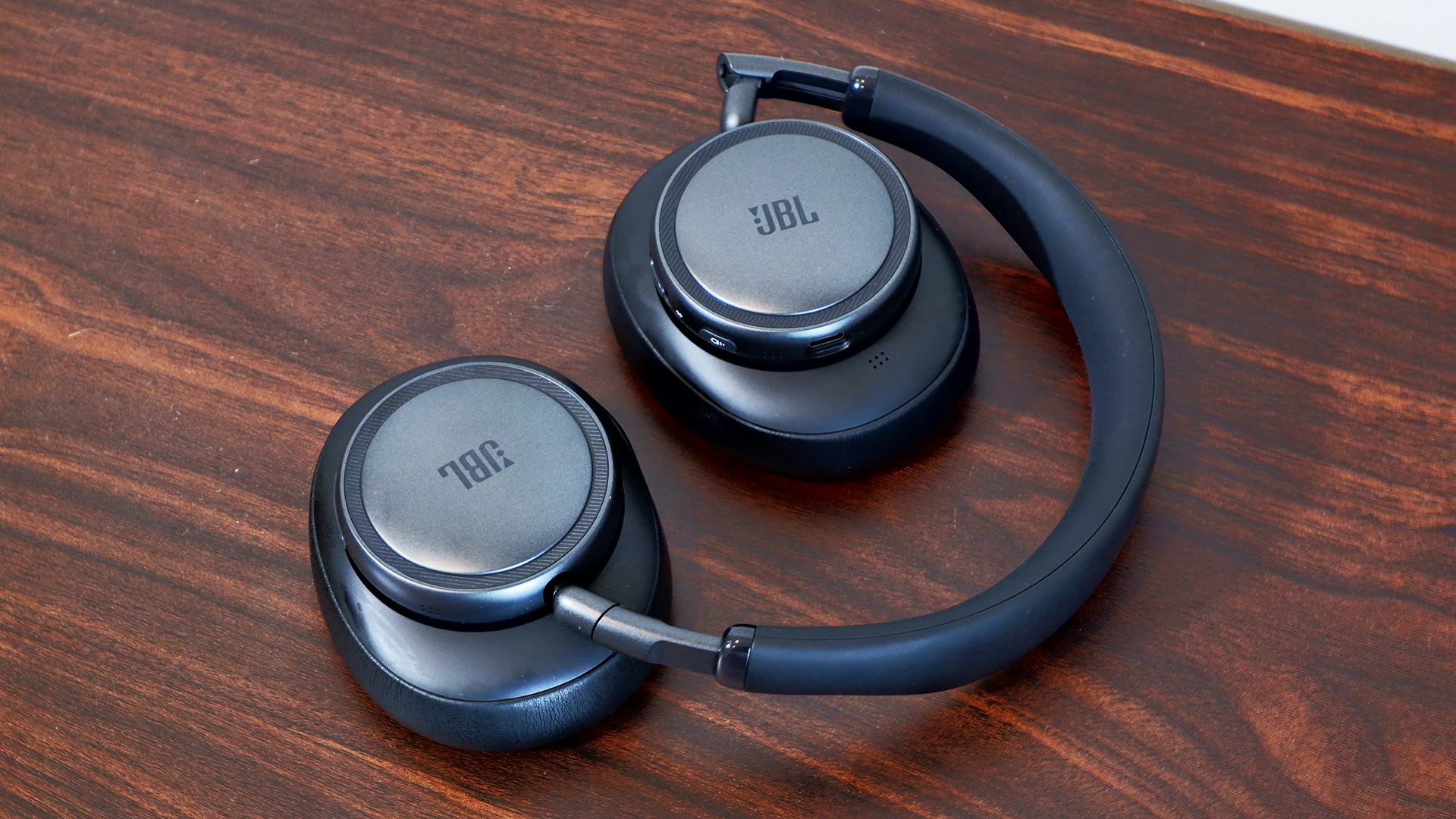
To bass or not to bass? That’s one of the few questions you’ll need to ask yourself when choosing between the JBL Live 780NC and 680NC. Of course, on-ear and over-ear designs appeal to different consumers, but the fact is that the former sounds hollow and the latter is more bass-heavy. Both headphones are comfortable and offer great ANC and features.
Overall, however, the JBL Live 780NC falls in the middle of the overcrowded market for noise-cancelling wireless headphones, while the 680NC stands just tall enough to make you want to take a closer look. On a sale, I’d say you could grab either of these cans and be satisfied, but at their full price, I’d be wary. If you twist my arm, I could make an argument for the 680NC because there aren’t enough on-ear noise-cancelling headphones available these days.
This article originally appeared on Engadget at https://www.engadget.com/audio/headphones/jbl-live-780nc-and-680nc-review-great-leaps-greater-missteps-120000508.html?src=rss
OpenAI 'pauses' its Stargate UK data center plan
9 Apr 2026, 11:56 am by Mariella Moon
OpenAI is putting the brakes on Stargate UK, according to Bloomberg. That’s the company’s AI infrastructure project with NVIDIA that’s meant to help the UK build out its sovereign computing capabilities. The company announced Stargate UK back in September, but it launched a strategic partnership with the UK government months before that. Stargate UK would enable the government to run top AI models locally from data centers inside the region, “particularly for specialist use cases where jurisdiction matters.” But now OpenAI is pausing the project due to high cost of energy and regulatory issues.
In a statement provided to the publication, the company said that it still sees a “huge potential for the UK‘s AI future.” It added that “AI compute is foundational to that goal” and that it continues “to explore Stargate UK and will move forward when the right conditions such as regulation and the cost of energy enable long-term infrastructure investment.”
Upon announcing Stargate UK, OpenAI said that it would offer the same deal to other countries that want to expand their sovereign AI capabilities. It’s unclear if those plans are affected, as well, but it’s worth noting that the initiative, OpenAI for Countries, is also working with Australia, Greece, the UAE, Slovakia, Kazakhstan and other regions.
This article originally appeared on Engadget at https://www.engadget.com/ai/openai-pauses-its-stargate-uk-data-center-plan-115626978.html?src=rss
Google bakes NotebookLM, its research tool, into Gemini
9 Apr 2026, 10:18 am by Mariella Moon
Google has fully integrated NotebookLM, its AI-powered research tool, into the Gemini app. The company launched a standalone NotebookLM app last year, but as it said in its announcement, “keeping track of everything can be a challenge.” It added NotebookLM as a source in the Gemini app last year, but now you can create notebooks right inside the chatbot.
You can now find the option to create a new notebook in Gemini’s side panel and then select “Add sources” that the tool can use, such as PDFs, documents, website URLs, YouTube videos and even copy-pasted text. NotebookLM will use information from those sources to create a searchable repository of information for you, and you can ask Gemini to create things like reviewers, infographics and video and audio overviews that turn your uploaded information into an easy-to-understand format. Take note, however, that Google warns users within the NotebookLM interface that it can be inaccurate, and that it’s best if you double-check information it puts out.
The company is rolling out NotebookLM’s full integration into Gemini this week for Google AI Ultra, Pro and Plus subscribers on the web. It will be available on mobile, in more locations and to free users over the coming weeks.
This article originally appeared on Engadget at https://www.engadget.com/ai/google-bakes-notebooklm-its-research-tool-into-gemini-101850634.html?src=rss
Dyson just announced its first-ever handheld fan, with a motor that spins up to 65,000 RPM
9 Apr 2026, 12:01 am by Lawrence Bonk
Dyson just announced its first-ever handheld fan, the HushJet Mini Cool. As the name suggests, it uses the company's proprietary HushJet air projection system. This tech first showed up on an air purifier that we found to be exceptionally quiet.
Dyson promises the fan can deliver focused airflow of up to 25m/s, which works out to 55mph. The brushless motor spins up to 65,000 RPM. This thing looks like a legitimate cooling system, despite its size. It also weighs just 7.5 ounces.
It offers five speeds and a boost mode, which should be useful during that next heat wave. It charges via USB-C and ships with a charging stand. The fan can also stand on its own, making it a decent choice for a desk. The rechargeable battery can get up to six hours of use per charge.
The HushJet Mini Cool costs $100, which is cheap for a Dyson product but expensive for a handheld fan. It's available in a trio of colorways. The gray model is available tomorrow. The red version goes on sale this May and the blue one will be available for purchase in June.
This article originally appeared on Engadget at https://www.engadget.com/home/dyson-just-announced-its-first-ever-handheld-fan-with-a-motor-that-spins-up-to-65000-rpm-000135028.html?src=rss
End of today’s Engadget roundup.