Photo by Kamil Switalski on Unsplash
This digest compiles the latest from Engadget.
Today’s Engadget Roundup
iPhone Fold rumors: Everything we know so far, including the leaked foldable design
4 Feb 2026, 4:36 pm by Georgie Peru
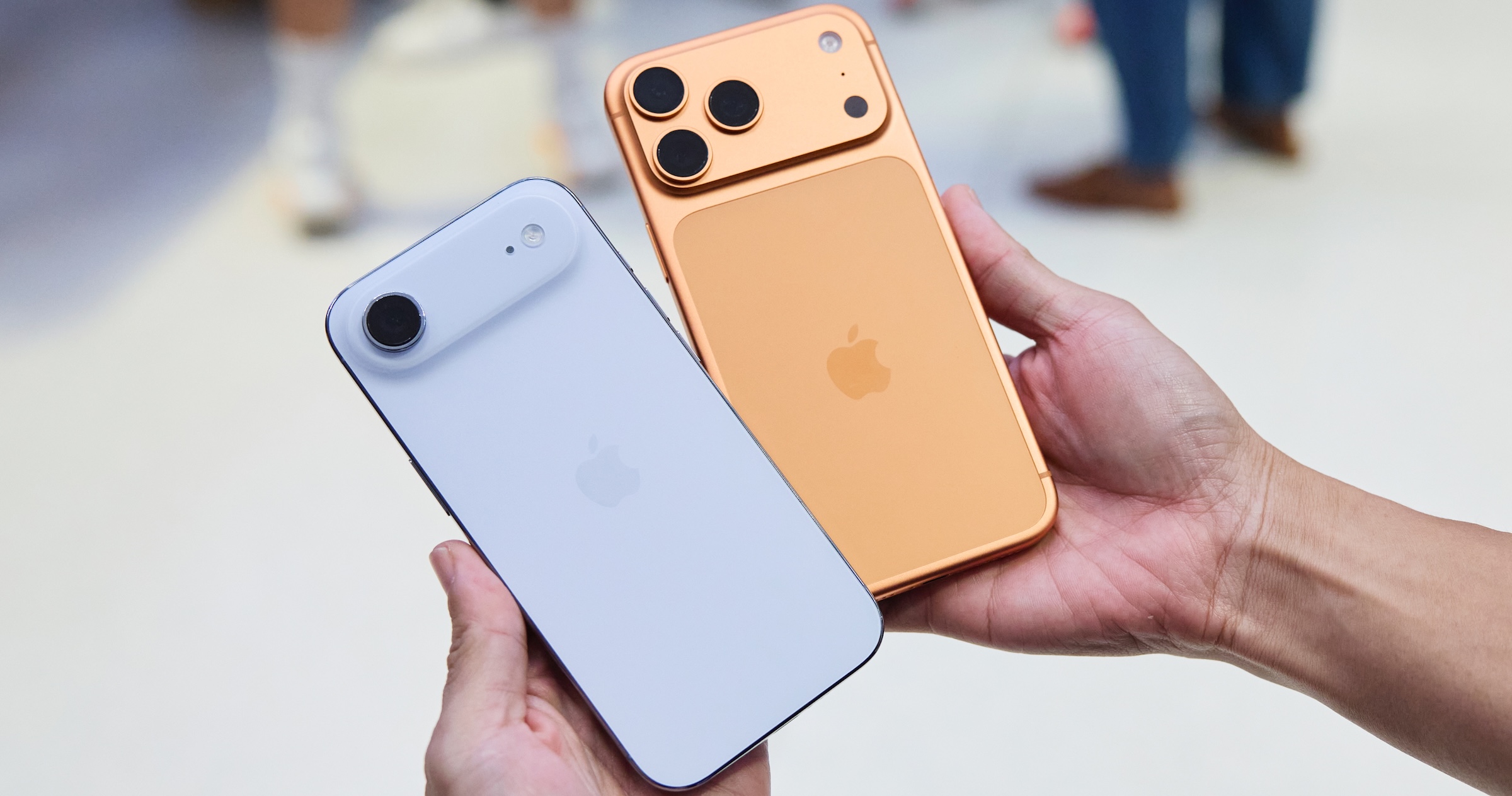
Apple’s long-rumored foldable iPhone hasn’t been announced yet, but after years of speculation, it seems like this device could finally be coming out soon(ish). Multiple sources claim that Apple could be targeting a late-2026 launch for its first foldable phone, and new rumors suggest the company is even already thinking about its second model, which could be a clamshell-style foldable iPhone.
But of course, nothing is official yet. Plans can change, features can be dropped and timelines can slip. Still, recent reports paint the clearest picture yet of how Apple might approach a foldable iPhone and how it plans to differentiate itself from rivals like Samsung and Google.
Here, we’ve rounded up the most credible iPhone Fold rumors so far, covering its possible release timing, design, display technology, cameras and price. We’ll continue to update this post as more rumors and details become available.
When could the iPhone Fold launch?
Rumors of a foldable iPhone date back as far as 2017, but more recent reporting suggests Apple has finally locked onto a realistic window. Most sources now point to fall 2026, likely alongside the iPhone 18 lineup.
Mark Gurman has gone back and forth on timing, initially suggesting Apple could launch “as early as 2026,” before later writing that the device would ship at the end of 2026 and sell primarily in 2027. Analyst Ming-Chi Kuo has also repeatedly cited the second half of 2026 as Apple’s target.
Some reports still claim the project could slip into 2027 if Apple runs into manufacturing or durability issues, particularly around the hinge or display. Given Apple’s history of delaying products that it feels aren’t ready, that remains a real possibility.
What will the iPhone Fold look like?
Current consensus suggests Apple has settled on a book-style foldable design, similar to Samsung’s Galaxy Z Fold series, rather than a clamshell flip phone.
When unfolded, the iPhone Fold is expected to resemble a small tablet like the iPad mini (8.3 inches). Based on the rumor mill, though, the iPhone Fold may be a touch smaller, with an internal display measuring around 7.7 to 7.8 inches. When closed, it should function like a conventional smartphone, with an outer display in the 5.5-inch range.
CAD leaks and alleged case-maker molds suggest the device may be shorter and wider than a standard iPhone when folded, creating a squarer footprint that better matches the aspect ratio of the inner display. Several reports have also pointed to the iPhone Air as a potential preview of Apple’s foldable design work, with its unusually thin chassis widely interpreted as a look at what one half of a future foldable iPhone could resemble.
If that theory holds, it could help explain the Fold’s rumored dimensions. Thickness is expected to land between roughly 4.5 and 5.6mm when unfolded, putting it in a similar range to the iPhone Air, and just over 9 to 11mm when folded, depending on the final hinge design and internal layering.
Display and the crease question
The display is arguably the biggest challenge for any foldable phone, and it’s an area where Apple appears to have invested years of development.
Multiple reports say Apple will rely on Samsung Display as its primary supplier. At CES 2026, Samsung showcased a new crease-less foldable OLED panel, which several sources — including Bloomberg — suggested could be the same technology Apple plans to use.
According to these reports, the panel combines a flexible OLED with a laser-drilled metal support plate that disperses stress when folding. The goal is a display with a nearly invisible crease, something Apple reportedly considers essential before entering the foldable market.
If Apple does use this panel, it would mark a notable improvement over current foldables, which still show visible creasing under certain lighting conditions.
Cameras and biometrics
Camera rumors suggest Apple is planning a four-camera setup. That may include:
-
Two rear cameras (main and ultra-wide, both rumored at 48MP)
-
One punch-hole camera on the outer display
-
One under-display camera on the inner screen
Several sources claim Apple will avoid Face ID entirely on the iPhone Fold. Instead, it’s expected to rely on Touch ID built into the power button, similar to recent iPad models. This would allow Apple to keep both displays free of notches or Dynamic Island cutouts.
Under-display camera technology has historically produced lower image quality, but a rumored 24MP sensor would be a significant step up compared to existing foldables, which typically use much lower-resolution sensors.
iPhone Fold’s hinge and materials
The hinge is another area where Apple may diverge from competitors. Multiple reports claim Apple will use Liquidmetal, which is a long-standing trade name for a metallic glass alloy the company has previously used in smaller components. While often referred to as “liquid metal” or “Liquid Metal” in reports, Liquidmetal is the branding Apple has historically associated with the material.
Liquidmetal is said to be stronger and more resistant to deformation than titanium, while remaining relatively lightweight. If accurate, this could help improve long-term durability and reduce wear on the foldable display.
Leaks from Jon Prosser also reference a metal plate beneath the display that works in tandem with the hinge to minimize creasing — a claim that aligns with reporting from Korean and Chinese supply-chain sources.
Battery and other components
Battery life is another potential differentiator. According to Ming-Chi Kuo and multiple Asian supply-chain reports, Apple is testing high-density battery cells in the 5,000 to 5,800mAh range.
That would make it the largest battery ever used in an iPhone, and competitive with (or larger than) batteries in current Android foldables. The device is also expected to use a future A-series chip and Apple’s in-house modem.
Price
None of this will come cheap, that’s for certain. Nearly every report agrees that the iPhone Fold will be Apple’s most expensive iPhone ever.
Estimates currently place the price between $2,000 and $2,500 in the US. Bloomberg has said the price will be “at least $2,000,” while other analysts have narrowed the likely range to around $2,100 and $2,300. That positions the iPhone Fold well above the iPhone Pro Max and closer to Apple’s high-end Macs and iPads.
Despite years of rumors, there’s still plenty that remains unclear. Apple hasn’t confirmed the name “iPhone Fold,” final dimensions, software features or how iOS would adapt to a folding form factor. Durability, repairability and long-term reliability are also open questions. For now, the safest assumption is that Apple is taking its time and that many of these details could still change before launch.
This article originally appeared on Engadget at https://www.engadget.com/mobile/smartphones/iphone-fold-rumors-everything-we-know-so-far-including-the-leaked-foldable-design-130000349.html?src=rss
Presidents' Day sales 2026: The best tech deals from Apple, Sony, Roku and others
4 Feb 2026, 4:30 pm by Engadget
You can find a lot of good deals for Presidents’ Day, but to say it’s a tech-deal boon would be an overstatement. The best Presidents’ Day deals are usually on mattresses, appliances and furniture, but you can find some decent tech sales thrown in as well. This year, Presidents’ Day comes right after Valentine’s Day and Super Bowl 2026, which means there are even more chances to save as sales and discounts overlap. If you’re looking for a new streaming device, a fresh iPad or an upgraded vacuum so you can enter the spring-cleaning season properly, we have you covered. These are the best President Day sales on tech we could find this year.
Presidents’ Day deals under $50
Roku Streaming Stick Plus 2025 for $24 (40 percent off): This is one of the most affordable ways to get 4K streaming on almost any TV set. The dongle has a sleek design, it comes with handy remote that can also control your TV’s power and volume and the device gives you access to Roku’s TV operating system, which has tons of ways to watch free content.
Anker Nano 45W USB-C charger for $30 ($10 off): Anker’s latest 45W charger has a small smart display on it that can show you real-time charging stats. It’s compact design is great for travel, as are its foldable prongs.
Blink Mini 2K+ — 2 cameras for $45 (50 percent off): Blink’s latest plug-in security cameras support 2K video and improved audio quality. Like previous versions, these cameras have two-way talk, motion alerts and support for Alexa voice commands.
TurboTax Deluxe for $45 (44 percent off): While it pains us to recommend Intuit’s software, it may be the best (and cheapest) option for some this tax season — particularly those who don’t qualify for Free File.
Anker Nano 5K ultra-slim magnetic power bank for $46 (16 percent off): This Qi2 power bank measures less than a half inch thick and snaps onto the backs of the latest iPhones for wireless charging. Its 5K capacity will be enough to top up your phone when it’s close to empty, preventing you from searching for a charger or outlet.
Presidents’ Day deals on Apple devices
Apple iPhone Air MagSafe battery pack for $79 (20 percent off): This magnetic power bank will add up to 65 percent additional battery charge to the iPhone Air, but note that it only works with Apple’s new, ultra-slim smartphone. We’ve tested plenty of others that also work with other iPhone and smartphone models.
Apple Watch Series 11 for $299 ($100 off): The latest flagship Apple Watch has excellent performance, a boosted battery life and a lightweight design that you can comfortably wear all day long — and even into the night to track sleep.
iPad mini (A17 Pro ) for $399 ($100 off): The updated iPad mini runs on the A17 Pro chip for improved performance, plus it has an 8.3-inch Liquid Retina display, a 12MP ultra wide camera with Center Stage, USB-C charging and compatibility with the Apple Pencil Pro.
Beats Studio Pro for $170 (51 percent off): Beats updated these cans to have improved sound quality, and you can really hear the difference from models that came before it. These headphones also have solid Transparency mode, good voice performance and USB-C audio.
Beats Solo 4 headphones for $130 (35 percent off): These on-ear headphones support spatial audio and dynamic head tracking, and they have up to 50 hours of battery life. The “fast fuel” feature allows them to get up to five hours of playback time with just a quick 10-minute power-up.
More Presidents’ Day deals on tech
Disney+ and Hulu bundle (one month) for $10 ($3 off)
Shark Steam & Scrub steam mop for $125 (22 percent off)
Levoit LVAC-200 cordless vacuum for $150 (25 percent off)
Google Pixel Buds Pro 2 earbuds for $179 (22 percent off)
Roku 55-inch 4K smart TV for $248 (29 percent off)
Sonos Beam Gen 2 soundbar for $369 ($130 off)
Sony WH-1000XM6 headphones for $398 (13 percent off)
Anker Nebula Capsule 3 projector for $540 (28 percent off)
Hisense 75-inch QD7 Mini-LED 4K smart TV for $548 (16 percent off)
DJI Mini 3 Fly More Combo drone bundle for $575 (20 percent off)
Google Pixel 10 Pro for $899 (18 percent off)
Sony 55-inch Bravia XR8B 4K smart TV for $998 (9 percent off)
This article originally appeared on Engadget at https://www.engadget.com/deals/presidents-day-sales-2026-the-best-tech-deals-from-apple-sony-roku-and-others-163000379.html?src=rss
Egypt to block Roblox for all users
4 Feb 2026, 4:13 pm by Andre Revilla
Egyptian regulators have banned Roblox, a popular children's video game, Bloomberg reports. The nation's Supreme Council for Media Regulation is coordinating with the National Telecommunications Regulatory Authority on the decision to ensure its enforcement.
The state-owned outlet reported that Senator Walaa Hermas Radwandid had proposed regulation of the platform to “protect children’s moral and educational values." The senator outlined his concerns with the nature of the Roblox platform, including the ability to communicate directly with strangers as well as "potential psychological and behavioral effects on young users." In a statement to Bloomberg, Roblox stated that it has "built rigorous safeguards that go beyond those of many other platforms."
Egypt joins others including Iraq, Algeria, Saudi Arabia and the UAE that have banned or heavily restricted the US-based gaming platform; Turkey and Russia also enacted blanket bans on Roblox recently, citing the "promotion of homosexuality" and "LGBT propaganda."
Roblox has a significant presence in the Middle East and North Africa (MENA) region. The company's most recent economic impact report claims it added $15 million to total GDP across Egypt, Saudi Arabia, Morocco, Qatar and the UAE between 2021 and 2024.
Roblox recently tightened its age verification requirements for certain in-game features following pressure from numerous US state attorneys general over child safety, though the new system is reportedly a mess.
All of this comes against the backdrop of globally internet restrictions, especially for social media services. A raft of nations including Australia, Spain and Denmark have moved to ban social media entirely for children.
This article originally appeared on Engadget at https://www.engadget.com/gaming/egypt-to-block-roblox-for-all-users-161343443.html?src=rss
Alexa+ is now available nationwide, with a free text-based version for non-Prime members to try
4 Feb 2026, 3:55 pm by Matt Tate
Amazon’s next-generation AI assistant is now available to everyone in the US for $20 per month, or for free if you’re a Prime member. Amazon has also introduced a try-before-you-buy free tier for non-Prime members, but it’s limited to text-based chat.
Alexa+ has been in early access since last year, and Amazon says it’s listened to user insights ahead of rolling out the update nationwide today. If you’re a Prime member, you can start using the new assistant by saying "Alexa, upgrade to Alexa+" or by heading to Alexa.com and signing into your Amazon account. The Alexa website is also where you’ll find the new free Alexa chat feature, which lets you ask questions and research various topics with usage limits.
Given that a Prime membership costs less ($15 per month) than Alexa+ on its own, Amazon is no doubt hoping that the introduction of its now more conversational Alexa assistant will entice some would-be subscribers. Amazon also offers a 30-day free trial of Prime to first-time customers.
As well as allowing more complex and naturally flowing interactions, Alexa+ also has new agentic capabilities, making it more effective at managing your schedule, providing recommendations, making reservations and controlling your smart home devices. It’s also a more personalized experience, with the idea being that Alexa keeps an eye on your digital activity so it gives you more useful answers.
Whether the overhauled Alexa will work for everyone remains to be seen. In our preview last summer, Engadget’s Cherlynn Low wrote about her conflicted feelings on the next-gen assistant. While impressed by its ability to handle more complex tasks, she found the experience to be inconsistent and "just incompetent enough to be annoying."
This article originally appeared on Engadget at https://www.engadget.com/ai/alexa-is-now-available-nationwide-with-a-free-text-based-version-for-non-prime-members-to-try-155550342.html?src=rss
How to watch the 2026 Super Bowl: Patriots vs. Seahawks channel, where to stream, start time, and more
4 Feb 2026, 3:44 pm by Liz Kocan
The countdown is on, and Super Bowl LX, between the New England Patriots and Seattle Seahawks, is less than a week away. This year’s game will be held at Levi’s Stadium in Santa Clara, CA, and the Bay Area will be host to loads of other football events this week, too, including Thursday’s NFL Honors, where we’ll learn who this season’s MVP is. (That event, which will be held in San Francisco, will air live on NBC and the NFL Network on Thursday at 9 p.m. ET.) While we’re curious to see who will snag the most prestigious awards at the NFL Honors, we’re more excited for the championship game itself, which airs on Sunday, Feb. 8, with a 6:30 p.m. ET kickoff, and there will be pre-game coverage airing from 12 p.m. ET on.
Like all other Sunday Night Football games this season, the championship game will be broadcast on NBC, and will stream live on Peacock. Here’s everything you need to know to tune in to Super Bowl LX on February 8, including the game channel, where to stream, and who’s performing at halftime.
How to watch Super Bowl LX
Date: Sunday, Feb. 8, 2026
Time: 6:30 p.m. ET
TV channel: NBC, Telemundo
Streaming: Peacock, DirecTV, NFL+ and more
2026 Super Bowl game time
The 2026 Super Bowl is set to begin at 6:30 p.m. ET/3:30 p.m. PT on Feb. 8, 2026.
2026 Super Bowl game channel
The 2026 Super Bowl will air on NBC, with a Spanish-language broadcast available on Telemundo.
2026 Super Bowl teams:
The New England Patriots and the Seattle Seahawks will play in the 2026 Super Bowl.
Where is the 2026 Super Bowl being played?
The 2026 Super Bowl will be held at Levi’s Stadium in Santa Clara, CA, home of the San Francisco 49ers.
What teams are playing in the 2026 Super Bowl?
The teams for the 2026 Super Bowl will be determined after the AFC and NFC Championship games are played on Sunday, Jan. 25. You can keep tabs on the post-season playoff bracket here.
How to watch the 2026 Super Bowl without cable
You can stream NBC and Telemundo on platforms like DirecTV and Hulu + Live TV, both of which are among Engadget’s choices for best streaming services for live TV. (Note that Fubo and NBC are currently in the midst of a contract dispute and NBC channels are not available on the platform.) The game will also be streaming on Peacock and on NFL+, though with an NFL+ subscription, you’re limited to watching the game on mobile devices.
Who is performing at the 2026 Super Bowl halftime show?
Bad Bunny, who holds the title as the most-streamed artist in the world, will be headlining the 2026 Super Bowl halftime performance. You can expect that show to begin after the second quarter, likely between 8-8:30 p.m. ET. Singer Charlie Puth will also be at the game to perform the National Anthem, Brandi Carlile is scheduled to sing “America The Beautiful,” and Coco Jones will perform “Lift Every Voice and Sing.”
Where to buy tickets to the 2026 Super Bowl:
Tickets to the 2026 Super Bowl are available on third-party resale platforms like StubHub and Gametime.
More ways to watch Super Bowl LX
This article originally appeared on Engadget at https://www.engadget.com/entertainment/streaming/how-to-watch-the-2026-super-bowl-patriots-vs-seahawks-channel-where-to-stream-start-time-and-more-175759112.html?src=rss
iPad deal: Get $100 off the latest iPad mini right now
4 Feb 2026, 3:35 pm by Sarah Fielding
Apple’s smallest tablet is a great option for frequent travelers or anywho who prefers their slabs be the size of an ereader. The latest iPad mini with the A17 Pro chip is down to one of the best prices we’ve seen right now — $400, which is $100 off.
Apple released this iPad mini in late 2024 and it was a solid update. We gave it an 83 in our review thanks to the power of its A17 Pro chip and that it comes with a minimum of 128GB of storage. The model currently on sale comes with 128GB, Wi-Fi and all four color options: Blue, Purple, Space Gray and Starlight.
We named the Apple iPad mini our favorite compact iPad — though, to be fair, its only competitor is itself. Still, it’s a good iPad with an 8.3-inch Liquid Retina display, Apple Intelligence and 12MP Wide back and 12MP Ultra Wide cameras. For 20 percent off, it’s a great option for a light, useful way to entertain yourself through the rest of winter and beyond.
Follow @EngadgetDeals on X for the latest tech deals and buying advice.
This article originally appeared on Engadget at https://www.engadget.com/deals/ipad-deal-get-100-off-the-latest-ipad-mini-right-now-140900989.html?src=rss
Super Bowl 2026 TV deals: The best sales this week on OLEDs and other smart TVs ahead of the big game
4 Feb 2026, 3:19 pm by Engadget
Whether you’re having people over to watch the Patriots and the Seahawks battle it out in Super Bowl 2026, or you’re more interested in the Bad Bunny halftime show, your TV will be an important part of the puzzle of putting together an excellent big-game party. If you’ve been thinking about upgrading your current TV, now’s a decent time to do it. The weeks leading up to the Super Bowl are typically awash with TV deals to consider.
Generally, TV prices steadily decrease after a new model comes out. Some 2026 TV models were announced at CES and are forthcoming things year, making now a good time to look for discounts on 2025 sets. Aside from the holiday shopping season, now is one of the best times of the year to save on a TV. Here, we’ve curated the best Super Bowl TV deals we could find this year, from already affordable sets discounted even further to high-end OLEDs that are hundreds of dollars off.
Super Bowl 2026 TV deals for less than $500
You can easily find solid 1080p and 4K TV sets within this budget-friendly price range. What you’ll be more limited in is size — most TV deals under $500 we’re seeing right now are on sets up to 55 inches. There are a few 65- and 75-inch models in there, but the pickings are slim.
Roku 24-inch 720p smart TV for $100 (18 percent off)
TCL 40-inch Class S3 1080p smart TV for $150 (21 percent off)
Roku 55-inch 4K smart TV for $248 (29 percent off)
Roku 55-inch Mini LED 4K smart TV for $348 (30 percent off)
TCL 75-inch Class S5 4K smart TV for $480 (26 percent off)
OLED TV deals
This is where you want to look if you want your new TV to have the richest colors, deepest blacks and excellent contrast performance. Of course, that all comes at steeper prices — it can be difficult to find a good OLED set for less than $1,000, even on sale.
Sony 55-inch Bravia XR8B 4K smart TV for $998 (9 percent off)
Samsung 65-inch Class OLED S95F 4K smart TV for $2,298 (23 percent off)
Sony 77-inch Bravia XR A95L OLED 4K smart TV for $3,498 (30 percent off)
Super Bowl 2026 TV deals for $500 and up
This will likely be the sweet spot for many people when it comes to TV features, performance and price. Good 4K sets are common in this price range, and you’ll also find some Mini LED sets available here as well.
TCL 65-inch Class T7 4K smart TV for $500 (29 percent off)
Hisense 75-inch QD7 Mini-LED 4K smart TV for $548 (16 percent off)
Amazon 65-inch Fire TV Omni Mini LED 4K smart TV for $920 (16 percent off)
TCL 65-inch Class QM8K Mini LED 4K smart TV for $998 (33 percent off)
Streaming and home entertainment deals
A good TV is key, but having the right peripherals and accessories to go along with it will complete your home theater setup. Deals we’re tracking right now include discounts on streaming devices, soundbars and projectors.
Roku Streaming Stick HD 2025 for $16 (47 percent off)
Roku Ultra streamer for $78 (22 percent off)
Samsung HW B400F soundbar with built-in subwoofer for $100 (29 percent off)
Anker Nebula Capsule 3 projector for $540 (28 percent off)
Valerion VisionMaster Max 4K projector for $3,999 (20 percent off)
This article originally appeared on Engadget at https://www.engadget.com/deals/super-bowl-2026-tv-deals-the-best-sales-this-week-on-oleds-and-other-smart-tvs-ahead-of-the-big-game-160000415.html?src=rss
Pick up the Apple Watch Series 11 while it's $100 off
4 Feb 2026, 2:45 pm by Sarah Fielding
If you need a little help with your New Year’s resolution to be more active, you can save on the latest Apple Watch right now. The Apple Watch Series 11 is on sale for $299, which is $100 off and the lowest price we’ve seen.
We named the Apple Watch Series 11 as our choice for best smartwatch overall. It scored a 90 in our review thanks to its 24 hours-plus of battery life and a thin, light design that’s easy to wear. It also offers new health metrics, including Apple’s hypertension alerts system and Sleep Score.
The Apple Watch Series 11 deal is available on the 42mm case with a small/medium band. It also only includes GPS and four colorways: the Jet Black and Space Gray aluminum cases with a Black sport band, the Rose Gold aluminum case with a Light Blush sport band and the Silver aluminum case with a Purple Fog sport band.
Follow @EngadgetDeals on X for the latest tech deals and buying advice.
This article originally appeared on Engadget at https://www.engadget.com/deals/pick-up-the-apple-watch-series-11-while-its-100-off-151616650.html?src=rss
Apple's iPhone Air MagSafe battery is cheaper than ever
4 Feb 2026, 2:45 pm by Matt Tate
Despite its supremely sleek design, the iPhone Air actually has a pretty respectable battery life, lasting for somewhere in the region of 27 hours if you’re continuously streaming video. But you’re still going to be wary of it dying on you if you’re on a trip or just having a particularly screen-heavy day. That’s where Apple’s iPhone Air MagSafe battery pack comes in, and it’s currently on sale for $79.
This accessory only works with the iPhone Air, but much like the phone it attaches to, it’s extremely slim at 7.5mmm, so crucially doesn’t add so much bulk when attached that it defeats the point of having a thin phone in the first place. The MagSafe Battery isn’t enormous at 3,149mAh (enough to add an extra 65 percent of charge to the Air), but it can wirelessly charge the AirPods Pro 3 as well, making it an even more useful travel companion. You can also charge your iPhone while charging the battery pack.
At its regular price of $99, the MagSafe battery pack is an admittedly pricey add-on to what is already an expensive phone, but for $20 off it’s well worth considering what Engadget’s Sam Rutherford called an “essential accessory” for some users in his iPhone Air review.
Many Apple loyalists will always insist on having first-party accessories for their iPhone, but there are plenty of third-party MagSafe chargers out there too, a lot of them considerably cheaper than Apple’s lineup. Be sure to check out our guide for those.
Follow @EngadgetDeals on X for the latest tech deals and buying advice.
This article originally appeared on Engadget at https://www.engadget.com/deals/apples-iphone-air-magsafe-battery-is-cheaper-than-ever-144516608.html?src=rss
Apple AirTag (2026) review: Simply better
4 Feb 2026, 2:30 pm by Mat Smith
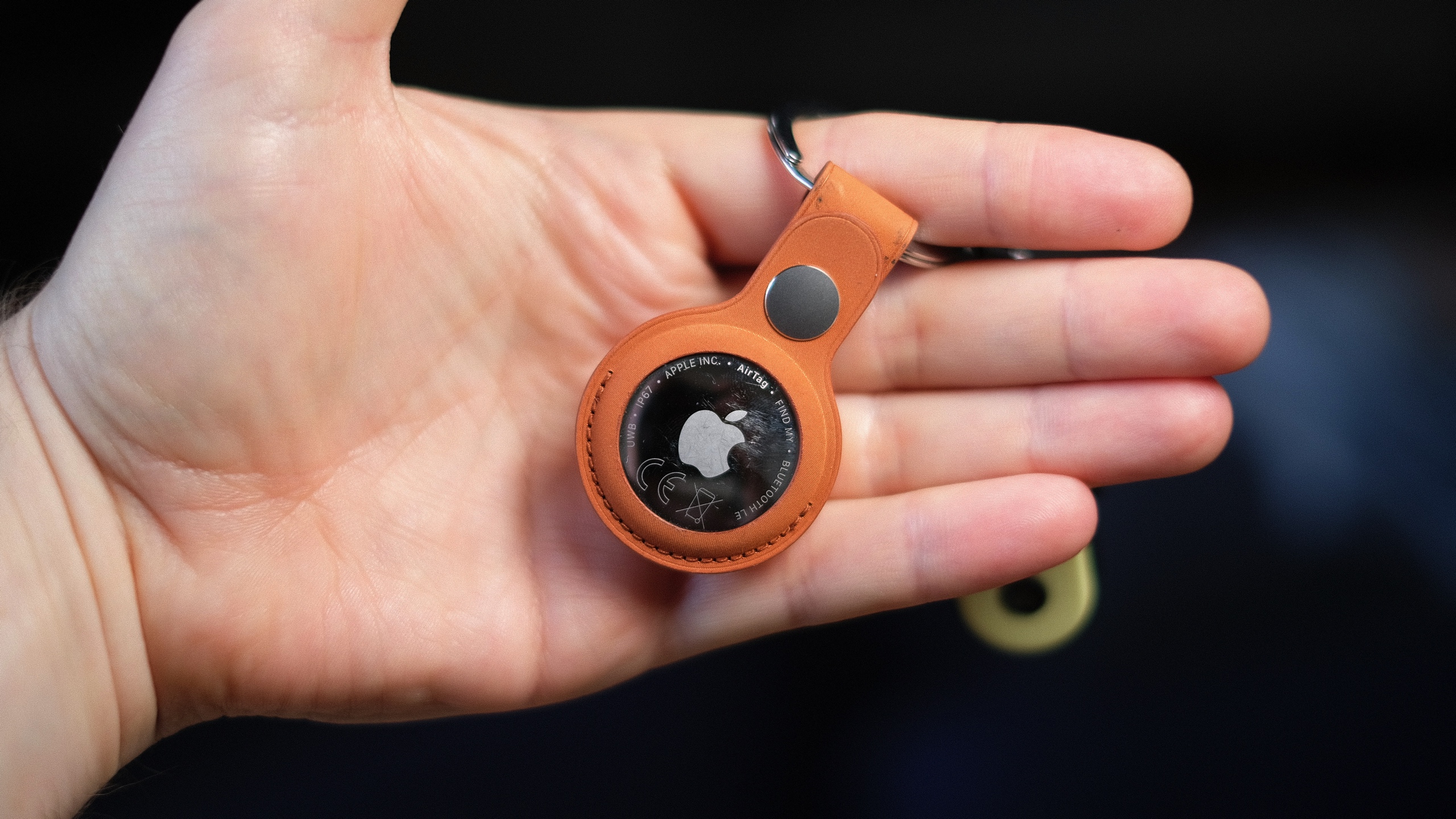
It’s hard to tell the difference between Apple’s second-generation AirTag and the almost-five-year-old original just by looking at them. In fact, the only way to tell is the many scratches on my old tracker, picked up from all those years attached to my keyring, living in my pocket.
While the price is still $29, Apple’s latest tracker packs some core upgrades. The new AirTag has a second-generation ultra-wideband (UWB) chip that extends its Precise Finding range up to 50 percent, though it requires an iPhone 15 or newer to do so. It’s also apparently 50 percent louder and has a new, higher-pitched chime. Still no keyring hole, though.
The new AirTag looks… the same. It’s arguably the most understated hardware design Apple has ever made, with no buttons or ports, just a company logo on one side. It’s made from a combination of a stainless steel plate and a (now 85-percent recycled) plastic enclosure. It’s like a thick coin, a little bigger than a quarter, and slips into any small pocket or wallet. The battery can be replaced by rotating the backing off, but it’s still solid enough that I never felt there was a risk of coming off accidentally.
Apple’s accessories to attach the AirTag to your keys are still more expensive than the tracker itself. However, compared to when the original tracker launched, there’s now a rich collection of third-party options from the likes of Mophie, Belkin and more, many of which are more reasonably priced at around $15. A $35 keyring for a $29 tracker is a very tough sell, Apple.
Setting up a new AirTag is just as effortless as its predecessor. Pull out the plastic tag, connecting the battery, and a notification will pop up on your nearby iPhone. You can then name it, assign it to an item and it’ll join your list of findable Apple hardware.
I’ve been testing the range of the new AirTag, and if anything, the 50 percent increase in Precision Finding range is a conservative estimate. Naturally, tracking can be affected by building structure, walls, a lack of nearby Find My network devices and other interference, but the next-generation AirTag’s “getting closer” screen consistently appeared on my phone when I was around 80 feet away. The older tracker, however, needed me to be around 30-40 feet away to do the same. The benefit of Precision Finding was limited on the debut AirTag, because its range was so tiny — especially in busy environments. The hardware upgrades now make it truly useful. The new AirTag is also faster to connect and more responsive to my movements and sudden turns, thanks, I expect, to the new ultra-wideband chip.
You can now also use newer Apple Watches (Series 9, Ultra 2 and up) with precision location detection. After updating her Apple Watch Series 11 to the latest software, my colleague Cherlynn Low reported that locating the new AirTag was pretty much the same as on an iPhone. She did find it slightly counterintuitive to have to first add the Find My shortcut to the Control Center on the watch instead of going to the Find My Items app to do so, but ultimately, once she did that, it mirrored the existing setup for Precision Finding on iPhones.
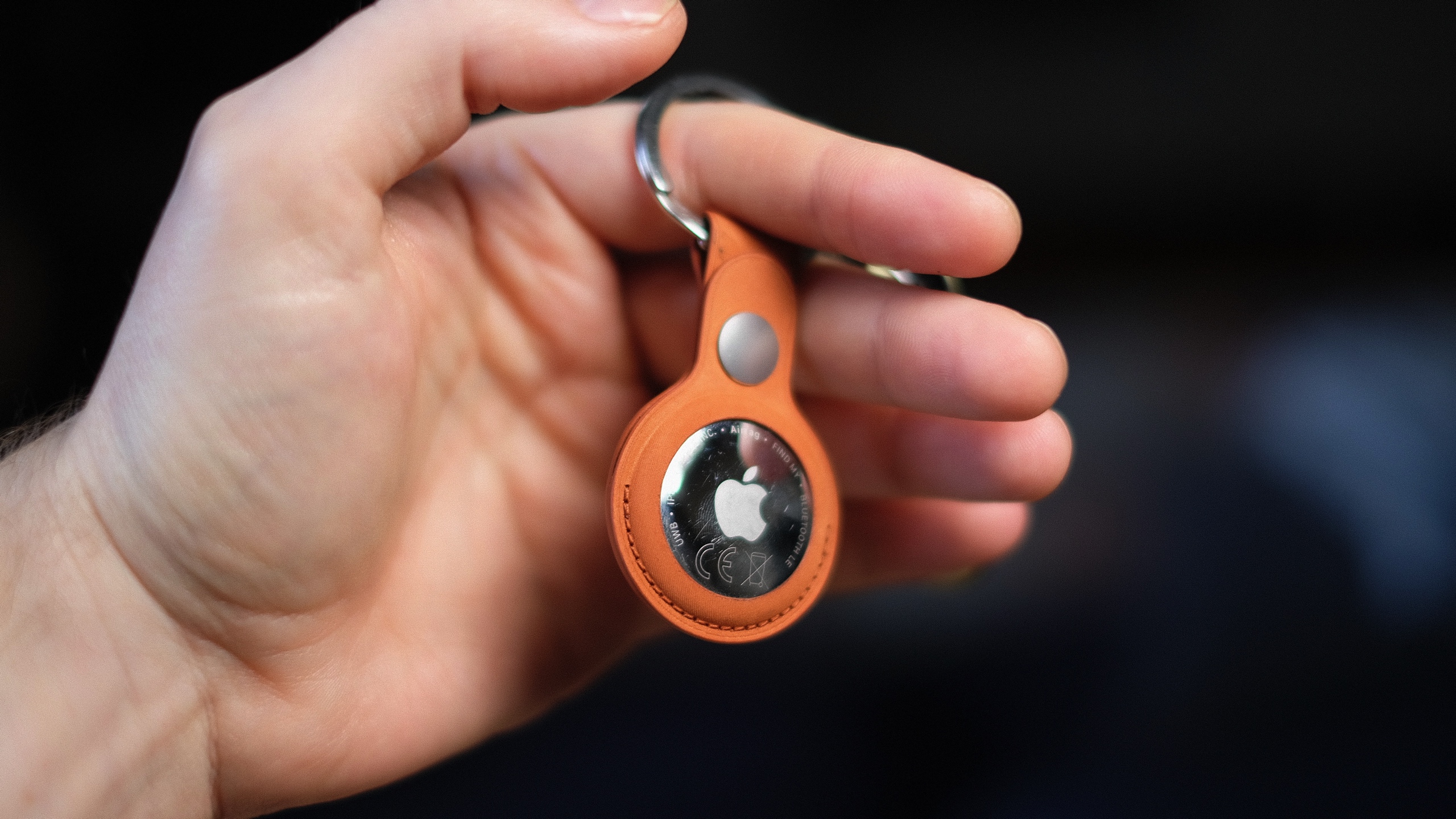
Apple also redesigned the AirTag’s speaker assembly, which it says makes sounds 50 percent louder. Possibly the most effective audio upgrade is a higher-pitched chime that’s easier to hear over ambient noise and in busy public spaces. I could hear it ringing out from the other side of my gym’s locker room, while inside a locker, over music playing in the background. My old AirTag was inaudible until I was a few feet away from my locker. I always thought the sound on the original AirTag was a little too low-key for something you were urgently trying to find. (I’d love to be able to customize the chime, though.)
It’s the Find My network that makes the AirTag shine. Apple’s massive footprint of over a billion devices, from iPhones to Macs, continues to offer a tracking range and finer precision than GPS and Bluetooth alone. If anything, this network is even more built out since the launch of the first Apple tracker.
Since we tested the first AirTag, Apple has added multiple new features, usually through iOS updates, that expanded the utility and versatility of its trackers. In iOS 17, you could share an AirTag through Family Sharing. In iOS 18.2, Share Item Location allowed you to share your tracking information with third parties (such as airlines or train companies), improving the chances of finding the AirTag.
There have also been subsequent safety upgrades, including expanding unknown tracker alerts to Android devices without needing to install an app. Apple also reduced the time an AirTag takes to emit a sound when separated from its owner, shifting the interval to a random range between 8 and 24 hours. At launch, this was a three-day span.
Wrap-up
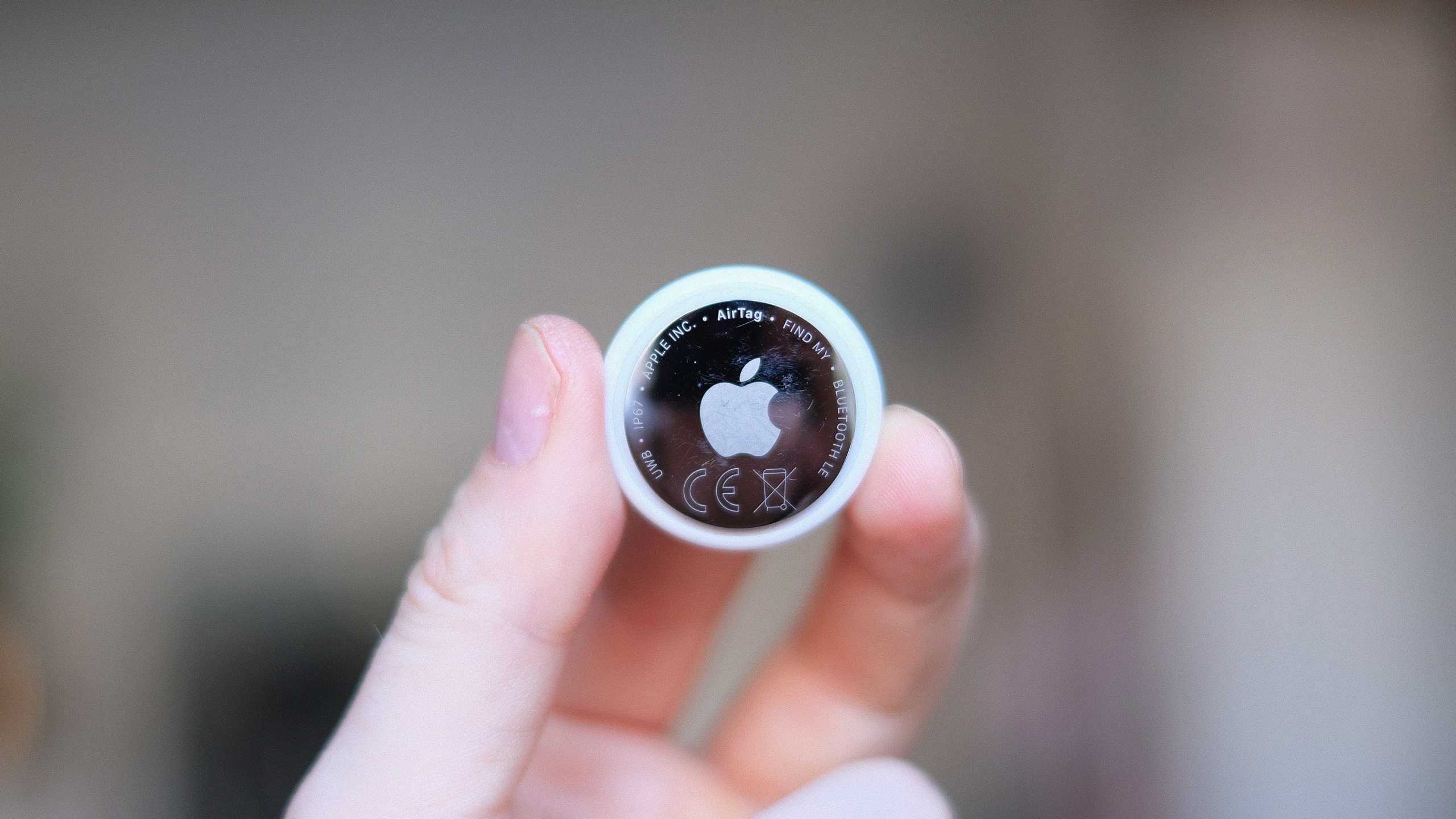
Do you need the new AirTag? While improved in every way, it’s pretty much the same device. However, the AirTag’s simplicity and ease of use are second to none when it comes to Bluetooth trackers. If you already own a single AirTag for your keys or wallet, upgrading to the second-gen iteration and repurposing the old one to track, say, your luggage, makes a lot of sense. You get the more precise location tracking and sensing for your smaller item, while you can reduce your bag anxiety if your suitcase doesn’t make it to your destination.
There’s no doubt the second-gen AirTags are improved, and thankfully, upgrading to the new capabilities doesn’t come at too steep a cost.
This article originally appeared on Engadget at https://www.engadget.com/computing/accessories/apple-airtag-2026-review-143000427.html?src=rss
Nintendo's first Direct showcase of 2026 is scheduled for February 5
4 Feb 2026, 2:19 pm by Mariella Moon,Kris Holt
Nintendo has lined up its first showcase of the year. The next Nintendo Direct is taking place on February 5 at 9AM ET, the company has announced. It will run for around 30 minutes.
As previous reports suggested, it will focus on third-party titles from partners instead of first-party games from Nintendo itself. So if you were hoping for new Mario or Zelda announcements, that may not happen during this event. Still, you can expect to hear about new games that are coming to Switch and Switch 2. You can tune into the Direct via the YouTube video embedded above.
FromSoftware’s The Duskbloods, a Nintendo Switch 2 exclusive, is slated to arrive this year, so we may get another look at that (or the Switch 2 version of Elden Ring, for that matter). Meanwhile, Resident Evil Requiem will hit the console later this month, so it wouldn’t be surprising to see Capcom making an appearance during this Direct.
This article originally appeared on Engadget at https://www.engadget.com/gaming/nintendo/nintendos-first-direct-showcase-of-2026-is-scheduled-for-february-5-141931154.html?src=rss
This 45W Anker Nano charger with smart display is on sale for only $30
4 Feb 2026, 1:55 pm by Lawrence Bonk
Anker introduced a nifty little charger at CES 2026, which is a refresh of the pre-existing Nano Charger. It’s already on sale for $30 on Amazon, which is a 25 percent discount.
The 45W charger includes a smart display that shows real-time data like power flow, temperature and charging status. It also features “fun animations to keep things cheerful.” Anker says it can recognize what’s being charged and automatically adjust certain metrics to ensure a longer battery lifespan.
To that end, it works with just about everything. The company advertises that this charger is a good fit for the iPhone, Apple Watch, AirPods and Samsung devices, among others. The new Nano Charger is on the smaller side, with dual folding prongs that rotate to fit most outlets.
Follow @EngadgetDeals on X for the latest tech deals and buying advice.
This article originally appeared on Engadget at https://www.engadget.com/deals/this-45w-anker-nano-charger-with-smart-display-is-on-sale-for-only-30-160707474.html?src=rss
Sonos home theater gear is on sale for up to 20 percent off right now
4 Feb 2026, 1:35 pm by Will Shanklin
Like many other companies during Super Bowl season, Sonos is discounting its home theater gear. Today, you can save $130 on the Beam (Gen 2) soundbar, bringing its price down to $369. You'll also find deals on the flagship Arc Ultra Soundbar, Sonos subwoofers, and more.
The Sonos Beam is the company's sub-$500 soundbar. Engadget's pick for the best midrange model, the compact speaker has impressive sound for its size. Part of that is its Dolby Atmos support. Although the soundbar lacks upward-firing speakers, it uses software tricks to compensate. Audio timing and frequency adjustments make sound seem to come from the side or slightly above.
One of the biggest drawbacks is that the Beam only has one HDMI port. Regardless, that compromise may be easier to accept at Beam's current $369 than at its usual $499.
Several more home theater speakers are included in Sonos's sale. If you have a loftier budget for a soundbar, there's the Arc Ultra. Typically $1,099, it's now $899. The company's pair of subwoofers is included as well. You can get the Sub Mini for $399 (down from $499) or the Sub 4 for $759 (from $899).
Although they aren't explicitly sold as home theater products, the Era 100 ($179) and Era 300 ($379) are also included in the sale. The portable Move 2 isn't discounted individually, but you will find it in a couple of bundles. You can check out the sale page for the complete list.
Follow @EngadgetDeals on X for the latest tech deals and buying advice.
This article originally appeared on Engadget at https://www.engadget.com/deals/sonos-home-theater-gear-is-on-sale-for-up-to-20-percent-off-right-now-174053138.html?src=rss
This 512GB Samsung P9 microSD Express card is on sale for 33 percent off
4 Feb 2026, 1:06 pm by Andre Revilla
If you're looking to expand the storage on your Switch 2, the 512GB Samsung P9 microSD Express card is on sale right now for 33 percent off, marked down to $80 from $120. With component prices skyrocketing these days, it's getting increasingly rare to see good storage on sale, and 512GB for $80 is a much better deal than you'll currently find directly from Nintendo.
The P9 boasts transfer speeds of up to 800MB/s, making moving games to the card that much faster. As for load times, in our testing we found that any microSD Express, the standard the Switch 2 requires, will offer roughly the same performance. This format is pretty new, so there aren't a ton of cards on the market. As such, the P9 makes our list of best microSD cards for the Nintendo Switch 2.
The P9 microSD Express is also compatible with the Steam Deck or any other gaming console that accepts the format, as well as cameras and more.
Follow @EngadgetDeals on X for the latest tech deals and buying advice.
This article originally appeared on Engadget at https://www.engadget.com/deals/this-512gb-samsung-p9-microsd-express-card-is-on-sale-for-33-percent-off-143849643.html?src=rss
How to set up an AirTag
4 Feb 2026, 12:00 pm by Georgie Peru
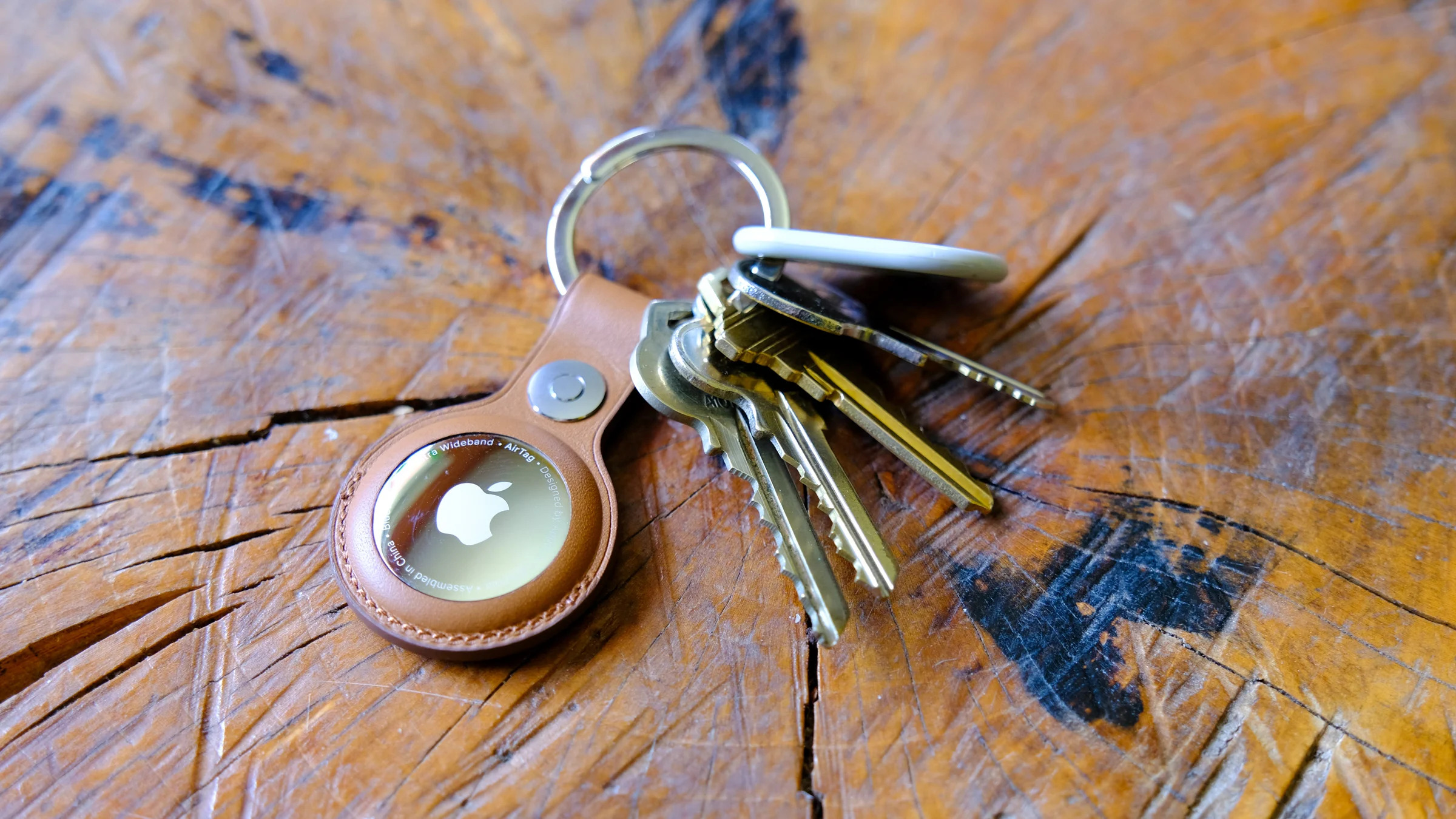
Apple’s AirTag makes it easy to keep tabs on everyday items like keys, bags and luggage using the Find My network. Setup is quick, requires no tools and takes just a minute or two as long as you have a compatible iPhone or iPad. Once paired, your AirTag quietly works in the background to help you locate misplaced belongings. This guide walks through how to set up an AirTag, how to name it so you can easily identify what it’s attached to and what to do if setup doesn’t go as planned.
What you need before setting up an AirTag
Before you begin, make sure you have the following:
-
An iPhone or iPad signed in to your Apple Account
-
Bluetooth enabled on that device
-
Location Services enabled
-
iOS or iPadOS 14.5 or later (AirTag 2nd generation requires iOS or iPadOS 26.2.1 or later)
-
A stable Wi-Fi or cellular connection
You’ll also want to ensure iCloud Keychain is enabled and that your Apple Account setup is fully completed in Settings.
How to set up an AirTag using your iPhone or iPad
The easiest way to set up an AirTag is directly through the on-screen setup prompt.
-
Remove the plastic tab from your AirTag to activate the battery.
-
Hold the AirTag near your unlocked iPhone or iPad.
-
When the setup animation appears, tap Connect.
-
Choose a category for your AirTag, such as Keys, Backpack or Luggage. If you select Custom Name, you can type your own label and choose an emoji.
-
Tap Continue to link the AirTag to your Apple Account.
-
Tap Done to finish setup.
Once completed, the AirTag will appear under the Items tab in the Find My app. If you’re setting up multiple AirTags, make sure only one is near your device at a time. If more than one is detected, a notification will appear saying “More than one AirTag detected”. If this happens, move the others farther away and try again.
How to add an AirTag using the Find My app
If the setup animation doesn’t appear automatically, you can add an AirTag manually through Find My.
-
Open the Find My app on your iPhone or iPad.
-
Tap the Items tab.
-
Tap the Add button.
-
Select Add AirTag or Other Item (if you’re adding a compatible FindMy Network accessory).
-
Follow the on-screen instructions to complete setup.
You can add up to 32 items in Find My, including AirTags, shared items and compatible accessories. If you’ve reached the limit, you’ll need to remove an item before adding a new one.
What to do if your AirTag won’t connect
If setup fails or the pairing animation disappears, try the following steps:
-
Lock your iPhone or iPad, unlock it again and wait about 15 seconds for the animation to reappear.
-
Make sure Bluetooth and Location Services are turned on in Settings.
-
Check that Find My has permission to use Precise Location.
-
Ensure you’re signed in to your Apple Account and iCloud Keychain is enabled.
-
Verify your device is running the latest version of iOS or iPadOS (iOS or iPadOS 26.2.1 or later).
If the AirTag still won’t connect, the battery may need replacing. AirTags use a standard CR2032 coin cell battery, and swapping it only takes a minute. If issues persist after replacing the battery, you may need to reset the AirTag and try setup again.
How to name and label your AirTag
Naming your AirTag makes it much easier to identify when you’re tracking multiple items. During setup, Apple offers preset labels like Keys or Backpack, but you can customize these at any time.
To rename an AirTag after setup:
-
Open the Find My app.
-
Tap Items and select your AirTag.
-
Tap Add Name or Rename Item.
-
Choose a preset label or select Custom Name.
-
Optionally add an emoji for quick visual identification.
Clear labels are especially helpful if you use AirTags for travel, work gear or shared household items.
Attaching your AirTag to everyday items
AirTags don’t have built-in clips or adhesive, so you’ll usually need an accessory to attach one securely. Depending on how you plan to use it, that could mean a key ring, luggage tag, wallet insert or bike mount.
If you’re unsure which style works best, Engadget has rounded up the best Apple AirTag accessories, covering options for keys, bags, wallets and more. Choosing the right accessory helps ensure your AirTag stays attached and works the way you expect.
Wrap-up
After setup, your AirTag will automatically update its location using Apple’s Find My network. You can view its last known location, play a sound to help locate it nearby or use Precision Finding on supported iPhones to guide you directly to it. With just a few minutes of setup and a clear label, an AirTag can become a reliable way to keep track of important belongings, whether you’re at home or on the move.
This article originally appeared on Engadget at https://www.engadget.com/computing/accessories/how-to-set-up-an-airtag-120000789.html?src=rss
The best VR headsets for 2026
4 Feb 2026, 10:00 am by Devindra Hardawar
Stepping into VR is about more than strapping on a headset and loading a game. The best VR headsets today are gateways to fully realized experiences, whether that’s gaming, fitness, creative work or simply spending time inside a richly rendered virtual world. As the hardware has improved, so has the sense of presence, with sharper displays, wider fields of view and tracking systems that make movement feel more natural and responsive. The result is VR that feels less like a novelty and more like a platform you can actually spend time in.
That said, not every headset is built for the same function. Some prioritize ease of use and standalone play, while others demand a powerful PC in exchange for higher fidelity. Compatibility also matters more than ever, especially as VR begins to overlap with mixed reality and early smart glasses experiments. Whether you want a simple way to explore virtual spaces or a high-end rig that pushes immersion as far as possible, this guide breaks down the best VR headsets you can buy in 2026 and explains who each one is really for.
Table of contents
Best VR headsets for 2026
How we test VR headsets
I tend to judge candidates for the best VR headset on a few basic criteria: Ergonomics, immersion and controls. It's not that hard to shove a mobile display into a plastic headset and strap some cheap elastic headbands onto it. But it takes real design skill to craft something that's well balanced, includes a supportive headstrap, and doesn't feel uncomfortable after 30 minutes.
My test for ergonomics is fairly simple: How long can I wear a headset until I start to feel discomfort? For the most ergonomic devices, like the Quest 3, that could easily be an hour or two. But heavier PC hardware often feels cumbersome after just 15 minutes — you won’t find those kinds of devices in our list of the best VR headsets.
Immersion, meanwhile, comes from having high resolution screens with fast refresh rates, like a 120Hz refresh rate, helping users feel fully present inside a virtual world. Field of view is also a major element, as it describes how well VR screens can cover what you see. A narrow FOV makes it feel like you're peering through a pair of binoculars, which limits your sense of “presence.” The best VR headsets aim for a wider field of view, helping virtual environments feel more natural and fully surround you.
A wide field of view, on the other hand, can make it seem like you’re actually flying over the globe in Google Earth. We look at a few popular video games, like Superhot, Beat Saber and Pistol Whip, on every headset to judge how immersed we feel and how enjoyable the gaming experience is overall.
The best controllers fit naturally in your hands and offer accurate tracking. The industry has basically adopted the design of Meta’s excellent touch controllers, but we're also seeing intriguing leaps forward like Valve's finger tracking gamepads. We judge controllers based on how easy they are to hold, how they hold up to sweaty gameplay sessions and how easily headsets can track their position in space.
However, it’s important to look at a virtual reality headset’s specs as a whole, including compatibility with your existing hardware and the kind of experiences you plan to use it for. Depending on what you’re looking for in yourVR headset, you’ll want to consider factors like your PC’s CPU and graphics card if you plan to use the headset to play the best VR games. You might not need a super powerful PC, but you should check the minimum requirements for the headset you’re looking to purchase. If you’re not looking to invest in a VR headset solely for gaming, features like head tracking allow you to explore your environment just by simply moving your head in the simulator. This often results in a more immersive and realistic experience.
Other VR headsets we’ve tested
HTC Vive Focus Vision
The Vive Focus Vision is a sleek premium standalone VR headset that can also deliver solid PC VR. But it’s also running aging hardware, it’s riddled with software issues and it’s expensive compared to the Meta Quest 3.
Meta Quest Pro
As great as the Meta Quest 3 is, the Quest 2 is still a very good entry-level VR headset, and it’s worth considering if it’s on sale below its current $250 list price. The Meta Quest Pro, on the the hand, is an expensive boondoggle best ignored.
HTC Vive Pro 2
Outside of Meta’s hardware, the HTC Vive Pro 2 remains a fantastic PC headset, but it’s far more expensive than the Valve Index, which is more comfortable and offers better audio.
VR headset FAQs
How do VR headsets work?
At the most basic level, a VR headset is simply a high quality screen that you’re holding up to your face. For a wired headset, the actual work of rendering a game is done on either a PC or game console. For completely wireless devices, like the Meta Quest 3, that work is handled right on the headset. They rely on either external sensors, or sensors built into the headsets, to map your physical space. While you can use a traditional gamepad or keyboard and mouse in VR, they typically use motion tracking controllers to immerse you in their 3D environments.
What VR headset is best for full body tracking?
While we’re still waiting for a truly great haptic VR bodysuit to arrive, you can still achieve accurate body tracking with most Steam VR-compatible PC headsets. The Valve Index and HTC Vive Pro 2 both rely on room-tracking sensors that can map your body more effectively than the built-in sensors on competitors. You can also add HTC Vive Trackers to wrist and leg straps, as well as belts, for even better coverage. The Meta Quest 3 doesn’t have any easy body tracking solutions, but you can add Vive trackers when it’s plugged into your PC to mimic a Steam VR headset.
Only a few experiences, like VRChat, take advantage of full body tracking at the moment. Currently there aren’t any body tracking solutions for the PlayStation VR and VR2, but we’re intrigued by the company’s Mocopi body trackers, which were really announced in Japan.
What VR headsets are better than Oculus?
Oculus is the previous name for Meta’s VR hardware. Currently, Meta only supports the Quest 3, Quest 3S and Quest Pro, all of which are wireless headsets. As we explain above, PC VR headsets can generally achieve better quality virtual reality, since they rely on more powerful graphics hardware.
What VR headsets work with Xbox?
Currently, Microsoft’s Xbox consoles don’t support any VR headsets.
Recent updates
November 2025: Updated to include the Apple Vision Pro M5.
April 2025: Updated to include review scores for our top picks, where applicable.
November 2024: Added the HTC Vive Focus Vision to the "others we tested" section.
October 2024: Updated our "best cheap VR headset" top pick to be the Meta Quest 3S.
This article originally appeared on Engadget at https://www.engadget.com/ar-vr/best-vr-headsets-140012529.html?src=rss
How to buy a GPU in 2026
4 Feb 2026, 8:00 am by Igor Bonifacic,Devindra Hardawar
One of the toughest parts of any new computer build or upgrade is finding the right video card. In a gaming PC, the GPU is easily the most important part, and you can limit your experience by going with the wrong model. The buying process can be frustrating, especially right now with memory shortages leading to higher prices. In this guide, we'll help you navigate the market and find the right GPU for your needs.
It's all about the games
The first question to ask yourself is what kind of games do you want to play. Competitive shooters like Valorant, Overwatch and Marvel Rivals were designed to run on older hardware. As such, even entry-level GPUs like the GeForce RTX 5060 can push those games at 120 frames per second and above at 1080p (more on why that's important in a moment).
By contrast, if you want to play modern, single-player games with ray tracing and other graphical extras, you'll need a more powerful GPU. Just how much more powerful will depend on the resolution of your monitor.
A 1440p or QHD monitor has 78 percent more pixels than a 1080p screen, and a 4K display has more than twice as many pixels as a QHD panel. In short, running a game at 4K, especially at anything above 60 frames per second, is demanding, and most GPUs will need to use upscaling techniques like NVIDIA's Deep Learning Super Sampling (DLSS) and AMD's FidelityFX Super Resolution (FSR) to push new games at high refresh rates.
On the subject of resolution, it doesn't make sense to spend a lot of money on a 4K monitor only to pair it with an inexpensive GPU. That's a recipe for a bad experience. As you're shopping for a new video card, you should think about the resolution and frame rate you want to play your games. If you're in the market for both a GPU and display, be sure to check out our guide to the best gaming monitors.
If your budget allows, a good bet is to buy a midrange card that can comfortably render all but the most demanding games at 1440p and at least 144 frames per second. Put another way, you want a GPU that can saturate a monitor at its native resolution and refresh rate in as many games as possible. That will give you the smoothest possible experience in terms of motion clarity, and allow you to dabble in both competitive shooters and the latest single-player games as the mood strikes you.
NVIDIA vs AMD and Intel
One of the confusing aspects of the GPU industry are all the players involved. What you need to know is that there are three main players: AMD, Intel and NVIDIA. They design the cards you can buy, but delegate the manufacturing of them to so-called add-in board (AIB) partners like ASUS, XFX, Gigabyte and others.
As you can imagine, this creates some headaches. The most annoying of which is that AMD, Intel and NVIDIA will often set recommended prices for their graphic cards, only for their partners to sell their versions of those GPUs for more than the manufacturer's suggested retail price (MSRP). For example, NVIDIA's website lists the RTX 5070 with a starting price of $549. On Newegg, there are no new 5070s listed at that price. The only models anywhere close to $549 are refurbished and open box specials. If you want one that comes sealed, that will cost you at least $630.
As for what company you should buy your new GPU from, before 2025, NVIDIA was the undisputed king of the market. Specific GeForce cards may have not offered the best rasterization performance in their price range, but between their performance in games with ray tracing and the fact NVIDIA was ahead on features like DLSS, an RTX GPU was a safe bet.
However, with this year's RTX 50 series release (and excluding models like the RTX 5080 and 5090 where there's no competition), it's safe to say NVIDIA missed the mark this generation. If you're in the market for an entry- or mid-level GPU, AMD and Intel offer better value, with cards that come with enough VRAM for now and into the future. That said, there are still a few reasons you might consider an NVIDIA GPU, starting with ray tracing.
Ray tracing
For decades, developers have used rasterization techniques to approximate how light behaves in the real world, and the results have been commendable. But if you know what to look for, it's easy to see where the illusion falls apart. For that reason, real-time ray tracing has been a goal of industry for years, and in 2018 it became a reality with NVIDIA's first RTX cards.
In some games, effects like ray-traced reflections and global illumination are transformational. Unfortunately, those features are expensive to run, often coming at a significant frame rate drop without upscaling. Since ray tracing was optional in many games before 2025, you could save money by buying an AMD GPU. For example, even if the RX 7800 XT was worse at ray tracing than the RTX 4070, the former was often cheaper to buy, had more onboard VRAM and offered as good or better rasterization performance in many games.
However, you can't ignore ray tracing performance anymore. We're starting to see releases like Doom: The Dark Ages where the tech is an integral part of a game's rendering pipeline, and more are likely to follow in the future. Thankfully, AMD's newest cards are much better in that regard, though you'll still get an edge running an NVIDIA model. For that reason, if ray tracing is important to you, NVIDIA cards are still the way to go.
Refresh rates and frame rates
If you're new to the world of PC gaming, it can be tricky to wrap your head around refresh rates. In short, the higher the refresh rate of a monitor, the more times it can update the image it displays on screen every second, thereby producing a smoother moving picture.
For example, moving elements on a monitor with a 240Hz refresh rate will look better than on one with a 120Hz refresh rate. However, that's dependent on your GPU being able to consistently render a game at the appropriate frame rates. In the case of a 120Hz monitor, you want a GPU with enough headroom to drive most games at 120 fps. Realistically, most video cards won't be able to achieve that in every game, but it's a good baseline to aim for when shopping for a new GPU.
Frame generation
Since the release of NVIDIA's RTX 40-series GPU, the company has offered a feature called frame generation. As the name suggests, it allows NVIDIA's latest video cards to generate an additional frame for every frame they render normally. With the 50-series, NVIDIA has since begun offering multi-frame generation, which gives those GPUs the ability to generate up to three additional frames for every rendered frame. AMD has its own take on the tech, as does Intel, though NVIDIA's offering is considered superior to both due to how it handles frame pacing.
Frame generation is nice to have, but it's not the silver bullet it might seem. Enabling it will increase system latency, reducing how responsive your games feel. Somewhat unintuitively, high-end GPUs also benefit more from the tech than their entry-level counterparts since they can naturally render more frames. For that reason, it's best to think of frame generation as a way to get the most out of a high refresh rate display.
Upscaling and latency
I've mentioned DLSS a few times already. Alongside FSR and Intel XeSS, DLSS is an example of what's known as an image reconstruction technology. More and more, native rendering is going out of fashion in game design. With ray tracing and other modern effects enabled, even the most powerful GPUs can struggle to render a game at 1440p or 4K and a playable framerate. That’s why many developers will turn to DLSS, FSR or XeSS to eke out additional performance by upscaling a lower resolution image to QHD or UHD.
Upscaling in games is nothing new. For example, the PS4 Pro used a checkerboard technique to output games in 4K. What’s different now is how modern GPUs go about it. With DLSS, NVIDIA pioneered an approach that uses machine learning to recreate an image at a higher resolution, and in the process, addressed some of the pitfalls of past upscaling methods. If you're sensitive to these sorts of things, there's still blur and shimmer with DLSS, FSR and XeSS, but it's much less pronounced and can lead to significant performance gains.
To DLSS, NVIDIA later added single and multi-frame generation. DLSS is only available on NVIDIA cards, and following the recent release of DLSS 4.5, widely considered to offer the best image quality. That's another reason why you might choose an NVIDIA card over one of its competitors.
However, if you decide to go with an AMD GPU, don't feel like you're missing out. The company recently released FSR 4. While it's not quite on par with DLSS 4 and 4.5 in terms of support and image quality, it's a major leap over FSR 3 and FSR 2.
While on the subject of DLSS, I'll also mention NVIDIA Reflex. It's a latency-reducing technology NVIDIA introduced in 2020. AMD has its own version called Radeon Anti-Lag, but here again Team Green has a slight edge. If you're serious about competitive games, Reflex can significantly reduce input lag, which will make it easier to nail your shots in Counter-Strike 2, Valorant and other shooters.
Driver support
Previously, one of the reasons to pick an NVIDIA GPU over the competition was the company's solid track record of driver support. With one of the company's video cards, you were less likely to run into stability issues and games failing to launch. At the start of 2025, NVIDIA's drivers were abysmal, but the company has since corrected course.
VRAM
As you're comparing different GPUs, especially those in the same tier, pay close attention to the amount of VRAM they offer. Many modern games will eat up as much VRAM as a GPU can offer, and if your card has a low amount, such as 8GB, you're likely to run into a performance bottleneck.
If your budget allows for it, always go for the model with more VRAM. Consider, for instance, the difference between the $379 RTX 5060 Ti 8GB and $429 RTX 5060 Ti 16GB. Spending an extra $50 is going to be a lot for some people, but it's the difference between a card that is only adequate for many recent releases and one that will last you for a few years. In many cases, more VRAM is better.
A slight caveat to this is when comparing models that have different memory bandwidths. A GPU that can access more of its memory faster can outperform one with more memory, even if it has less of it outright. Here, you'll want to read reviews of the models you're comparing to see how they perform in different games.
Size and power draw
Modern GPUs are big. Most new cards will take up at least two PCI slots on the back of your motherboard. They can also vary dramatically in length, depending on the number of fans the AIB has added to cool the PCB. To be safe, be sure to check the length of the card you want to buy against the maximum clearance listed by your case manufacturer. If you have a radiator at the front of your case, you will also need to factor the size of that in your measurements. The last thing you want is to buy a card that doesn't fit in your case.
Lastly, be sure to check the recommended power supply for the card you want. As a rule of thumb, unless you know what you're doing, it's best to just stick with the manufacturer's recommendation. For instance, NVIDIA suggests pairing the RTX 5070 Ti with a 750 watt PSU. So if you're currently running a 650 watt unit, you'll need to factor in the price of a PSU upgrade with your new GPU.
Should you buy a used GPU?
It depends. If you can find a deal on an old RTX 40 series GPU, then yes. NVIDIA's RTX 50 series don't offer greatly improved performance over their predecessors, and with most models selling for more than their suggested retail price, it's not the best time to buy a new NVIDIA card.
That said, I suspect finding a good deal on a used GPU will be difficult. Most people will know the value of what they have, and considering the current market, will probably try to get as much as they can for their old card.
You may find better deals on older AMD and Intel GPUs, but I think you're better off spending more now on a new model from one of those companies since the generational gains offered by their latest cards are much more impressive. Simply put, the 9070 XT and B580 are two of the best cards you can buy right now.
Anything older than a card from NVIDIA's 40 series or AMD's RX 6000 family is not worth considering. Unless your budget is extremely tight or you mostly play older games, you're much better off spending more to buy a new card that will last you longer.
When is a good time to buy a new GPU?
If you've read up to this point, you're probably wondering if it's even worth buying a GPU right now. The answer is (unsurprisingly) complicated. There are a handful of great cards like the Radeon RX 9060 XT and 9070 that are absolutely worth it. The problem is finding any GPU at a price approaching those set by AMD, Intel or NVIDIA.
The AI boom, and in particular actions by OpenAI, have led to memory shortages. In turn, those shortages have caused the price of consumer GPUs, SSDs and RAM kits to skyrocket in recent months. As of our latest update to this guide, some models like the GeForce RTX 5070 Ti are selling for hundreds of dollars above MSPR.
As such, if you own a relatively recent GPU, you're probably best off trying to hold onto your current card until things settle down. But if your GPU isn't cutting it anymore, you face a difficult decision: overpay now, or wait and potentially pay even more later.
To make that decision easier, I've been maintaining a separate guide that lists a selection of GPU models you can buy close to MSPR. My goal is to update that article at least once per month, so be sure to check often.
Best GPUs for 2026: Engadget ecommendations
Entry-level (1080p)
As we mentioned above, if you're only aiming to play basic competitive shooters like Valorant and Overwatch 2 in 1080p, an entry-level GPU may be all you need. While 1080p isn't an ideal resolution when it comes to sharpness, many gamers prefer it since it's easier to reach higher framerates. And it also helps that 1080p gaming monitors, like the AOC 24G15N 24-inch we recommend, tend to offer speedy refresh rates for between $100 and $200. When you're zipping through matches, you likely won't have time to take a breath and appreciate the detail from higher resolutions.
Here are our recommendations for entry-level video cards:
-
AMD Radeon RX 9060 XT 8GB: Surprisingly enough, you can actually find this AMD GPU for $300. While you'll have to live with 8GB of RAM, that's more than enough for 1080p gaming, and it also has the benefit of DLSS 4 upscaling.
-
AMD Radeon RX 7600: While it's a last-gen card, the RX 7600 is still powerful enough to handle basic shooters.
Midrange (1440p)
While entry-level cards can dabble with 1440p gaming, it's worth stepping up to something a bit more powerful if you actually want to achieve higher refresh rates. For most gamers, 1440p is the best balance between sharpness and high frame rates. It looks noticeably better than 1080p, and doesn't require the horsepower overhead of 4K. (And there's a good chance you won't really see a visual difference with the jump to 4K.)
Here are our recommendations for midrange GPUs:
-
NVIDIA RTX 5060 Ti: Forget the disappointing RTX 5070, the 5060 Ti delivers excellent 1080p and 1440p performance. And best of all, you can still find it under $500. (Read our NVIDIA RTX 5060 Ti review.)
-
AMD Radeon RX 9060 XT 16GB: A step up from the 8GB model we recommend above. The 16GB 9060 XT offers excellent performance across many of the latest games, and is less expensive than the 5060 Ti.
-
AMD Radeon RX 9070: AMD surprised us all with the Radeon RX 9070 and 9070 XT, two midrange cards that offered similar power to and more VRAM than NVIDIA's more expensive cards. While you won't see the RX 9070 for its $550 launch price today, you can still snag one for a slight premium at $650. (Check out our AMD Radeon RX 9070 and 9070 XT review.)
High-end (4K)
If you want the most of what modern PC games have to offer, including 4K and all of the benefits of ray tracing, then be ready to spend big bucks on a high-end GPU. If you're going this route, though, be sure you're also gaming on a high-end monitor that befits these powerful GPUs.
Here are our recommendations for premium GPUs:
-
NVIDIA RTX 5070 Ti: The RTX 5070 Ti surprised me with excellent 4K gaming performance for a launch price that was well below the RTX 5080. It's the best overall NVIDIA card if you want to play in 4K at 120Hz or beyond, but it's also the hardest to find at MSRP. (Check out our NVIDIA RTX 5070 Ti review.)
-
AMD Radeon RX 9070 XT: I already mentioned the RX 9070 XT. With shortages of the 5070 Ti, it's the best GPU you can buy now without paying a ridiculous premium. (Check out our AMD Radeon RX 9070 and 9070 XT review.)
-
NVIDIA RTX 5080: If the RTX 5070 Ti isn't enough for you, the RTX 5080's additional power and 24GB of VRAM should suit your fancy. Just be prepared to pay around $1,500 for it, a 50 percent jump from its $999 launch price.
This article originally appeared on Engadget at https://www.engadget.com/gaming/pc/how-to-buy-a-gpu-160100017.html?src=rss
AMD suggests the next-gen Xbox will arrive in 2027
4 Feb 2026, 5:27 am by Mariella Moon
Microsoft could launch the next-generation Xbox console sometime in 2027, AMD CEO Lisa Su has revealed during the semiconductor company’s latest earnings call. Valve is on track to start shipping its AMD-powered Steam Machine early this year, she said, while Microsoft’s development of an Xbox with a semi-custom SOC from AMD is “progressing well to support a launch in 2027.” While it doesn’t necessarily mean Microsoft is releasing a new Xbox console next year, that seems to be the company’s current goal.
Xbox president Sarah Bond announced Microsoft’s multi-year partnership with AMD for its consoles in mid-2025. Based on Bond’s statement back then, Microsoft is embracing the use of artificial intelligence and machine learning in future Xbox games. She also said that the companies are going to “co-engineer silicon” across devices, “in your living room and in your hands,” implying the development of future handheld consoles.
Leaked documents from the FTC vs. Microsoft court battle revealed in the past that Microsoft was planning to make the next Xbox a “hybrid game platform,” which combines local hardware and cloud computing. The documents also said that Microsoft was planning to release the next Xbox in 2028. Whether the company has chosen to launch the new Xbox early remains to be seen, but it is possible when the Xbox X and S were released in 2020, and they haven’t sold as well as the Xbox One.
This article originally appeared on Engadget at https://www.engadget.com/gaming/xbox/amd-suggests-the-next-gen-xbox-will-arrive-in-2027-052707822.html?src=rss
End of today’s Engadget roundup.