Photo by Alexander Lyashkov on Unsplash
This digest compiles the latest from Engadget.
Today’s Engadget Roundup
Get a four-pack of first-gen AirTags for only $64
6 Feb 2026, 4:36 pm by Matt Tate
Good deals on Apple products aren’t as frequent as we’d like them to be, but if there’s one of the company’s products that does seem to enjoy pretty regular price cuts, it’s the AirTag. Right now you can pick up a four-pack of Apple’s diminutive first-generation Bluetooth trackers for $64, which translates to 35 percent off and a near record low price.
Bear in mind that this deal brings the price per AirTag down to about $16 if you were to buy them individually, and when not on sale they usually cost $29. The single first-gen AirTags are also on sale right now, and you can pick one up for 41 percent off at $17.
If you use Apple devices and consider yourself to be a serial thing-misplacer, AirTags are extremely useful. Adding one to your account takes a single tap, and with Apple’s Find My network so well established, locating missing items has never been easier.
Using your iPhone you can trigger a sound from the AirTag’s built-in speaker, or alternatively Precision Finding can be used to pinpoint its location via Find My. You just follow the instructions on your iPhone, paying attention to the vibrations that signal you’re getting closer.
A reminder again that the above deals apply to the first-generation AirTag only. Apple introduced a refreshed tracker with greater range and a louder speaker last month, which retails at the same price as its predecessor. For deals on the new AirTag, you may have to wait a bit.
Follow @EngadgetDeals on X for the latest tech deals and buying advice.
This article originally appeared on Engadget at https://www.engadget.com/deals/get-a-four-pack-of-first-gen-airtags-for-only-64-163619159.html?src=rss
Presidents' Day sales 2026: The best early tech deals from Apple, Sony, Roku and others
6 Feb 2026, 3:45 pm by Engadget
You can find a lot of good deals for Presidents’ Day, but to say it’s a tech-deal boon would be an overstatement. The best Presidents’ Day deals are usually on mattresses, appliances and furniture, but you can find some decent tech sales thrown in as well. This year, Presidents’ Day comes right after Valentine’s Day and Super Bowl 2026, which means there are even more chances to save as sales and discounts overlap. If you’re looking for a new streaming device, a fresh iPad or an upgraded vacuum so you can enter the spring-cleaning season properly, we have you covered. These are the best President Day sales on tech we could find this year.
Presidents’ Day deals under $50
Roku Streaming Stick Plus 2025 for $24 (40 percent off): This is one of the most affordable ways to get 4K streaming on almost any TV set. The dongle has a sleek design, it comes with handy remote that can also control your TV’s power and volume and the device gives you access to Roku’s TV operating system, which has tons of ways to watch free content.
Anker Nano 45W USB-C charger for $30 ($10 off): Anker’s latest 45W charger has a small smart display on it that can show you real-time charging stats. It’s compact design is great for travel, as are its foldable prongs.
Blink Mini 2K+ — 2 cameras for $45 (50 percent off): Blink’s latest plug-in security cameras support 2K video and improved audio quality. Like previous versions, these cameras have two-way talk, motion alerts and support for Alexa voice commands.
TurboTax Deluxe for $45 (44 percent off): While it pains us to recommend Intuit’s software, it may be the best (and cheapest) option for some this tax season — particularly those who don't qualify for Free File.
Anker Nano 5K ultra-slim magnetic power bank for $46 (16 percent off): This Qi2 power bank measures less than a half inch thick and snaps onto the backs of the latest iPhones for wireless charging. Its 5K capacity will be enough to top up your phone when it’s close to empty, preventing you from searching for a charger or outlet.
Presidents’ Day deals on Apple devices
Apple iPhone Air MagSafe battery pack for $79 (20 percent off): This magnetic power bank will add up to 65 percent additional battery charge to the iPhone Air, but note that it only works with Apple’s new, ultra-slim smartphone. We’ve tested plenty of others that also work with other iPhone and smartphone models.
Apple Watch Series 11 for $299 ($100 off): The latest flagship Apple Watch has excellent performance, a boosted battery life and a lightweight design that you can comfortably wear all day long — and even into the night to track sleep.
iPad mini (A17 Pro ) for $399 ($100 off): The updated iPad mini runs on the A17 Pro chip for improved performance, plus it has an 8.3-inch Liquid Retina display, a 12MP ultra wide camera with Center Stage, USB-C charging and compatibility with the Apple Pencil Pro.
Beats Studio Pro for $170 (51 percent off): Beats updated these cans to have improved sound quality, and you can really hear the difference from models that came before it. These headphones also have solid Transparency mode, good voice performance and USB-C audio.
Beats Solo 4 headphones for $130 (35 percent off): These on-ear headphones support spatial audio and dynamic head tracking, and they have up to 50 hours of battery life. The “fast fuel” feature allows them to get up to five hours of playback time with just a quick 10-minute power-up.
More Presidents’ Day deals on tech
Disney+ and Hulu bundle (one month) for $10 ($3 off)
H&R Block Deluxe + State tax software for $30 (50 percent off)
Waterpik cordless rechargeable water flosser for $40 (20 percent off)
Levoit Core 300-P air purifier for $85 (15 percent off)
Shark Steam & Scrub steam mop for $125 (22 percent off)
Google Pixel Buds Pro 2 earbuds for $179 (22 percent off)
Roku 55-inch 4K smart TV for $248 (29 percent off)
Roborock Q7 M5+ robot vacuum and mop for $250 (31 percent off)
Sonos Beam Gen 2 soundbar for $369 ($130 off)
Anker Nebula Capsule 3 projector for $540 (28 percent off)
Hisense 75-inch QD7 Mini-LED 4K smart TV for $548 (16 percent off)
DJI Mini 3 Fly More Combo drone bundle for $575 (20 percent off)
Google Pixel 10 Pro for $899 (18 percent off)
Sony 55-inch Bravia XR8B 4K smart TV for $998 (9 percent off)
This article originally appeared on Engadget at https://www.engadget.com/deals/presidents-day-sales-2026-the-best-early-tech-deals-from-apple-sony-roku-and-others-163000773.html?src=rss
Super Bowl 2026 TV deals: The best sales we found this week on OLEDs and other smart TVs ahead of kickoff
6 Feb 2026, 3:34 pm by Engadget
The big game is one of the few instances now in the US where most people gather around the TV to watch the live event together. While the teams playing in Super Bowl 2026 are the true stars of the show (and Bad Bunny, of course), your TV is a pretty important part of the puzzle of putting together an excellent Super Bowl party. Maybe you’ve been thinking about replacing an aging set, or you’re itching for a full refresh of your home theater setup — either way, you’ll want to try to get a good deal on a new TV. Thankfully, the weeks leading up to the Super Bowl can be a great time to shop for a new TV.
Generally, TV prices steadily decrease after a new model comes out. Some 2026 TV models were announced at CES and are forthcoming things year, making now a good time to look for discounts on 2025 sets. Aside from the holiday shopping season, now is one of the best times of the year to save on a TV. Here, we’ve curated the best Super Bowl TV deals we could find this year, from already affordable sets discounted even further to high-end OLEDs that are hundreds of dollars off.
Super Bowl 2026 TV deals for less than $500
You can easily find solid 1080p and 4K TV sets within this budget-friendly price range. What you’ll be more limited in is size — most TV deals under $500 we’re seeing right now are on sets up to 55 inches. There are a few 65- and 75-inch models in there, but the pickings are slim.
Roku 24-inch 720p smart TV for $100 (18 percent off)
TCL 40-inch Class S3 1080p smart TV for $150 (21 percent off)
Roku 55-inch 4K smart TV for $248 (29 percent off)
Roku 55-inch Mini LED 4K smart TV for $348 (30 percent off)
TCL 75-inch Class S5 4K smart TV for $480 (26 percent off)
OLED TV deals
This is where you want to look if you want your new TV to have the richest colors, deepest blacks and excellent contrast performance. Of course, that all comes at steeper prices — it can be difficult to find a good OLED set for less than $1,000, even on sale.
Sony 55-inch Bravia XR8B 4K smart TV for $998 (9 percent off)
Samsung 65-inch Class OLED S95F 4K smart TV for $2,298 (23 percent off)
Sony 77-inch Bravia XR A95L OLED 4K smart TV for $3,498 (30 percent off)
Super Bowl 2026 TV deals for $500 and up
This will likely be the sweet spot for many people when it comes to TV features, performance and price. Good 4K sets are common in this price range, and you’ll also find some Mini LED sets available here as well.
TCL 65-inch Class T7 4K smart TV for $500 (29 percent off)
Hisense 75-inch QD7 Mini-LED 4K smart TV for $548 (16 percent off)
Amazon 65-inch Fire TV Omni Mini LED 4K smart TV for $920 (16 percent off)
TCL 65-inch Class QM8K Mini LED 4K smart TV for $998 (33 percent off)
Streaming and home entertainment deals
A good TV is key, but having the right peripherals and accessories to go along with it will complete your home theater setup. Deals we’re tracking right now include discounts on streaming devices, soundbars and projectors.
Roku Streaming Stick HD 2025 for $16 (47 percent off)
Roku Ultra streamer for $78 (22 percent off)
Samsung HW B400F soundbar with built-in subwoofer for $100 (29 percent off)
Anker Nebula Capsule 3 projector for $540 (28 percent off)
Valerion VisionMaster Max 4K projector for $3,999 (20 percent off)
This article originally appeared on Engadget at https://www.engadget.com/deals/super-bowl-2026-tv-deals-the-best-sales-we-found-this-week-on-oleds-and-other-smart-tvs-ahead-of-kickoff-160000654.html?src=rss
NASA will now allow astronauts to take their smartphones to space
6 Feb 2026, 3:13 pm by Andre Revilla
Most people wouldn't leave their phones behind when they so much as go for a drive, but NASA astronauts have had to leave their phones on Earth while they went to work 250 miles away at the International Space Station. That is, until now.
In a post on X, NASA Administrator Jared Isaacman shared that the Crew-12 and Artemis II astronauts will be allowed to bring smartphones along for the journey to the ISS and beyond. "We are giving our crews the tools to capture special moments for their families and share inspiring images and video with the world," Isaacman said.
While these won't be the first smartphone images captured in space — that distinction belongs to a trio of miniature phone-based satellites sent into Earth orbit in 2013 which succeeded where the earlier British STRaND-1 project failed. But thanks to the upcoming Artemis II mission, we can look forward to the first smartphone images from the moon's orbit. The March (for now) launch will be the agency's first crewed moon mission since Apollo 17 in 1972.
The crews' personal devices will be far less cumbersome to use than the old Nikon DSLRs they were previously limited to for high-quality still images. Ideally, this means more spontaneous pictures that can be shared with friends and family back on Earth.
This article originally appeared on Engadget at https://www.engadget.com/science/space/nasa-will-now-allow-astronauts-to-take-their-smartphones-to-space-151310548.html?src=rss
Apple's iPhone Air MagSafe battery drops to an all-time-low price
6 Feb 2026, 2:55 pm by Matt Tate
We found the iPhone Air to have a pretty decent battery life for such a thin-and-light phone, somewhere in the region of 27 hours if you’re continuously streaming video. But it's still a phone, arguably your most used device on a daily basis, so you may need to top it up during the day if you're using it constantly. That’s where Apple’s iPhone Air MagSafe battery pack comes in, and it’s currently on sale for $79.
This accessory only works with the iPhone Air, but much like the phone it attaches to, it’s extremely slim at 7.5mmm, so crucially doesn’t add so much bulk when attached that it defeats the point of having a thin phone in the first place. The MagSafe Battery isn’t enormous at 3,149mAh (enough to add an extra 65 percent of charge to the Air), but it can wirelessly charge the AirPods Pro 3 as well, making it an even more useful travel companion. You can also charge your iPhone while charging the battery pack.
At its regular price of $99, the MagSafe battery pack is an admittedly pricey add-on to what is already an expensive phone, but for $20 off it’s well worth considering what Engadget’s Sam Rutherford called an "essential accessory" for some users in his iPhone Air review.
Many Apple loyalists will always insist on having first-party accessories for their iPhone, but there are plenty of third-party MagSafe chargers out there too, a lot of them considerably cheaper than Apple’s lineup. Be sure to check out our guide for those.
Follow @EngadgetDeals on X for the latest tech deals and buying advice.
This article originally appeared on Engadget at https://www.engadget.com/deals/apples-iphone-air-magsafe-battery-drops-to-an-all-time-low-price-144516333.html?src=rss
Olympics 2026: How to watch, schedule of events, and everything else you need to know about the Winter Games
6 Feb 2026, 2:45 pm by Danica Creahan,Liz Kocan

The 2026 Winter Olympics are taking place in Italy this year, with all the action taking place in Milan and the Alpine city of Cortina. This year marks the fourth time Italy has hosted the Winter Games; most recently, Turin hosted in 2006. Of the 16 sports that will be featured at the Winter Olympics, there will be 15 returning favorites, including figure skating, Alpine skiing, curling, ice hockey, speedskating, snowboarding, freestyle skiing and ski jumping, and one entirely new sport, snow mountaineering. (Will it be as big a hit as the 2024 Summer Games' new addition, breaking? It remains to be seen.)
Live coverage of every event at the Olympic Winter Games Milano Cortina 2026 will be available to stream on Peacock — though thanks to the time difference between Italy and the U.S., to watch many of the events live, you'll have to wake up (or stay up) until 2AM or 3AM ET. Primetime replays and select live coverage will air on NBC. The games officially kick off with the opening ceremony on Feb. 6, 2026.
Here's what else you need to know about watching the 2026 Winter Olympics.
How to watch the 2026 Winter Olympics
Dates: Feb. 6 – Feb. 22
TV channel: NBC
Streaming: Peacock
When are the 2026 Winter Olympics?
The Winter Olympics officially begin with the opening ceremony on Feb. 6, although some events will start as early as Feb. 4). The Milano Cortina 2026 games will run through Feb. 22. The closing ceremony of the 2026 Winter Olympics will take place in the Arena di Verona on Feb. 22.
Where are the Winter Olympics this year?
The 2026 Winter Olympics will be held in Northern Italy, primarily in Milan and also the Alpine mountain resort town of Cortina d'Ampezzo, where events like bobsled, skeleton, alpine skiing, curling, para snowboard, and more will take place.
What channel are the Olympics on?
The 2026 Winter Olympics will air on NBC and stream live on Peacock.
How to watch the 2026 Winter Olympics without cable
When is the Winter Olympics opening ceremony?
The Milano Cortina 2026 opening ceremony will be held on Feb. 6, 2026. Due to the time difference, the ceremony will kick off around 2PM ET/11AM PT.
Winter Olympics time difference
This year's Olympic Games are in Italy, which is 6 hours ahead of U.S. Eastern Time. Meaning that some events will start bright and early for U.S. viewers, and live coverage will likely wrap up around 4PM ET each day. NBC will have primetime replays of the biggest moments each night.
2026 Winter Olympics TV/streaming schedule:
All times Eastern.
Wednesday, Feb. 4 (early competition starts)
-
Curling (round robin) – 2AM (Peacock – Live)
-
Curling (round robin) – 8AM (Peacock – Live)
-
Alpine skiing training – 3–6AM (Peacock – Live)
Thursday, Feb. 5
-
Curling (round robin) – 2AM (Peacock – Live)
-
Curling (round robin) – 8AM (Peacock – Live)
-
Freestyle skiing qualifications – 4AM (Peacock – Live)
-
Snowboard qualifications – 6AM (Peacock – Live)
Friday, Feb. 6 – opening ceremony
-
Curling (round robin) – 2AM (Peacock – Live)
-
Figure skating (team event short programs) – 6AM (Peacock – Live)
-
Snowboard slopestyle qualifications – 6AM (Peacock – Live)
-
Speedskating (early distances) – 8AM (Peacock – Live)
-
opening ceremony – 2PM (Peacock – Live)
-
opening ceremony – 8PM (NBC – Primetime)
Saturday, Feb. 7
-
Alpine skiing (men’s downhill) – 3AM (Peacock – Live)
-
Snowboard slopestyle finals – 6AM (Peacock – Live)
-
Speedskating medals – 7AM (Peacock – Live)
-
Figure skating (team free programs) – 8AM (Peacock – Live)
-
Hockey (group play begins) – 10AM (Peacock – Live)
Sunday, Feb. 8
-
Alpine skiing (women’s downhill) – 3AM (Peacock – Live)
-
Freestyle skiing moguls finals – 6AM (Peacock – Live)
-
Figure skating (pairs short program) – 8AM (Peacock – Live)
-
Luge (singles runs) – 9AM (Peacock – Live)
-
Hockey (group play) – 12PM (Peacock – Live)
Monday, Feb. 9
-
Biathlon sprint – 5AM (Peacock – Live)
-
Speedskating medals – 7AM (Peacock – Live)
-
Figure skating (pairs free skate – medals) – 8AM (Peacock – Live)
-
Curling (round robin) – 9AM (Peacock – Live)
-
Skeleton (heat 1–2) – 11AM (Peacock – Live)
Tuesday, Feb. 10
-
Alpine skiing (giant slalom) – 4AM (Peacock – Live)
-
Snowboard halfpipe qualifications – 6AM (Peacock – Live)
-
Figure skating (men’s short program) – 8AM (Peacock – Live)
-
Curling (round robin) – 10AM (Peacock – Live)
Wednesday, Feb. 11
-
Nordic combined – 4AM (Peacock – Live)
-
Freestyle skiing aerials finals – 6AM (Peacock – Live)
-
Figure skating (men’s free skate – medals) – 8AM (Peacock – Live)
-
Speedskating medals – 11AM (Peacock – Live)
Thursday, Feb. 12
-
Alpine skiing (slalom) – 4AM (Peacock – Live)
-
Snowboard halfpipe finals – 6AM (Peacock – Live)
-
Figure skating (ice dance rhythm dance) – 8AM (Peacock – Live)
-
Curling (medal round qualifiers) – 10AM (Peacock – Live)
Friday, Feb. 13
-
Biathlon pursuit – 5AM (Peacock – Live)
-
Figure skating (ice dance free dance – medals) – 8AM (Peacock – Live)
-
Skeleton finals – 10AM (Peacock – Live)
-
Hockey (quarterfinals) – 12PM (Peacock – Live)
Saturday, Feb. 14
-
Alpine skiing (team combined) – 4AM (Peacock – Live)
-
Cross-country skiing distance race – 6AM (Peacock – Live)
-
Figure skating (women’s short program) – 8AM (Peacock – Live)
-
Speedskating medals – 11AM (Peacock – Live)
Sunday, Feb. 15
-
Snowboard cross finals – 6AM (Peacock – Live)
-
Figure skating (women’s free skate – medals) – 8AM (Peacock – Live)
-
Luge relay – 11AM (Peacock – Live)
-
Hockey (semifinals) – 1PM (Peacock – Live)
Monday, Feb. 16
-
Freestyle skiing dual moguls – 6AM (Peacock – Live)
-
Cross-country skiing team sprint – 8AM (Peacock – Live)
-
Curling (medal games) – 10AM (Peacock – Live)
Tuesday, Feb. 17
-
Biathlon relay – 5AM (Peacock – Live)
-
Speedskating team pursuit – 7AM (Peacock – Live)
-
Hockey (placement games) – 12PM (Peacock – Live)
Wednesday, Feb. 18
-
Alpine skiing (final technical events) – 4AM (Peacock – Live)
-
Freestyle skiing big air – 6AM (Peacock – Live)
-
Curling (gold medal match) – 9AM (Peacock – Live)
Thursday, Feb. 19
-
Cross-country skiing marathon – 6AM (Peacock – Live)
-
Snowboard parallel events – 8AM (Peacock – Live)
-
Hockey (bronze medal games) – 1PM (Peacock – Live)
Friday, Feb. 20
-
Biathlon mass start – 6AM (Peacock – Live)
-
Speedskating final medals – 8AM (Peacock – Live)
-
Figure skating gala – 1PM (Peacock – Live)
Saturday, Feb. 21
-
Men’s hockey gold medal game – 12PM (Peacock – Live)
-
Women’s hockey gold medal game – 3PM (Peacock – Live)
-
Men’s hockey gold medal game – 8PM (NBC – Primetime)
Sunday, Feb. 22 – closing ceremony
-
Cross-country skiing final event – 6AM (Peacock – Live)
-
closing ceremony – 2PM (Peacock – Live)
-
closing ceremony – 8PM (NBC – Primetime)
More ways to watch the 2026 Winter Olympics on NBC
While Peacock is the best way to watch the Winter Olympics, there are other options if you restrict yourself to the NBC broadcasts. As our guide to the best live TV streaming services to cut cable notes, both YouTube TV and Hulu + Live TV are excellent options, but you'll want to skip Fubo until and unless the service resolves its contract dispute with Comcast, as NBC channels remain unavailable for now.
This article originally appeared on Engadget at https://www.engadget.com/entertainment/olympics-2026-how-to-watch-schedule-of-events-and-everything-else-you-need-to-know-about-the-winter-games-172409755.html?src=rss
The 512GB Samsung P9 microSD Express card is 33 percent off right now
6 Feb 2026, 2:35 pm by Andre Revilla
MicroSD Express cards are still a little hard to find, considering they're pretty new and only really started becoming popular last year once the Switch 2 came out. These upgraded versions of microSD cards are the only ones compatible with the Switch 2 for expanding its storage, os if you're already starting to feel the crunch on your console, it's worth picking one up. Samsung's P9 microSD Express card is on sale right now — you can grab the 512GB version of $80, which is 33 percent off and one of the best prices we've seen.
The P9 boasts transfer speeds of up to 800MB/s, making moving games to the card that much faster. As for load times, in our testing we found that any microSD Express, the standard the Switch 2 requires, will offer roughly the same performance. This format is pretty new, so there aren't a ton of cards on the market. As such, the P9 makes our list of best microSD cards for the Nintendo Switch 2.
The P9 microSD Express is also compatible with the Steam Deck or any other gaming console that accepts the format, as well as cameras and more.
Follow @EngadgetDeals on X for the latest tech deals and buying advice.
This article originally appeared on Engadget at https://www.engadget.com/deals/the-512gb-samsung-p9-microsd-express-card-is-33-percent-off-right-now-143849000.html?src=rss
Uber ordered to pay $8.5 million to passenger who accused a driver of rape
6 Feb 2026, 2:18 pm by Mariella Moon
Uber must pay a passenger who accused one of its drivers of rape $8.5 million, a federal jury in Phoenix has ordered. The jury found Uber liable for its driver’s misconduct, determining that the driver was an agent of the company. Part of Uber’s defense was that it’s not responsible for what its drivers do, as they are independent contractors. This decision is for but one of the 3,000 similar cases against Uber that have been consolidated in federal court. It was a bellwether trial meant to determine the possible outcomes of the other cases, as well as the possible settlements. As The Guardian explains, the results for this case could be used as a precedent for all the other pending lawsuits if the verdict is upheld by the appeals court.
The case chosen for the bellwether trial was filed by Jaylynn Dean, who said she was raped by her Uber driver in 2023. Dean said she was intoxicated when she ordered an Uber to take her back home from her boyfriend’s apartment after celebrating passing a test for her flight attendant training. The driver allegedly stopped at a dark parking lot and raped her in the backseat.
Uber argued that the driver had no criminal history, had completed training and had excellent passenger feedback. The company’s camp also presented its safety measures, including the development of a machine-learning tool that can assess the risk of potential rides. But Dean’s lawyers showed evidence during the trial that she was tagged as high risk for a serious safety incident just before her ride arrived and that she wasn’t notified about it. They also presented documents suggesting that Uber resisted introducing in-car cameras, because it would slow down growth. “Women know it’s a dangerous world. We know about the risk of sexual assault,” Dean’s layer said in her closing arguments. “They made us believe that this was a place that was safe from that.“
Despite the jury holding Uber liable for the incident, it determined that the company wasn’t negligent when it comes to safety practices and its app’s safety systems were not faulty. “This verdict affirms that Uber acted responsibly and has invested meaningfully in rider safety,” an Uber spokesperson told The New York Times. He also said that Uber plans to appeal the jury’s decision. In addition to the 3,000 lawsuits consolidated in federal court, Uber is also facing 500 similar cases in California state court. Last year, a California jury found that the company was not liable for a sexual assault that the plaintiff alleged her driver had committed back in 2016.
This article originally appeared on Engadget at https://www.engadget.com/transportation/uber-ordered-to-pay-85-million-to-passenger-who-accused-a-driver-of-rape-141800931.html?src=rss
Google will soon offer AirDrop support on more Android devices
6 Feb 2026, 2:15 pm by Matt Tate
One of the more surprising tech developments in 2025 was Google bringing two-way support for Apple’s AirDrop functionality to its Pixel 10 series of phones. At the time, Google said it intended to expand the feature to other devices at a later date, and that date could be just around the corner.
At a press briefing attended by Android Authority at Google’s Taipei office, Eric Kay, Android’s Vice President of Engineering, confirmed that AirDrop interoperability will expand in 2026. "We spent a lot of time and energy to make sure that we could build something that was compatible not only with iPhone but iPads and MacBooks," he said. "Now that we’ve proven it out, we’re working with our partners to expand it into the rest of the ecosystem, and you should see some exciting announcements coming very soon."
Right now, Pixel 10 users can send and receive files and photos between Apple devices and Android using Quick Share. For an Android device to receive from an iPhone, they have to set their Quick Share visibility settings to "everyone for 10 minutes" and make sure they’re in "receive" mode on the Quick Share page.
It’s a similar story for an Android-to-Apple file share. You have to set your iPhone, iPad or Mac’s Airdrop visibility to "anyone for 10 minutes," which enables someone from outside your contacts to use Quick Share on their Pixel 10.
When this feature launched, it wasn’t clear how much involvement, if any, Apple had had, or if the infamous walled garden would once again banish Android-minded intruders in a subsequent software update. But that hasn’t happened, and back in November, Qualcomm confirmed that devices powered by its Snapdragon chips would also soon be able to transfer files to iPhones using Quick Share, suggesting that Pixel exclusivity wouldn’t last for much longer.
Google’s own willingness to play nice with Apple gear is seemingly a move designed to make the lives easier of anyone thinking about making the jump from an iPhone to an Android device. As reported by Android Authority, Kay also said his company was committed to making it as simple as possible to transfer data when switching.
It wasn’t that long ago that the idea of Apple and Google teaming up to make device-hopping more consumer-friendly was the stuff of fantasy, but in December it emerged that the longstanding rivals were working on a new simplified data transfer system. Each company already offers a method for swapping ecosystems, but a new build of Android Canary hinted at something that would work at the operating system level.
Last month, Apple and Google also released a joint statement confirming previous reports that the new version of Siri will utilise Google Gemini’s models, effectively resulting in a Google-powered voice assistant on your iPhone.
This article originally appeared on Engadget at https://www.engadget.com/mobile/google-will-soon-offer-airdrop-support-on-more-android-devices-141523521.html?src=rss
The Apple Watch Series 11 is down to a record-low price
6 Feb 2026, 2:06 pm by Sarah Fielding
Whether you're one of the few people still keeping up with New Year's resolutions or just want an upgraded smartwatch, now is a good time to get an Apple Watch. Currently, the Apple Watch Series 11 is on sale for $299, down from $399. The 25 percent discount brings the 2025 model back down to its record-low price.
We named the Apple Watch Series 11 as our choice for best smartwatch overall. It scored a 90 in our review thanks to its 24 hours-plus of battery life and a thin, light design that's easy to wear. It also offers new health metrics, including Apple's hypertension alerts system and Sleep Score.
The Apple Watch Series 11 deal is available on the 42mm case with a small/medium band. It also only includes GPS and four colorways: the Jet Black and Space Gray aluminum cases with a Black sport band, the Rose Gold aluminum case with a Light Blush sport band and the Silver aluminum case with a Purple Fog sport band.
Follow @EngadgetDeals on X for the latest tech deals and buying advice.
This article originally appeared on Engadget at https://www.engadget.com/deals/the-apple-watch-series-11-is-down-to-a-record-low-price-151616743.html?src=rss
Ford shows off the tech going into its $30,000 electric pickup truck
6 Feb 2026, 2:00 pm by Steve Dent
Ford may be discontinuing its F-150 Lightning pickup but it hasn’t given up on electric cars. CEO Jim Farley just teased the automaker’s electric pickup based on its new Universal Electric Vehicle platform that he called “one of the most audacious and important projects in Ford's history.”
The Universal EV platform will be used on a family of affordable EVs sold around the world, but will start with a mid-sized pickup for the US built in Louisville, Kentucky. It’s set to go on sale next year with a target price of $30,000.
An early peek at our brilliant team working on the Universal Electric Vehicle project – one of the most audacious and important projects in @Ford's history. American innovation is how we compete and win against China and the rest of the world.
➡️ The team is spending countless… pic.twitter.com/Un4eCe258L
— Jim Farley (@jimfarley98) February 5, 2026
Farley discussed some of the tech going into the pickup, particularly the aerodynamics, a key aspect if Ford is to compete with rivals. “The team is spending countless hours getting every last drop of aero efficiency on the mid-size electric pickup,” he noted. Farley also discussed the “simplified aluminum unicastings [that] condense over 146 parts into two” as a way to boost production efficiency.
Ford will invest $5 billion, including $2 billion at the Louisville factory on top of $3 billion already announced for its BlueOval battery plant. It will expand the Louisville facility by 52,000 square feet and "create or secure" nearly 4,000 direct jobs, the company said late last year.
Ford hasn't yet revealed the pickup’s name or shown a photo, but it’s supposed to have more interior room than a Toyota RAV4. Buyers will be able to lock bikes or surfboards into the pickup bed, mooting the need for roof or trailer hitch racks. It will have a low center of gravity from the battery, instant torque and a 0 to 60 mph time "as fast as a Mustang EcoBoost [around 4.5 seconds], with more downforce," Ford said.
Jim Farley famously imported a famously fast and high-tech Xiaomi SU7 EV from China and drove it daily, telling a podcaster he didn’t want to “give it up.” Hopefully, his experience will result in more tech-forward Ford EVs based on the Universal platform.
This article originally appeared on Engadget at https://www.engadget.com/transportation/evs/ford-shows-off-the-tech-going-into-its-30000-electric-pickup-truck-140000509.html?src=rss
The latest 45W Anker Nano charger with smart display is on sale for only $30
6 Feb 2026, 1:30 pm by Lawrence Bonk
Anker rolled out a bunch of new chargers and other gear at CES 2026, including a cute one that’s already on sale. The new Nano charger with smart display, which is an upgrade to the existing Nano charger in Anker’s lineup, is on sale for $30 right now when you clip an on-page coupon on Amazon. That’s $10 off the regular price.
The 45W charger includes a smart display that shows real-time data like power flow, temperature and charging status. It also features “fun animations to keep things cheerful.” Anker says it can recognize what’s being charged and automatically adjust certain metrics to ensure a longer battery lifespan.
To that end, it works with just about everything. The company advertises that this charger is a good fit for the iPhone, Apple Watch, AirPods and Samsung devices, among others. The new Nano Charger is on the smaller side, with dual folding prongs that rotate to fit most outlets.
Follow @EngadgetDeals on X for the latest tech deals and buying advice.
This article originally appeared on Engadget at https://www.engadget.com/deals/the-latest-45w-anker-nano-charger-with-smart-display-is-on-sale-for-only-30-160707158.html?src=rss
Engadget Podcast: So there’s a social network for AI agents now
6 Feb 2026, 1:30 pm by Devindra Hardawar
If you haven't heard, there's now a social network for AI: Moltbook, a site that purportedly features AI agents talking to each other. That includes OpenClaw, a personal AI agent (formerly called Clawdbot and Moltbot) that's open source and free for anyone to run on their systems. In this episode, Devindra and Senior Reporter Karissa Bell discuss the rise of these services, and the potential future that AI agents may have for all of us.
Subscribe!
Topics
-
What is Moltbook and OpenClaw? – 1:31
-
Anthropic reinforces its commitment against ads with Super Bowl ad spots – 19:32
-
SpaceX acquires xAI and plans for a mega IPO – 27:08
-
Alexa + rolls out free for all Amazon Prime subscribers – 33:36
-
Around Engadget: Reviews of the New AirTag and Switch Virtual Boy – 44:12
-
Working on – 46:34
-
Pop culture picks – 49:24
Credits
Hosts: Devindra Hardawar and Karissa Bell
Producer: Ben Ellman
Music: Dale North and Terrence O’Brien
This article originally appeared on Engadget at https://www.engadget.com/ai/engadget-podcast-so-theres-a-social-network-for-ai-agents-now-133000813.html?src=rss
Apple reportedly axed its planned AI health coach
6 Feb 2026, 1:30 pm by Mariella Moon
Apple is no longer launching an AI service that can “replicate” a doctor and act as a personal health coach, according to Bloomberg’s Mark Gurman. The company has reportedly scaled back the unannounced initiative in recent weeks, following a recent organization reshuffling wherein services chief Eddy Cue took over the health division.
While Apple has never officially announced the AI health coach, it was reported last year that the company was working on developing the service that has been unofficially dubbed Health+. It was supposed to be able to help users track food and correct workout forms using their iPhone’s camera, as well as to recommend lifestyle changes based on users’ health data. Apple even reportedly produced videos for the service, including ones explaining medical conditions and some training guides.
Cue reportedly wanted Apple to move faster and be more competitive when it comes to its health-focused products, seeing as the most well-known names in the field like Oura are already offering a lot of compelling features on their iOS apps. He didn’t think Apple’s plans could compete, Bloomberg said.
Instead of rolling out an AI health coach as a whole package, Apple will instead release the individual features it has developed to its Health app over time. The videos it shot and the capability to make recommendations based on user data could be available early this year. Apple is also reportedly working on an AI health chatbot to answer wellness questions. It’s just an interim solution, however, and the company’s goal is to let its reported upcoming Siri chatbot handle those inquiries in the future.
This article originally appeared on Engadget at https://www.engadget.com/ai/apple-reportedly-axed-its-planned-ai-health-coach-133000941.html?src=rss
EU says TikTok uses 'addictive design' and must change
6 Feb 2026, 1:17 pm by Steve Dent
TikTok’s signature features that hooked users around the world are its algorithm and endless scroll. Now, though, the European Union has called those aspects of the app illegal and may order the company to alter them.
“Today, the European Commission preliminarily found TikTok in breach of the Digital Services Act for its addictive design,” the EU’s regulator said in a press release. “This includes features such as infinite scroll, autoplay, push notifications, and its highly personalized recommender system.” It said that TikTok failed to put up safeguards to ensure that those “addictive” features don’t “harm the physical and mental wellbeing of users,” including minors.
“For example, by constantly ‘rewarding' users with new content, certain design features of TikTok fuel the urge to keep scrolling and shift the brain of users into ‘autopilot mode'. Scientific research shows that this may lead to compulsive behaviour and reduce users' self-control,” the regulators stated.
TikTok’s current parental controls and features to limit screen time are insufficient, the Commission added, and TikTok may need to modify them. The platform may also be required to limit its infinite scroll and adjust its recommendation algorithms.
The EU Commission will give TikTok an opportunity to rebut the findings and the company said would use “any means available” to challenge them. “The commission’s preliminary findings present a categorically false and entirely meritless depiction of our platform,” the company told The New York Times in a statement.
Europe opened its wide-ranging investigation against TikTok in February 2024 and has already found the company at fault for its data sharing practices and advertising transparency. If found guilty of violating the DSA, TikTok faces a fine up to six percent of its annual worldwide turnover.
This article originally appeared on Engadget at https://www.engadget.com/social-media/eu-says-tiktok-uses-addictive-design-and-must-change-131738425.html?src=rss
Sonos soundbars and home theater gear is up to 20 percent off right now
6 Feb 2026, 1:09 pm by Will Shanklin
It's big-game season, which means it's a good time to look for home theater gear on sale ahead of Super Bowl 2026. There are plenty of Super Bowl TV deals to consider, but if you have arguably the most important piece of the puzzle down, you may want to upgrade your sound system instead. Sonos' latest sale may have just what you need; a bunch of the company's home theater gear is up to 20 percent off right now. You can save $130 on the Beam (Gen 2) soundbar, bringing its price down to $369, and you'll also find deals on the flagship Arc Ultra soundbar, subwoofers, and more.
The Sonos Beam is the company's sub-$500 soundbar. Engadget's pick for the best midrange model, the compact speaker has impressive sound for its size. Part of that is its Dolby Atmos support. Although the soundbar lacks upward-firing speakers, it uses software tricks to compensate. Audio timing and frequency adjustments make sound seem to come from the side or slightly above.
One of the biggest drawbacks is that the Beam only has one HDMI port. Regardless, that compromise may be easier to accept at Beam's current $369 than at its usual $499.
Several more home theater speakers are included in Sonos's sale. If you have a loftier budget for a soundbar, there's the Arc Ultra. Typically $1,099, it's now $899. The company's pair of subwoofers is included as well. You can get the Sub Mini for $399 (down from $499) or the Sub 4 for $759 (from $899).
Although they aren't explicitly sold as home theater products, the Era 100 ($179) and Era 300 ($379) are also included in the sale. The portable Move 2 isn't discounted individually, but you will find it in a couple of bundles. You can check out the sale page for the complete list.
Follow @EngadgetDeals on X for the latest tech deals and buying advice.
This article originally appeared on Engadget at https://www.engadget.com/deals/sonos-soundbars-and-home-theater-gear-is-up-to-20-percent-off-right-now-174053415.html?src=rss
The best VPNs with free trials in 2026
6 Feb 2026, 1:00 pm by Sam Chapman
A free trial to a virtual private network (VPN) can mean a few different things. Several of the best VPNs let you try them out without paying. A rare few, and only one on this list, let you try them without submitting payment information at all. Some VPNs have forever free plans that let you use them indefinitely without paying, as long as you're OK with some limits.
For the most part, though, your best chance to test a VPN for free is to pay for a subscription. Then, if you don't like the service, you can get your money back before the refund guarantee expires. This takes a bit more work, and some services have very tight turnarounds. However, it'll get you the most time with the most complete version of the VPN.
With that out of the way, let's talk about the best VPN free trials for each definition of "free trial." I'll start with VPNs that actually have free trials, most of which require a payment method and only work on mobile devices. The next section lists the best forever free plans. Finally, I'll share instructions for how to use a VPN money-back guarantee as a free trial.
Best VPNs with free trials
Best VPN forever free plans
Using VPN money-back guarantees as free trials
Although VPN free trials are great when you can get them, you'll enjoy a lot more flexibility by taking advantage of refund guarantees. Almost every provider has a money-back guarantee that doesn't require you to prove a specific problem. You'll probably have to deflect some upselling attempts before you actually get the refund, but most policies do promise you all your money back, with no pro-rating.
I like to download VPNs on their one-month plans so I can put the full service through my usual battery of tests. A 30-day money-back guarantee grants you enough time to learn whether you can use the VPN long-term. If you don't like the service, the standard method for getting a refund is to get in touch with customer support on the VPN provider's help page.
This article originally appeared on Engadget at https://www.engadget.com/cybersecurity/vpn/best-vpns-with-free-trials-130000435.html?src=rss
HBO is making a Baldur's Gate 3 TV show
6 Feb 2026, 1:00 pm by Steve Dent
The Last of Us series co-creator Craig Mazin is teaming with Hasbro Entertainment to create an HBO series based on the popular (and spicy) Baldur’s Gate 3 game, Deadline reported. The show will be simply be called Baldur’s Gate and the story will resume where Baldur’s Gate 3 left off. Mazin will reportedly have full creative control and act as co-creator, writer, executive producer and showrunner.
"It is a dream come true to be able to continue the story that [Baldur’s Gate 3 developer] Larian and Wizards of The Coast created," Mazin said in a statement. "I am a devoted fan of DnD and the brilliant way that Swen Vincke and his gifted team adapted it. I can’t wait to help bring Baldur’s Gate and all of its incredible characters to life with as much respect and love as we can.”
Larian, which won’t be making the Baldur’s Gate 3 sequel, said it wasn’t involved in the creation of the show. However, Larian CEO Swen Vincke said that to his knowledge, Mazin is a “big fan” of the game and even requested to visit the studio (Mazin told Deadline that he has put about 1,000 hours into the game).
Mazin is best known for co-creating the Emmy-winning limited series Chernobyl as well as The Last of Us. The latter was widely praised for its first season but critics and fans were mixed on season 2, which deviated a bit more from the corresponding game.
The show will reportedly feature familiar and new characters, but no other details have been released. A Baldur’s Gate 4 game is not currently in development, so the series creators will have no source material to draw from. That gives them a lot of freedom, but also puts the storytelling onus fully on Mazin and his team of writers. Wizards of the Coast story head Chris Perkins will reportedly act as a consultant on the show to ensure it doesn’t stray from its DnD origins.
This article originally appeared on Engadget at https://www.engadget.com/entertainment/streaming/hbo-is-making-a-baldurs-gate-3-tv-show-130000864.html?src=rss
Two years of NordVPN's Complete plan is 70 percent off
6 Feb 2026, 12:30 pm by Rob Webb
NordVPN is offering a significant discount on its two-year plans, with 70 percent off its Complete tier and up to 78 percent off overall. For the Complete tier, the deal brings the total cost down to $130 for 24 months
NordVPN regularly appears on Engadget’s list of the best VPN services thanks to its wide server network, strong security tools and consistent performance across devices. NordVPN’s latest promotion puts one of its most comprehensive plans at a price that undercuts many competing premium VPN subscriptions.
The Complete tier includes full access to NordVPN’s core VPN service, which encrypts internet traffic and masks a user’s IP address to help protect online activity on public Wi-Fi networks and at home. Subscribers can use the service on multiple devices, including phones, tablets, laptops and smart TVs, with apps available for major operating systems. It also includes access to NordPass (more on that below), an ad blocker and 1TB of cloud storage. You’ll find similar discounts on all of NordVPN’s other plans: Basic, Plus and Prime.
Beyond the basics, NordVPN offers features like threat protection to help block malicious websites and trackers, as well as specialty servers designed for added privacy or faster performance in specific scenarios. In our NordVPN review, the service was praised for its evolving feature set and overall reliability, even as the VPN market becomes increasingly competitive.
Engadget regularly tracks VPN pricing trends and this offer compares favorably with other current promotions. It also appears alongside NordVPN deals featured in Engadget’s ongoing roundup of the best VPN discounts available right now, which compares offers from multiple major providers.
Those looking for additional security tools may also want to note that NordVPN’s Complete plan bundles in extra services beyond the VPN itself. One of those is NordPass, the company’s password management app. NordPass is also discounted as part of a separate promotion, if you’re primarily looking for a password manager rather than a VPN. The Premium tier is currently 50 percent off, bringing the price down to $36 for two years. NordPass Premium adds features such as cross-device password syncing, secure password sharing and breach monitoring, which alerts users if stored credentials appear in known data leaks.
Both offers are available for a limited time, though Nord has not specified an end date for the promotion. If you’re still unsure whether NordVPN is right for you, it offers a 30-day money-back guarantee, so you can change your mind and get a full refund.
This article originally appeared on Engadget at https://www.engadget.com/deals/two-years-of-nordvpns-complete-plan-is-70-percent-off-123000301.html?src=rss
The Morning After: The Switch is officially Nintendo’s most popular console ever
6 Feb 2026, 12:15 pm by Mat Smith

With over 155 million sold, Nintendo’s Switch is officially the company’s biggest console hit ever. It’s been a long road to surpassing the DS, which reached 154 million consoles over its seven-year lifespan. The Switch, meanwhile, is a year shy of its 10-year anniversary.
We’ve seen the original console, the non-hybrid Lite and the OLED versions of the Switch over the decade, but despite being replaced by Switch 2, the original is still selling at a strong pace: 1.36 million units in Q3. Just think how many Joy-Cons it sold/replaced?
Next goal: try to be the best-selling console of all time. Currently, that’s the PlayStation 2.
Nintendo is just shy of five million units to go.
— Mat Smith
The biggest stories you might have missed
Explained: Moltbook, the social network for AI agents
Are they talking about us behind our backs?
Moltbook is a “digital petri dish,” a Reddit-style forum populated entirely by AI agents that post, follow and even gossip about their owners in dedicated submolts. Built using vibe coding, it’s a surreal experiment in autonomous socialization — though there’s no shortage of user-data security flaws. Is Moltbook a profound look at the dead internet theory or just a very loud AI echo chamber? Or something in the middle? Karissa explains it all. (Sorry, Karissa.)
Nintendo’s Virtual Boy is a niche slice of gaming history.
Lean in.

Nintendo’s worst-selling console was probably the Virtual Boy. It sold less than 800,000 units, with only 22 games in Japan and 14 in North America. And it didn’t even have the guts to launch in Europe or Australia.
But Nintendo doesn’t care. It’s brought the Virtual Boy back, baby, as an add-on for the Switch 2, in all its red monochrome ’90s-tech glory. And we finally got to test it.
It even includes the original bipod, which you use to prop it up and lean into it. Yes, you still can’t just wear the thing like modern VR headsets. The Switch 2 console, sans Joy-Cons, then slides in, acting as display, battery and processor.
It seems more of a historical nod than anything else. This is pretty much 30-year-old VR tech, as-is. But… I still want one as a gaming objet d’art. A hundred bucks is a fair chunk of change for that, though. Read on for our full impressions.
Surprise! Google teases the Pixel 10a
Pre-orders open later this month.
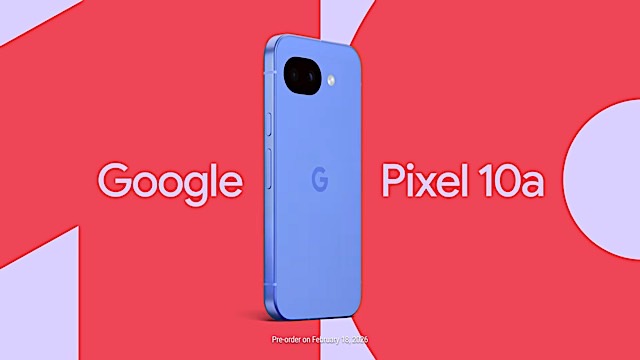
Google posted a teaser video revealing its new entry-level smartphone, the Pixel 10a, in a lovely lilac colorway. We don’t know much more, however. You can see it’s another dual-camera Pixel, with that same flush body — which I like. (How does that already seem retro?)
Leaks suggest a 6.3-inch display and a large 5,100 mAh battery. It otherwise looks and seems like the Pixel 9a, although Google promises that there’s “more in store.” Last year’s A-series launched at $500 — will this land at a similar price? You can pre-order the Pixel 10a on February 18.
AMD suggests a 2027 launch for next-gen Xbox
Shouldn’t Microsoft be saying this?
AMD CEO Lisa Su revealed on the company’s latest earnings call that Microsoft’s development of an Xbox with a semi-custom SOC from AMD is “progressing well to support a launch in 2027.” Maybe Microsoft can chase that best-selling console crown too?
This article originally appeared on Engadget at https://www.engadget.com/general/the-morning-after-the-switch-is-officially-nintendos-most-popular-console-ever-121500738.html?src=rss
How to watch the Opening Ceremony at the 2026 Milan Cortina Winter Olympics today
6 Feb 2026, 11:45 am by Liz Kocan
The 2026 Milan Cortina Winter Olympics begin this week, and this year's Opening Ceremony promises to be one for the ages. The three-hour event will feature performances from Mariah Carey and Andrea Bocelli, 3,000 athletes participating in the Parade of Nations, and not one but two Olympic cauldrons being lit. (One at Milan's Arco della Pace, since Milan will serve as the main hub for this year's Games, and the other in the Alpine city of Cortina d’Ampezzo, where events like skiing will take place.) The festivities are all happening this Friday, Feb. 6, and will air on NBC — you can tune in live this afternoon starting at 2 PM ET, or wait for the primetime broadcast at 8PM ET.
If you want to tune in to the 2026 Milan Cortina Olympics Opening Ceremony, we've got you covered. Here's all the info you need to watch, including the channel, the broadcast schedule, and who will be there.
How to watch the Opening Ceremony at the 2026 Winter Olympics
Date: Friday, Feb. 6
Time: Airs live from 2-5 PM ET, primetime re-air from 8-11 PM ET
Location: San Siro Stadium, Milan
TV channels: NBC
Streaming: Peacock, DirecTV, NBC.com, and more
Where can I stream the Opening Ceremony at the 2026 Winter Olympics?
How to watch the 2026 Opening Ceremony on TV:
There will be two broadcasts of the 2026 Milan Cortina Winter Olympics Opening Ceremony this Friday. You can tune in live from 2PM – 5PM ET on Friday afternoon, or catch the encore broadcast from 8PM – 11PM ET that night. Both broadcasts will air on NBC, which is available with DirecTV, Hulu + Live TV, and more.
With a live TV streaming service subscription or cable package, you can also catch all of NBC and Peacock's Olympics coverage on NBC.com and via NBCOlympics.com or the NBC App, just by logging in with your provider.
How to watch the Opening Ceremony in Milan without cable:
You can watch the Opening Ceremony live or on-demand on Peacock. If you already subscribe to a live TV streaming service or cable package, you should also be able to catch all of Peacock's Olympics coverage on NBC.com, NBCOlympics.com and the NBC app.
Who is hosting the Winter Olympics Opening Ceremony?
Sportscaster Terry Gannon will be hosting coverage of the 2026 Winter Games Opening Ceremony. Also appearing at the Opening Ceremony will be former Olympic snowboarder Shaun White, and NBC Olympics primetime host Mike Tirico will also participate remotely from San Francisco, where he'll be pulling double duty covering the Olympics and prepping to call Super Bowl LX.
Who is performing at the 2026 Winter Olympics Opening Ceremony?
Mariah Carey will headline the Opening Ceremony, and the event will also include a performance from iconic Italian tenor Andrea Bocelli. Actress Sabrina Impacciatore (The Paper, The White Lotus) and pianist Lang Lang, will also perform. And viewers will also get to see the nearly 3,000 Olympic athletes participating in the Parade of Nations.
Where is the 2026 Olympics Opening Ceremony being held?
The 2026 Winter Olympics Opening Ceremony will be held at Milan's San Siro Stadium, home to football clubs AC Milan and Inter Milan. The Opening Ceremony will actually be one of the final events held at San Siro Stadium, it's set to be demolished some time after the Games end.
More ways to watch the 2026 Winter Olympics Opening Ceremony
This article originally appeared on Engadget at https://www.engadget.com/entertainment/streaming/how-to-watch-the-opening-ceremony-at-the-2026-milan-cortina-winter-olympics-today-143529401.html?src=rss
The best mesh Wi-Fi systems of 2026
6 Feb 2026, 10:00 am by Daniel Cooper
If your Wi-Fi struggles to reach every corner of your house, it’s probably not your internet plan that’s the problem. A single router can only do so much, especially in larger spaces or homes with thick walls. That’s where the best mesh Wi-Fi system comes in, replacing one overworked router with a Wi-Fi mesh network designed to deliver high-speed coverage across your entire home.
A whole home mesh Wi-Fi setup uses multiple nodes that act as shared access points, spreading your connection more evenly and reducing slowdowns as you move from room to room. Compared to basic range extenders, mesh systems handle traffic more intelligently, balance bandwidth between devices and usually offer easy setup through companion apps. Many support dual-band Wi-Fi and newer standards, making them better suited for households full of phones, laptops, TVs and smart home devices.
We’ve tested today’s leading mesh systems to see which ones actually deliver consistent speeds and reliable coverage. Whether you’re trying to eliminate dead zones in a small apartment or blanket a large, multi-floor house with fast, stable Wi-Fi, these are the mesh systems worth considering.
Best mesh Wi-Fi systems for 2026
What to look for in a mesh Wi-Fi system
Linksys’ CEO Jonathan Bettino told Engadget why mesh systems are an “advancement in Wi-Fi technology” over buying a single point router. With one transmitter, the signal can degrade the further away from the router you go, or the local environment isn’t ideal. “You can have a small [home], but there’s thick walls […] or things in the way that just interfere with your wireless signal,” he said.
Historically, the solution to a home’s Wi-Fi dead zone was to buy Wi-Fi range extenders but Bettino said the hardware has both a “terrible user experience” and one of the highest return rates of any consumer electronics product. Mesh Wi-Fi, by comparison, offers “multiple nodes that can be placed anywhere in your home,” says Bettino, each acting as an access point that works together as part of a whole home mesh Wi-Fi system.
Rather than having one main router in your home, having a “router in every room” is the biggest selling point for mesh Wi-Fi given how reliant we all are on the internet. Each node is in constant contact with each other, broadcasting a single, seamless network to all of your connected devices. There’s no separate network for the 2.4GHz and 5GHz bands, just a single name that you connect to.
It’s a good time to buy a mesh Wi-Fi system since the latest standard, Wi-Fi 6E, represents a big leap in the technology. Matt MacPherson, Cisco's Chief Technology Officer for Wireless, said Wi-Fi 6E is a big “inflection point,” using much more of the wireless spectrum than its predecessors. “If you’re using that spectrum with a Wi-Fi 6 [device],” he said, “you’re going to get significant gains [in speed.]”
MacPherson added Wi-Fi 6E will likely “carry you for a long time” thanks to the fact its “top throughputs now typically exceed what people can actually connect their home to.” In short, with a top theoretical per-stream speed of 1.2 Gbps, Wi-Fi 6E is fast enough to outrun all but the fastest internet service.
What do all these Wi-Fi numbers and letters mean?
I’m sorry folks, we need to get boringly technical for one paragraph, but I promise you it’s worth it.
Wi-Fi is governed by International Standard IEEE 802.11, and every few years a letter gets added onto that name when the technology evolves and improves. Until 2019, routers were sold under their IEEE name, leaving users to pick through the word soup of a product labeled 802.11 b/g/a/n/ac and so on.
Mercifully, wiser heads opted to rebrand the letters as numbers, so rather than 802.11 b/g/a/n/ac, we have Wi-Fi 1, 2, 3 4 and 5. Right now, we’re in the middle of one of those Wi-Fi generations, with most of the gear on sale right now supporting either Wi-Fi 6 or Wi-Fi 6E.
What’s the difference between Wi-Fi 6 and Wi-Fi 6E?
Wi-Fi uses chunks of the radio frequency spectrum, with Wi-Fi 6 using the 2.4GHz and 5GHz bands to pump data around. In fact, back in the old days, it was likely your home router would offer you the choice of the 2.4GHz or the 5GHz network, as separate bands to access. These days, all of the spectrums are tied together as one thing, and Wi-Fi 6E has the added ability to use the 6GHz band as well. That’s a big chunk of extra wireless real estate that isn’t as cluttered up as the 2.4 and 5GHz bands.
You’re going to talk about wireless frequencies now, aren’t you.
Each Wi-Fi band had tradeoffs, because the slower radio frequencies have greater range but less speed. 2.4GHz signals will travel a long way in your home but aren’t quick, while 6GHz is blisteringly fast but can be defeated by a sturdy brick wall. A lot of Wi-Fi-enabled gear you own, like smart home products, only use the 2.4GHz band because the range is better and it’s a lot cheaper. But it means that the band is also overcrowded and slow, making it great for your doorbell and robovac, but lackluster for Twitch streaming.
So, what am I looking for?
Right now, the market is full of mature Wi-Fi 6 and 6E devices, and most new systems available to buy are capable of taking advantage of the faster speeds they offer. This guide focuses on Wi-Fi 6E gear since it’s what we think it’s more than enough to satisfy almost everyone’s at-home Wi-Fi needs.
What about Wi-Fi 7?
We’re now seeing the first generation of Wi-Fi 7 devices available to buy, but we don’t recommend you do so immediately. The Wi-Fi 7 standard is still so new that there’s little to no reason for you to rush out and buy one for your home. The hardware is tremendously expensive and while Wi-Fi 7 will, eventually, offer some great benefits over 6E, it’s not as transformative an upgrade as 6E. Not to mention, Wi-Fi 7 is so new that almost none of your home’s devices will be able to take advantage of its big-ticket features. I’d estimate you won’t need to worry about upgrading to Wi-Fi 7 for at least five years, if not longer.
Range and speed
All Wi-Fi routers boast a theoretical broadcast range and a theoretical top speed, and in some cases external antennas to boost signal directionality — but these figures don’t mean much. After all, manufacturers can’t control your ISP’s real speed, the materials and layout of your home or where you put your Wi-Fi gear. Raw speed isn’t everything, either, and you likely need less peak speed than your provider advertises. What matters more is consistent bandwidth and stable performance throughout your entire home. After all, Netflix needs just 15 Mbps to push a single 4K video stream to your home. As cool as it is to say you’ve got all these hundreds of Mbps, factors like latency and reliability are far more crucial to a happy internet life. And unless you have Gigabit internet that can reach speeds of up to 1 Gbps, you won’t need a mesh router that offers that spec.
Backhaul
Mesh Wi-Fi systems work by connecting every hardware node to a single wireless network, letting them all communicate with each other. Imagine four people in a busy, noisy restaurant all trying to order their dinner from a weary staff member, all at once. Now imagine, while this is going on, that four more people at that same table are also trying to tell a funny anecdote. It’s no surprise that it might take a long time for the right information to reach its intended destination.
To combat this, higher-end mesh routers offer dedicated wireless backhaul, allowing nodes to communicate without eating into the high-speed bandwidth your devices rely on. So rather than everyone talking at once in the same space, the conversations are essentially separated, reducing the invisible clutter in the air. Because there’s less confusing cross-chatter, everything moves faster, offering a significant performance boost to those systems.
Connectivity
These days, even your washing machine can have a wireless connection, but that doesn’t mean you should ignore the joys of wired internet. No matter how fast Wi-Fi is, a hard line will always be faster, and wired connections can significantly improve Wi-Fi mesh network performance when used for backhaul. Plenty of routers can also use these hard connections as backhaul, eliminating further wireless clutter.
It’s convenient for spread-out systems and power users, but it will mean running more wires through your home. The most common standard is Cat 5e, or gigabit ethernet which, unsurprisingly, has a top speed of 1 Gigabit per second (Gbps). Since Ethernet cables are backward compatible, you should be able to easily find one that works with your system. However, to get the most out of your mesh routers, it’s worth investing in an Ethernet cable that meets the standard your router uses — if it’s Cat 5e, use a Cat 5e cable. You can check your router’s specs via the manufacturer’s website to be sure.
Flexibility and scalability
Mesh routers enable you to add (or subtract) modules from your home network to suit your needs. D-Link’s Alan Jones said users should “check how scalable the prospective product is” before you buy. This sense of scale doesn’t just apply to the number of nodes on the network, but how many simultaneous connections it can handle.
It’s also worth looking at ASUS’ AiMesh products, which can combine mesh Wi-Fi gear and its standard “spider” Wi-Fi routers. If you’ve got a tricky part of your home, you can bolt on an ultra-power standalone Wi-Fi router to a compatible mesh.
Placement
Mesh networks replace one big piece of hardware with a series of identical nodes that you scatter around your home, each acting as a shared access point to maintain coverage throughout the entire home. You connect one to your modem (usually over ethernet), and then scatter the rest around the place for the best coverage. A good rule of thumb is to place each node no more than two rooms away from the last one, rather than sticking them at the far ends of your home.
Bear in mind, every physical obstacle between a Wi-Fi node, its siblings and your devices will hurt your overall performance. You should aim to place them, at the very least, at waist height on furniture in open air, without too many obstructions. The reason many mesh Wi-Fi products are designed to look like an inoffensive white doodad is so you don’t feel compelled to hide them behind your TV.
Other mesh Wi-Fi router systems we tested
Amazon Eero Pro 7
Eero built its reputation on easy to use yet powerful mesh systems that offer a lot of good in a relatively small and affordable package. Setup is effortless, the app running things is clean and simple, and you get the added benefit of backwards compatibility with older hardware. Sadly, the issue with every Eero system is that so many basic management features, like parental controls, are paywalled behind the company’s Eero Plus subscription for $100 a year.
Amazon Eero 6E
Eero Pro 6E is an “easy” device, the sort a total novice can set up on their own and thrive with for years on end. There’s little brainwork required to get things set up, and the app has a clean UI with plenty of hand-holding. But, as with the Eero Pro 7, the fact that so many basic management tools are paywalled irks me, especially since you can get plenty of them for free with Google’s rival offering.
Netgear Orbi 960
The Orbi 96T0 (RBKE963) is Netgear’s flagship mesh Wi-Fi product, which the company calls the “world’s most powerful Wi-Fi 6E system.” It’s also one of the most expensive consumer-level kits on the market, setting you back $1,499.99 for a three pack. It's a fantastic piece of gear, but it's worth saying that the subset of people who could, would or should buy it remains far smaller than you might expect. Ultimately, I feel that if you’re paying luxury prices, you should expect a luxury product. There were plenty of times during testing that I went looking for a feature that was either only available via the web client, or behind a paywall. While, yes, much of your cash is going to the superlative hardware, but for this sort of money, the fact you have to pay extra for some table-stakes features is insulting. If you’re looking for a new Wi-Fi system and aren’t prepared to spend almost $1,500, it’s worth considering our other top picks for the best Wi-Fi routers and mesh systems.
How we test Wi-Fi routers
My home covers around 2,200 square feet across three stories with the office on the third floor. It’s relatively long and thin, with the living room at the front of the house, the kitchen at the back and the three bedrooms on the first floor. Its age means there are a lot of solid brick walls, old-school lathe and plaster as well as aluminum foil-backed insulation boards to help with energy efficiency. There are two major Wi-Fi dead zones in the house: The bathroom and the third bedroom behind it, since there’s lots of old and new pipework in the walls and floors.
For mesh routers with two nodes, I place the first in my living room, connected via ethernet to my cable modem with the second on the first floor landing in the (ostensible) center of the house. For three-node sets, the third goes in my kitchen, which I’ve found is the optimal layout to get the bulk of my house covered in Wi-Fi. Fundamentally, my home poses enough challenges that if it succeeds here, it stands a very good chance of succeeding in your place.
Each mesh is judged on ease of setup, Wi-Fi coverage, reliability, speed and any additional features that it advertises. I look at how user-friendly each companion app is from the perspective of a novice rather than an expert given you shouldn’t need to be a network engineer to do this sort of thing. Tests I do include checking for dead zones, moving from room to room to measure consistency of connectivity and streaming multiple videos at once to replicate common usage patterns.
Mesh Wi-Fi system FAQs
This is the section of our mesh Wi-Fi buyer’s guide where we talk about the stuff that most people just glide past. If you’re not familiar with technology, it can be intimidating if people talk about these things as if you’re expected to already know. So here’s a very simple, very basic rundown of some of the stuff you might have missed in very basic terms.
What’s the difference between a Wi-Fi router and a mesh router?
A Wi-Fi router is a box that usually sits close to wherever the internet comes into your home and pumps out information over radio waves. A mesh router, meanwhile, is a set of smaller devices, one of which sits next to your internet connection while the rest are scattered around your home. A single Wi-Fi router is great if your home is small, your needs aren’t too demanding, or if your home doesn’t have many radio-blocking obstructions that mean those signals can’t reach every corner of your home. But, much like standing next to a radio transmitter and then walking away from it in a straight line, after a while, the signal will degrade.
That’s the problem a mesh system is designed to solve, since it will take the signal from your modem and pump to the other mesh devices, known as nodes, in your home. That way, instead of having one big router in one part of your home, you have several small ones that ensure you have good Wi-Fi connectivity all over. It also helps ensure that there’s no risk of dropping your connection as you move around — a mesh router system makes it easy to, for instance, walk from room to room watching Netflix and know you won’t miss a single frame.
What's the difference between a Wi-Fi extender and a mesh system?
Oh boy. Wi-Fi extenders, or repeaters, are small devices designed to push Wi-Fi a little further than your Wi-Fi router can stretch. They’re cheap, compact and often come in the form of little boxes that sit on your plug sockets with the hope of pushing Wi-Fi to a signal-sparse corner of your home. They are, and I can’t put this delicately enough, often a big pile of rubbish and are often not worth your time. Especially since the price of mesh routers has fallen to within most people’s budgets.
What is a wireless backhaul?
As we explained above, mesh Wi-Fi systems work by connecting every hardware node to a single wireless network, letting them all communicate with each other. Imagine four people in a busy, noisy restaurant all trying to order their dinner from a weary staff member, all at once. Now imagine, while this is going on, that four more people at that same table are also trying to tell a funny anecdote. It’s no surprise that it might take a long time for the right information to reach its intended destination.
To combat this, higher-end mesh routers offer dedicated wireless backhaul; a slice of the spectrum for node-to-node communication. So rather than everyone talking at once in the same space, the conversations are essentially separated, reducing the invisible clutter in the air. Because there’s less confusing cross-chatter, everything moves faster, offering a significant performance boost to those systems.
Is it better to hard wire instead of using a mesh Wi-Fi system?
This is a great question that doesn’t have a simple answer.
It is (almost) always preferable to connect devices with a wire, in this case Ethernet, than to use Wi-Fi. The speeds are faster, it’s more reliable and your data is less vulnerable to the slings and arrows of the laws of physics. Hell, I spent about a year trying to work out how to build an iPhone to Ethernet connector back in the bad old days of Wi-Fi.
But your ability to do so depends on your level of DIY skills and / or how much money you want to spend on contractors. Wiring your home for Ethernet if you don’t have the infrastructure already can be a costly and time-consuming process. Particularly if you don’t want ugly wires running along your baseboards and under your carpets or across your hardwood floors.
If you’re building your own home or can do some serious DIY, then hard wiring is a fantastic thing to have. It goes wonderfully hand-in-glove with mesh networks too, since you’ll be able to hook up your nodes to the network for even better speeds.
But if I’m honest, advances in Wi-Fi technology mean I’d only go for hard wiring if I really believed I needed the sort of speed it offers. Unless you’re a Twitch streamer running your own 24/7 content studio, it’s probably overkill.
When we started renovating our 140-year-old home, I had Ethernet installed in the living room, the master and second bedroom and in my office, all at the front of the house. I can’t use it for my mesh since I’d need to put the wiring through the middle of the house. If I ever had the wiring done again, I would do so as I know I’ll instantly see a meaningful improvement in both my connection speed and reliability. But I wouldn’t spend several thousand pounds to have it done just for the sake of it.
This article originally appeared on Engadget at https://www.engadget.com/home/smart-home/best-mesh-wifi-system-130028701.html?src=rss
End of today’s Engadget roundup.