This digest compiles the latest from Engadget.
Today’s Engadget Roundup
Elon Musk is reportedly trying to take SpaceX public
21 Jan 2026, 5:03 pm by Lawrence Bonk
Elon Musk is reportedly looking to finally take SpaceX public after years of resistance, according to sources who spoke to The Wall Street Journal. The company has long said it wouldn't choose an IPO until it had established a presence on Mars. That isn't happening anytime soon.
So why now? Company insiders have suggested it's because Musk wants to build AI data centers in space. Google recently announced it was looking into putting a data center in space, with test launches scheduled for 2027. Musk reportedly wants to beat his rival to the punch, but SpaceX would need the billions of dollars in capital that an IPO would deliver. Putting a giant center in space isn't cheap.
Our TPUs are headed to space!
Inspired by our history of moonshots, from quantum computing to autonomous driving, Project Suncatcher is exploring how we could one day build scalable ML compute systems in space, harnessing more of the sun’s power (which emits more power than 100… pic.twitter.com/aQhukBAMDp
— Sundar Pichai (@sundarpichai) November 4, 2025
Sources say that Musk wants to complete the IPO by July. SpaceX is reportedly expected to select banks to lead the stock offering in the near future.
This is also being seen as an attempt to boost xAI, which trails behind rivals like OpenAI and Google in the AI race. If SpaceX were to be successful in putting data centers in space, it's likely that xAI would get a sweetheart deal given that Musk runs both companies. Then they could pass money to one another in perpetuity, which seems to be the AI way.
Other companies have also begun considering jettisoning data centers into the great beyond. Blue Origin CEO Jeff Bezos recently suggested that shifting data centers to orbit makes sense. OpenAI CEO Sam Altman has been looking into partnering or purchasing a rocket maker called Stoke Space for a similar reason.
Of course, putting data centers in space is an extraordinary undertaking. There are serious issues that must be overcome, from latency to heat dissipation and radiation. Components must be launched and the structure must be built in space. WSJ reports that SpaceX made a breakthrough of some sort last year, but the company hasn't announced specifics.
If we need giant data centers to generate Garfield memes or whatever, I'd rather them in space. Microsoft's latest AI data center in Wisconsin takes up 325 acres. Meta recently announced a data center that would be nearly the size of Manhattan. These structures hoover up energy and water, strain local resources, create pollution and offer just a few long-term local jobs.
This article originally appeared on Engadget at https://www.engadget.com/science/space/elon-musk-is-reportedly-trying-to-take-spacex-public-170337053.html?src=rss
The best winter tech for 2026 to help get you through the coldest months
21 Jan 2026, 4:31 pm by Engadget
The festive lights, time off and cute scarfs can only conceal the truth for so long: Winter can be pretty bleak. I don't mean to be a downer, but it's cold all of the time, dark most of the time and this lasts far beyond the most wonderful time of the year. Here at Engadget, we've tried so many tools and products to make winter more bearable from therapy lamps to heaters. We've invested in tea sets, wrapped ourselves in heated blankets and learned to grow herbs indoors — really, anything that will make these three-plus months more bearable, we've tried.
Here, you'll find some of the best winter tech getting us at Engadget through the coldest months, plus a number of recommendations from our other gift guides that will get anyone through the winter warm, comfortable and content.
Best winter tech and gear
This article originally appeared on Engadget at https://www.engadget.com/home/smart-home/the-best-winter-tech-for-2026-to-help-get-you-through-the-coldest-months-130009890.html?src=rss
YouTube CEO promises more AI features in 2026
21 Jan 2026, 4:24 pm by Matt Tate
YouTube is just as wary of the rise of AI slop as you, and that’s why more AI-generated content is coming to the platform in the near future. In a lengthy blog post outlining YouTube’s 2026 plans, CEO Neal Mohan said the company will continue to embrace this new "creative frontier" by soon allowing its creators to throw together Shorts using their AI-generated likeness.
Mohan didn’t elaborate further about how this feature will work when it launches, but acknowledged the "critical" issue of deepfakes currently polluting the web, and reaffirmed his company’s support for new legislation such as the NO FAKES Act. YouTube also allows its own creators to protect themselves against unauthorized use of their likeness using a detection feature that scans newly uploaded videos for matches.
Other fresh AI (note: in no way slop) features referenced in the post include the currently-in-beta no-code Playables platform, which lets you make games using Gemini 3 with a single text prompt, as well as new music creation tools. At the same time, Mohan said YouTube is building on its existing systems designed to combat spam, clickbait and "low quality AI content." He added that an average of six million daily viewers watched more than 10 minutes of AI autodubbed content in December, despite the issues that rival platforms have had with similar features.
Mohan didn’t say when we can expect the new AI likeness generation feature for Shorts, but if that sounds like the sort of content you’d rather not encounter on your lunch break, here’s a little PSA: the company now allows you to omit its short-form videos from your YouTube search results altogether.
This article originally appeared on Engadget at https://www.engadget.com/entertainment/youtube/youtube-ceo-promises-more-ai-features-in-2026-162409452.html?src=rss
Sony LinkBuds Clip review: Open-fit benefits aren't enough to stand out
21 Jan 2026, 4:00 pm by Billy Steele

I vividly remember when Bose announced the Ultra Open Earbuds. While I applauded the company for trying something different, I wasn’t sure if the clip-on design would take hold. Well, here we are almost two years later and most earbud makers now have something akin to Bose’s fashion experiment. You can now count Sony among those as the company revealed its LinkBuds Clip ($230) open-fit earbuds today.
These aren’t the first open-wear earbuds in Sony’s LinkBuds lineup. The company has two generations of the LinkBuds Open (originally called just LinkBuds) under its belt, giving users a more traditional earbud fit with donut-shaped drivers that let ambient sounds in. Now Sony is taking a cue from Bose and others with a clip-on design that attaches securely and comfortably to the ear while leaving the ear canal unobstructed. It’s clear companies believe customers like this type of earbuds, but Sony’s challenge is to make the LinkBuds Clip unique among the growing list of alternatives.
Design and fit
Sony isn’t offering anything distinctive in terms of design here, but that’s okay. To be fair, I haven’t seen too much innovation in terms of aesthetics in these clip-on-style earbuds. For the most part, they all have similar shapes: two cylindrical cases connected by short, flexible cable. True to its predecessors, Sony put the drivers in a squatty housing while the bulk of the components are in a larger one that sits behind your ear lobe.
Sony kept the weight of the LinkBuds Clip low, and it avoided the bulk of the Ultra Open Earbuds. Both of these factors contribute to a very comfortable fit, so the IPX4-rated earbuds can be easily worn all day without becoming a burden. And while I didn’t need them, Sony includes a pair of flexible silicone “fitting cushions” in the box. These clip on to the short, flat cable of the newest LinkBuds for a more secure fit. During my tests, the LinkBuds Clip stayed in place just fine without them, but there also wasn’t any decreased comfort when I did install them.
The last design-related item I’ll mention is the touch controls. On the LinkBuds Clip, the flat connector between the two housings accepts taps for playback controls, volume changes, cycling through sound modes and more. You can tap along this area to make an adjustment, and you don’t have to do so right in the center. The LinkBuds Clip were pleasantly responsive during this review, quickly completing the task without delay or repeated taps. That is, except for volume, because you have to keep tapping for that change to happen.
LinkBuds Clip features
Sony typically throws a whole host of features at its earbuds. Even though they’re technically the company’s midrange line, the LinkBuds family has a robust set of conveniences that make them well suited for both productivity and leisure. Unfortunately, the LinkBuds Clip doesn’t have as much to offer here. The company gives you the basics, like the ability to fine-tune the tap controls or customize the EQ, and there’s even the Adaptive Audio tool that lets you customize settings based on activity or location (Sony calls them “scenes”). But there are some handy features I’ve come to expect from Sony that are notably absent.
The LinkBuds Clip doesn’t support speak-to-chat, Sony’s voice recognition feature that pauses audio and activates ambient sound when you start talking. Quick attention mode, the tool that lowers the volume and lets in ambient sound for brief chats, isn’t here either. These earbuds don’t even have wear detection, and you have to settle for regular ol’ DSEE audio upscaling instead of an enhanced version of that tech.
Sony did equip the LinkBuds Clip with unique listening modes meant to enhance the audio performance in two scenarios. First, Voice Boost increases the volume of voices when you’re on a call or listening to podcasts or audiobooks. The company says this is designed for noisy environments where the ambient sound is overly raucous. During my testing, I found the setting to be an extreme treble boost and volume increase — something that’s definitely not well-suited for music.
Next, Sound Leakage Reduction dials back high-pitched tones to avoid annoying your neighbors in the office or coffee shop. To me, this is the opposite of Voice Boost, removing the highs for a more mid- and bass-heavy tuning, but it doesn’t sound very good compared to the default setting. Plus, my family wasn’t really able to hear any leakage on the LinkBuds Clip anyway, unless I had the volume cranked uncomfortably high. I’ll also note that any EQ customization/presets and DSEE upscaling are only available in Standard (default) listening mode.
Sound and call quality

Open-fit earbuds typically struggle to muster adequate low-end tone, and the LinkBuds Clip meets the same fate. However, it’s not all bad in the audio department as these earbuds have great clarity and provide a solid soundstage so overall quality doesn’t suffer to the point of being unpleasant. The lack of bass is most apparent in booming genres, like hip-hop and synth-heavy electronic tunes.
The LinkBuds Clip doesn’t fare much better with more chaotic music styles like rock and metal. Spiritbox’s “Holy Roller” doesn’t have the depth that it does on closed-fit earbuds like the AirPods Pro 3 or over-ear headphones like Sony’s WH-1000XM6. As such, the band’s songs aren’t nearly as immersive or impactful without adequate amounts of bass. So if pristine, enveloping sound quality is your primary aim, you’ll want to look elsewhere, and you’ll want to tread carefully with any other open-type earbuds.
The open nature of the LinkBuds Clip makes them well-suited for calls. Since your ears aren’t plugged, you can clearly hear your own voice so you never feel like you need to shout. Sony says these earbuds have AI noise reduction and a bone conduction sensor for voice pickup, both of which are supposed to keep you sounding good. During the course of this review, I found the background noise reduction worked well without making me sound overly processed. However, the overall voice quality is average at best, which means you can get by with using these for calls, but there are better options if you really value clarity here.
Battery life on the LinkBuds Clip
When it comes to battery life, Sony says you can expect up to nine hours of use on a charge with up to 37 hours when you factor in the case. That means the LinkBuds Clip alone is enough to get you through a full workday, especially if you’re pausing for the occasional office chat or in-person meeting. And you’ll get more if you’re docking the earbuds in their case once or twice a day. If you do find yourself with a depleted battery though, a three-minute charge will give you an hour of play time.
I’m still conducting battery tests on the LinkBuds Clip. In my first attempt at a full, nine-hour run down, I wasn’t able to hit Sony’s stated figure, so I’m doing more testing before I offer any final observations here.
The competition

Based on my testing, the Bose Ultra Open Earbuds are still the best in this emerging clip-on category. However, they’re the bulkiest and the most expensive at $299. While they offer all the perks of open wear, sound quality can vary based on how they fit your ears and the lack of multipoint Bluetooth could be a deal breaker for some.
If you’re hoping to pay less than either Bose or Sony, Anker’s Soundcore line offers the AeroClip for $170. Or if you’re truly ballin’ on a budget, JLab has the Flex Open Earbuds that are now just $40. JBL just announced a new $150 set during CES too, but those won’t be available until March. I’ve only given these two a casual listen without any in-depth testing, so I won’t make a definitive call on which one stacks up best against the LinkBuds Clip. But they’re also just three of currently available options, and there are many more if none of these seem compelling.
Wrap-up
The LinkBuds Clip expands Sony’s midrange lineup with a completely different design that comes with inherent perks. They’re plenty comfortable and exploit the benefits of open-type designs while doing basic earbud functionality well. Subpar bass performance and the omission of some of Sony’s more attractive features (and even some basic ones) mean the company hasn’t done enough to distinguish the Clip from the competition in an obvious way. Sure, these earbuds work as intended without being flashy or overly complicated, but there are plenty of other options that do that too.
This article originally appeared on Engadget at https://www.engadget.com/audio/headphones/sony-linkbuds-clip-review-open-fit-benefits-arent-enough-to-stand-out-160000140.html?src=rss
Weber's 2026 smart grill lineup includes the company's first Wi-Fi-equipped charcoal grill
21 Jan 2026, 3:00 pm by Billy Steele
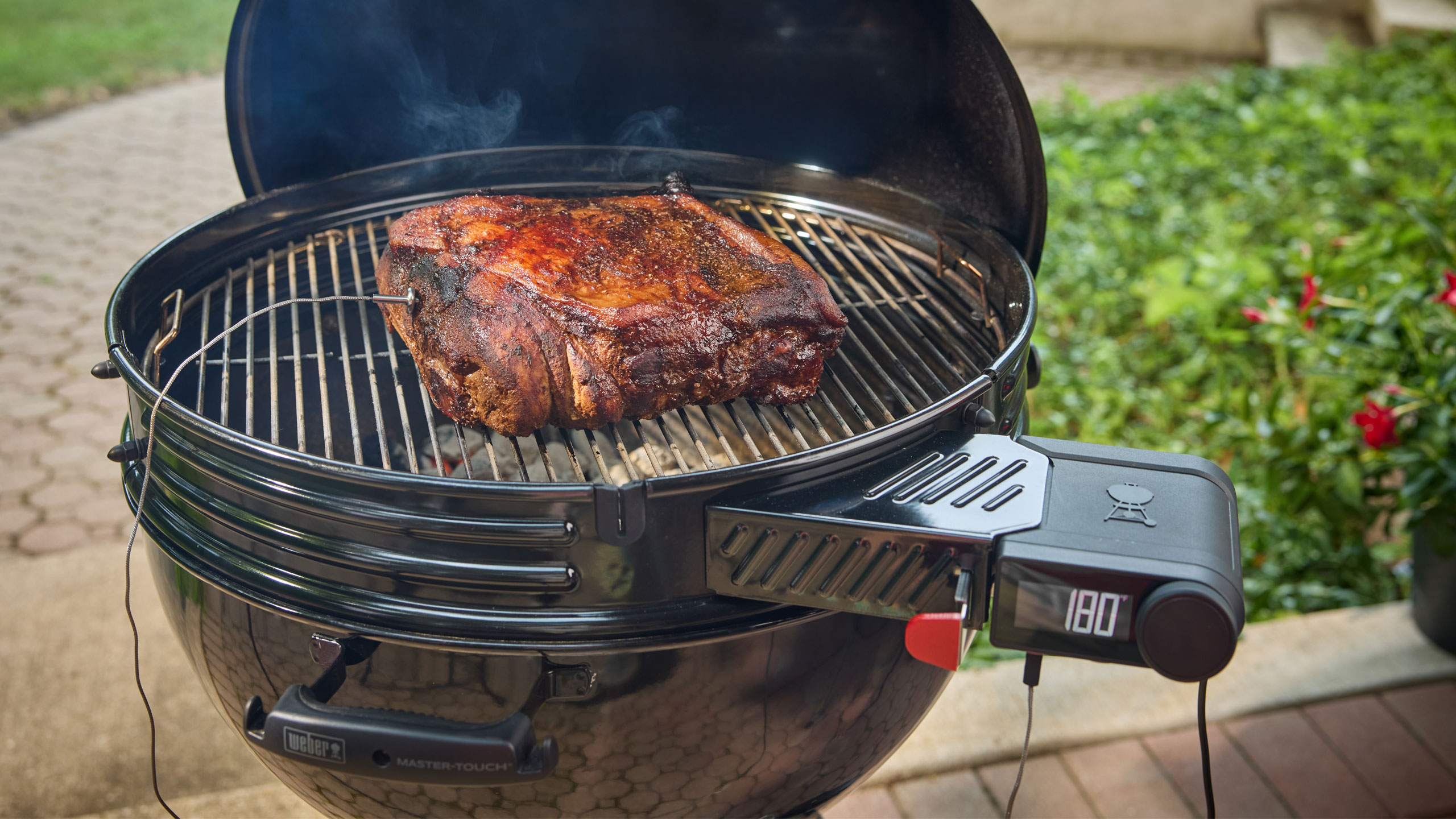
Weber has been in the smart grilling game since 2020, dabbling in Wi-Fi connectivity for gas and pellet grills. It has also offered grillers a standalone option for its Weber Connect platform. For 2026, the company is expanding its smart grilling lineup to its original fuel source: charcoal. Today, Weber announced the Performer Smart Charcoal Grill and Kettle Smart Ring, both of which bring Weber Connect control and cooking guidance to charcoal grilling in a more integrated way.
The 22-inch Performer Smart Charcoal Grill has a Wi-Fi-enabled LCD controller that regulates grill temperature by adjusting the airflow to lit charcoal. Weber says this grill is well-suited for overnight smoking and longer cooks thanks to this bit of automation. The new Performer also has a so-called Rapidfire Assist mode to get those coals lit faster. The grill can be controlled remotely with the Weber Connect app, which can also keep tabs on any connected food probes.
The new Performer is essentially an upgraded version of the Performer Premium, Deluxe and base options that currently exist. You still get the porcelain-enamel finish, adjustable dampers for manual temperature controls and the One-Touch cleaning system for ash removal. The other upgrade is a Weber Works side table and side rail that accommodate the company’s line of accessories. A premium version comes with a cart with storage shelves for $799 while an option with a more basic cart will be $599. Weber also plans to sell non-smart versions for $649 and $449, respectively. The company says the base models will arrive this spring while the premium trims will be available this summer.
If you already have a Weber Kettle and are looking to add a bit of automation to your setup, the Kettle Smart Ring brings temperature control and smart connectivity for $280 this spring. This accessory fits the company’s 22-inch grills and is equipped with an LCD display and knob-based controls. Of course, it also syncs with the Weber Connect app and offers two slots for wired food probes.
Another key smart grilling area Weber lags behind its competition is wireless temperature probes, but that changes this spring. The company will debut a $70 Smart Wireless Probe and a $115 version with range booster and charger. These new probes sync with any Weber smart grill, the Weber Connect app or the new Smart Hub Display and Booster ($90) that works on any grill. Weber also built a retractable wired Smart Probe ($40) that can be used to monitor the temperature at the grates.
And if you’re loyal to propane, Weber has new options for you too. Updated Genesis Smart Gas Grills have a Sear Zone that can hit temperatures of up to 750 degrees Fahrenheit and a side table that now accommodates Weber Works accessories. It will be available in both propane and natural gas versions — in both three- and four-burner configurations — this spring starting at $999. More affordable Spirit Smart Gas Grills will start at $599 and will also come in three- and four-burner options. Both the Genesis and Spirit smart models work with the Weber Connect app like the rest of the company’s Wi-Fi grills and accessories.
This article originally appeared on Engadget at https://www.engadget.com/home/kitchen-tech/webers-2026-smart-grill-lineup-includes-the-companys-first-wi-fi-equipped-charcoal-grill-150000097.html?src=rss
The 512GB Samsung P9 microSD Express card is 33 percent off right now
21 Jan 2026, 2:38 pm by Andre Revilla
If you're looking to expand the storage on your Switch 2, the 512GB Samsung P9 microSD Express card is on sale right now for 33 percent off, marked down to $80 from $120. With component prices skyrocketing these days, it's getting increasingly rare to see good storage on sale, and 512GB for $80 is a much better deal than you'll currently find directly from Nintendo.
The P9 boasts transfer speeds of up to 800MB/s, making moving games to the card that much faster. As for load times, in our testing we found that any microSD Express, the standard the Switch 2 requires, will offer roughly the same performance. This format is pretty new, so there aren't a ton of cards on the market. As such, the P9 makes our list of best microSD cards for the Nintendo Switch 2.
The P9 microSD Express is also compatible with the Steam Deck or any other gaming console that accepts the format, as well as cameras and more.
Follow @EngadgetDeals on X for the latest tech deals and buying advice.
This article originally appeared on Engadget at https://www.engadget.com/deals/the-512gb-samsung-p9-microsd-express-card-is-33-percent-off-right-now-143849000.html?src=rss
Adobe Acrobat can now generate presentations and audio podcasts from your documents
21 Jan 2026, 2:00 pm by Igor Bonifacic
Back in August, Adobe debuted Acrobat Studio. The new service saw Adobe bring the humble PDF into the 21st century with support for a handful of new genAI features, including PDF Spaces, a hub where you can upload up to 100 documents and have AI summarize them. Now the company is enhancing the capabilities of those hubs with the introduction of four new genAI features inside of Adobe Acrobat, Acrobat Studio and Adobe Express.
The next time you add documents and files to a PDF Space, you can prompt Adobe's built-in AI assistant to generate a presentation from those materials. The software will first create an outline. From there, you can select from a handful of "professional" designs to build the presentation around, and then make tweaks. Adobe says the majority of changes, including copy edits and image swaps, can be made without the need to generate entirely new slides. Once you're happy with the results, you can share the presentation with your co-workers for further editing. Adobe has also made it easier to collaborate inside of PDF Spaces. With this latest update, you can invite others to add files and leave notes.
On the subject of editing, you can now carry out a dozen different tweaks using natural-language prompts. That includes adding text, comments, images and e-signatures. If you're old-fashioned like me, Adobe has also reworked the Help section to offer step-by-step instructions on how to complete most tasks.
Last but not least, Adobe is borrowing a page from NotebookLM by adding a feature that allows users to generate podcasts from a PDF Space. This works much like it does in Google's app. Acrobat will default to centering the generated podcast around two hosts having a conversation about the material you want summarized.
Adobe says Acrobat's AI features have been highly popular, in part because users are finding those tools are saving them time. As you might expect, the company reports students have had a particularly strong response to its efforts to add AI inside of Acrobat, seeing as the app can generate summaries of course material while providing citations for fact checking.
This article originally appeared on Engadget at https://www.engadget.com/ai/adobe-acrobat-can-now-generate-presentations-and-audio-podcasts-from-your-documents-140000146.html?src=rss
Get NBA League Pass Premium for only $75 for the rest of the season
21 Jan 2026, 1:46 pm by Andre Revilla
NBA League Pass, the streaming service that lets you catch hundreds of out-of-market NBA games, is on sale right now for up to 55 percent off. The League Pass Premium subscription is on sale for $75, down from $160, while League Pass Standard is marked down to $50 from $110. We're almost halfway through the season at this point, so it makes sense for a service like League Pass to start offering some discounts.
The Standard plan includes commercials and support for only one device at a time, while the Premium tier offers no commercials, in-arena streams during breaks in the game, offline viewing of full games and concurrent streams on up to three devices at once.
Last year, League Pass added multiview, which allows you to view up to four games at once on a single screen. This is included across both subscription tiers. The service also added a smart rewind tool that automatically selects key highlights and plays from each game.
Outside the US and Canada, League Pass carries every single NBA game live, but within these countries a bevy of restrictions apply. In the US, any games being shown on your regional sports network will be blacked out as the service is meant for out-of-market games only. Also, any nationally broadcast games will not be available live, but instead will be available for on-demand viewing at 6AM ET the following day. The service is only for regular-season games.
If you're an avid NBA fan that follows multiple teams then the League Pass almost certainly carries dozens of games you can watch even with the restrictions in the US. Subscribers can get a list of applicable blackouts by entering their ZIP code before signing up.
Follow @EngadgetDeals on X for the latest tech deals and buying advice.
This article originally appeared on Engadget at https://www.engadget.com/deals/get-nba-league-pass-premium-for-only-75-for-the-rest-of-the-season-163421048.html?src=rss
Xbox Game Pass adds Death Stranding DC, Ninja Gaiden, Talos Principle 2 and more
21 Jan 2026, 1:41 pm by Steve Dent

Microsoft has announced some solid additions to Game Pass this month, ranging from AAA titles to indies, including some of our favorites from 2024 and 2025. Topping the list is Death Stranding Director’s Cut, an extended version of Hideo Kojima’s 2019 sci-fi action game (now available). Other key inclusions are Warhammer 40,000: Space Marine 2 (January 29) and puzzle game The Talos Principle 2 (January 27).
We’re also seeing some award winners including Indika (February 2), a surreal tale about the devil living inside a nun’s head, one of Engadget’s 2024 games of the year. Last year’s Ninja Gaiden Ragebound (available today), a hack-and-slash platformer with top-notch pixel, was on our list for one of 2025’s best games. Finally, Roadcraft allows you to operate a fleet of 40 authentic construction vehicles to clear debris, repair bridges and restore infrastructure.
Along with the games, there are a few DLC releases arriving soon as well. The Sims 4 players (Ultimate, Premium, or PC tiers) will gain The Sims 25th Birthday Bundle on Jan. 22. You also get Grounded 2, Dead by Daylight (extra Stranger Things content coming January 27) and and Sea of Thieves, with season 18 act 2 coming on January 22.
Here’s a list of key games and tiers arriving on Game Pass over the next month:
-
Death Stranding Director’s Cut (Ultimate, Premium, PC ) on January 21
-
RoadCraft (Ultimate, Premium, PC) on January 21
-
Ninja Gaiden Ragebound (Ultimate, Premium, PC) on January 21
-
The Talos Principle 2 (Ultimate, Premium, PC) on January 27
-
Anno: Mutationem (Ultimate, Premium, PC) on January 28
-
Drop Duchy (Ultimate, Premium, PC) on January 28
-
MySims: Cozy Bundle (Ultimate, Premium, PC) on January 29
-
Warhammer 40,000: Space Marine 2 (Ultimate, Premium, PC ) on January 29
-
Indika (Ultimate, Premium, PC) on February 2
-
Final Fantasy 2 (Ultimate, Premium, PC) on February 3
At the same time, here are the titles leaving January 31:
-
Shady Part of Me (Cloud, PC, and Console)Cataclismo (PC)
-
Starbound (Cloud, PC, and Console)
-
Lonely Mountains Snow Riders (Cloud, PC, and Console)
-
Paw Patrol World (Cloud, PC, and Console)
-
Citizen Sleeper 2 Starward Vector (Cloud, PC, and Console)
-
Orcs Must Die! Deathtrap (Cloud, PC, and Console)
This article originally appeared on Engadget at https://www.engadget.com/gaming/xbox-game-pass-adds-death-stranding-dc-ninja-gaiden-talos-principle-2-and-more-134126315.html?src=rss
Get TurboTax Deluxe for only $45 ahead of tax season
21 Jan 2026, 1:16 pm by Igor Bonifacic
Tax season is fast approaching, and unfortunately for 2026, Direct File isn't an option anymore. The free, government-provided service was shut down, so you'll need to look to other federal programs, including IRS Free File, to file your paperwork. If you don't qualify for Free File, TurboTax might be your best bet for a relatively cheap, efficient way to file your taxes. While it pains us to suggest you give money to a company that has spent decades lobbying to ensure America's tax system remains a nightmare, we can at least help you save a bit of cash if you've determined TurboTax is a necessary expense for you this year.
Right now, Amazon has discounted the deluxe desktop edition of TurboTax by 44 percent. That gets you $35 off software that normally costs $80, which you can use to file both your individual state and federal taxes. For most Americans, that should cover their needs.
However, if you're self-employed, you'll need to pony up for the more expensive Business version of TurboTax, which is currently 42 percent off, or $54 off. One last thing to note: you'll need a PC with either Windows 11 or macOS Sonoma to run the software, so an older machine won't do, unfortunately.
Follow @EngadgetDeals on X for the latest tech deals and buying advice.
This article originally appeared on Engadget at https://www.engadget.com/deals/get-turbotax-deluxe-for-only-45-ahead-of-tax-season-204848842.html?src=rss
How to check if your VPN is working
21 Jan 2026, 1:00 pm by Sam Chapman

One of the disconcerting things about using a virtual private network (VPN) is that it can be hard to tell when it's doing its job. The best VPNs all work in the background to keep your IP address hidden and your communications with their servers encrypted. The better the VPN, the less you notice it, which can make a top-performing VPN feel (uncomfortably) like one that isn't working at all.
Luckily, you've got options for checking whether your VPN is working — other than just taking the app at its word. In this article, I'll cover the basics, then go through five different tests you can run to make sure you're actually using an encrypted VPN server. For each test, I'll explain what kind of problem it's looking for, how to run it and what to do in case it fails.
Make sure your VPN is turned on
Before you do anything else, though, it's not a bad idea to check your VPN app and make sure you remembered to connect. It's all too easy to open up the client app, choose a server, tweak some preferences and feel like your work is done. On top of that, we don't always remember to tell VPN beginners that simply opening the client isn't enough.
To check that your VPN is turned on, open the app on your desktop or mobile home screen. Each VPN designs its apps differently, but common signs include the color green, the word Connected and information on what server location you're connected to.
If you don't see anything like that, click the On button, which should be on the first page that appears when you log into the app. Most VPNs also connect whenever you click the name of a server location.
For those of you on iPhone or iPad, I've just written an explainer on how to turn a VPN off and on. For all the tests I'll discuss across the rest of this article, make sure you're connected to a VPN server before you run them. Also, make sure your internet connection is active — a VPN can only work when there's internet.
5 tests to check if your VPN works
Each of these tests investigates a different reason your VPN might not be working. We'll start by looking for connection problems that might not be obvious, check for DNS leaks, WebRTC leaks and IPv6 leaks, then finally make sure an apparently active VPN is managing to change your virtual location.
1. Has your IP address changed?
Websites and internet service providers (ISPs) use IP addresses to identify devices and their owners online. A VPN's most important job is to change your IP address to one matching its own server, which disassociates your identity from your online activities. Not doing this indicates a failure on a fundamental level: either the VPN says it's connected when it isn't, or its technology is active but somehow not sending you through the proper encrypted tunnel.
To check whether your VPN has changed your IP address, start by going to an IP address checker like whatismyipaddress.com or ipleak.net. This will show you the public IP address that everyone sees when you get online without a VPN, including the ISP that holds it and the geographic location it's associated with. Write that down or take a screenshot.
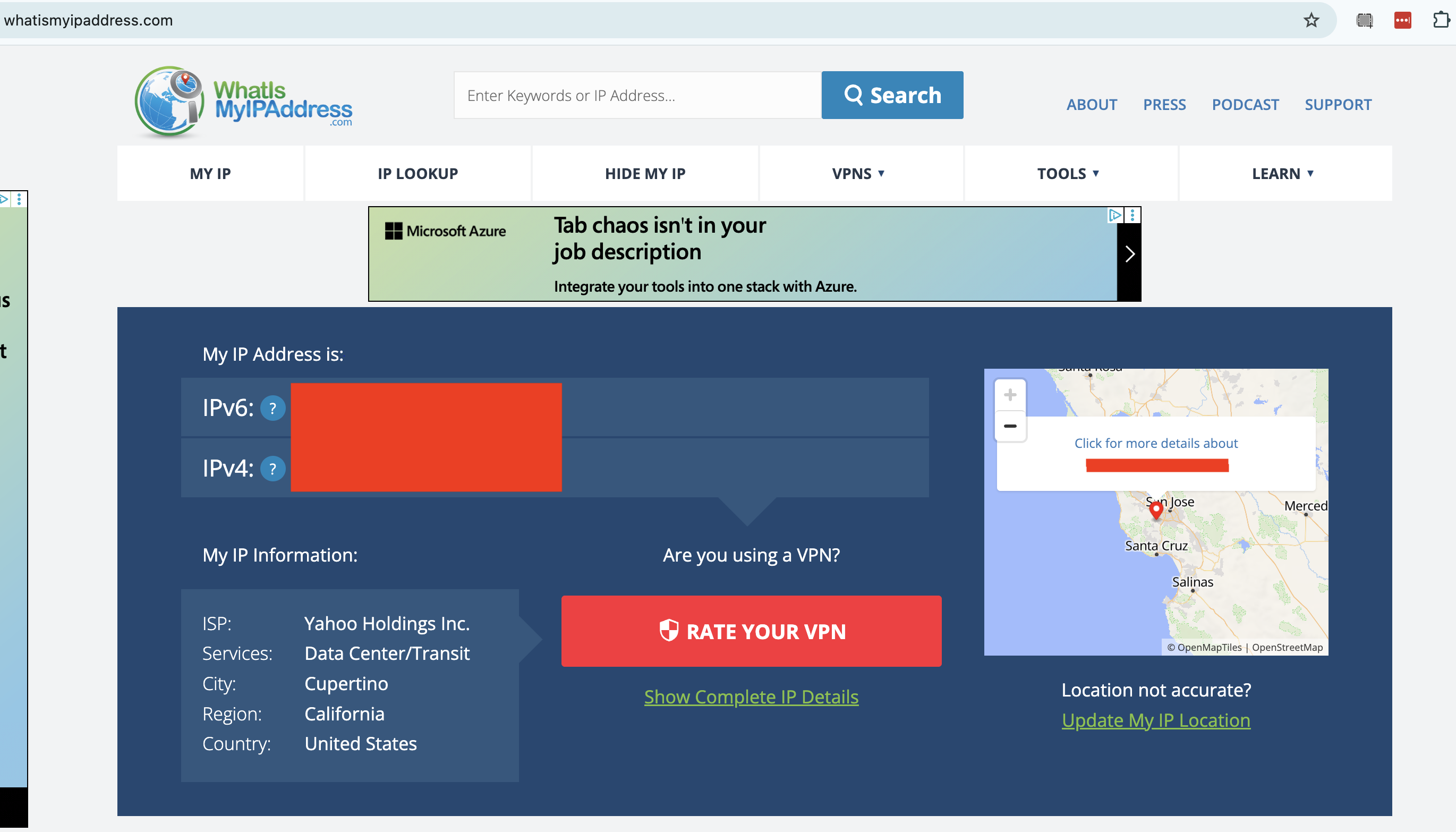
Next, connect to your VPN. Remember the location you connect to, and note down the new server IP address if the VPN tells you what it is. Go back to your IP tester tool and refresh the page. You should now see an IP address and location that match the one you connected to through the VPN, including a different ISP.
If your IP address is the same as before, your VPN isn't working. To fix this, try disconnecting from the server, waiting about 10 seconds, then connecting to the same location and trying the test again. This will show you whether the problem was with one individual server or an entire location.
If the problem persists, try a different server location, then a different VPN protocol. If it's still leaking, try restarting your VPN client, your device and your modem (in that order). This should fix the problem, but if it doesn't, move on to the remaining tests or get in touch with the VPN's tech support.
2. Are you leaking DNS requests?
A domain name system (DNS) server is an important step in getting a website to appear on your browser. DNS holds the information that connects URLs to the IP addresses of destination servers. If a VPN client lets your device contact a DNS server owned by your internet service provider without routing it through an encrypted tunnel first, the DNS request might reveal your real IP address to the ISP.
You can check for DNS leaks by connecting to your VPN, then going to dnsleaktest.com or another tool of your choice. The tester sends several innocuous DNS requests, then scans to see which servers resolve them. If you see your real ISP at all, you've got DNS leaks.
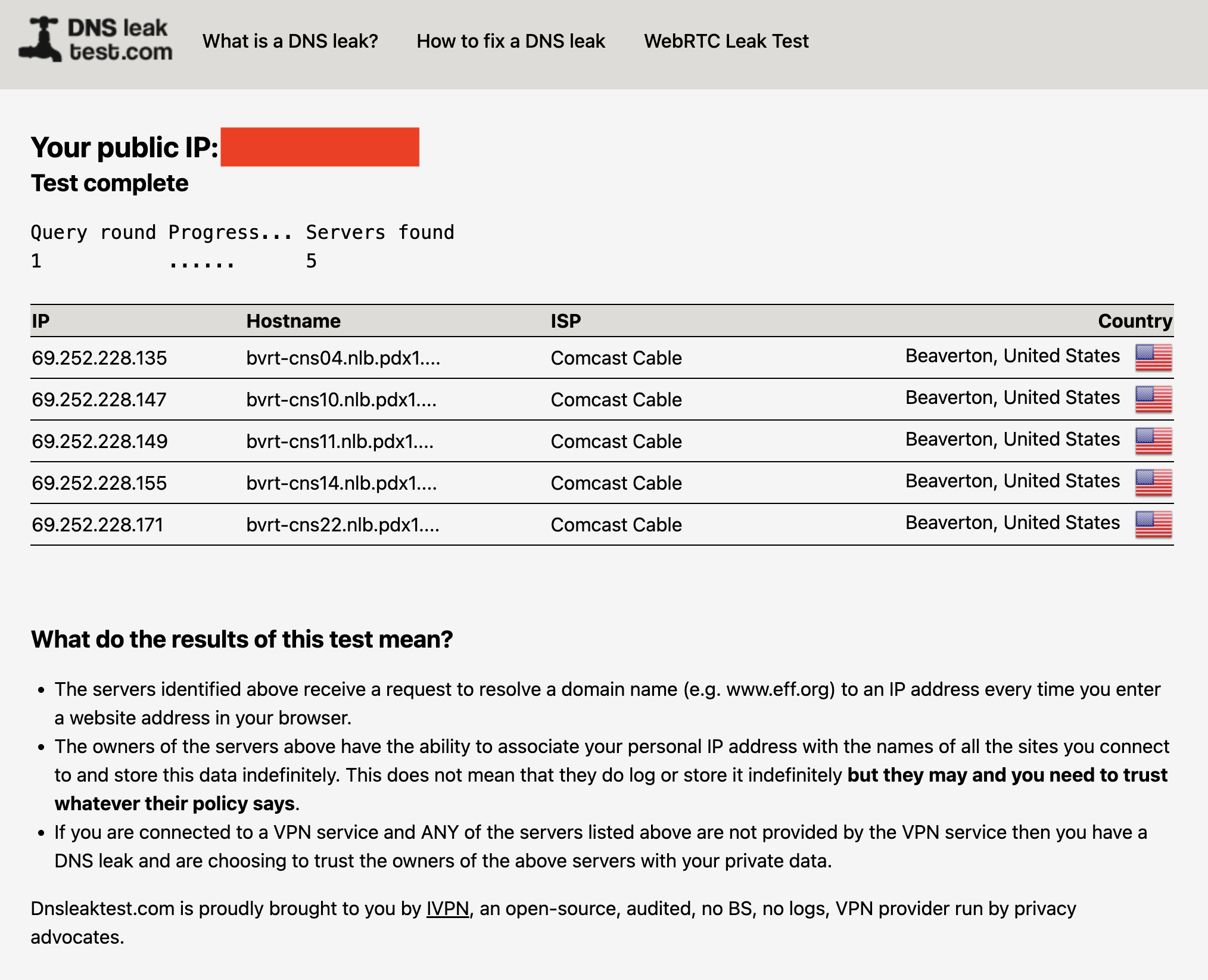
The fix for DNS leaks is more intensive than the fixes in step #1. Check your VPN's control panel to activate any DNS leak protections and try again. IPv6 leaks can also appear as DNS leaks, so try disabling IPv6 in your browser (see #4 below for instructions). If you keep seeing leaks, you can also try clearing your computer's DNS cache.
Here's how to do that. On Windows, go to the Command Prompt (on Windows 10) or the Windows Terminal (on Windows 11). Enter the phrase ipconfig/flushdns. On Mac, open Terminal from the Utilities folder, then paste in the phrase sudo dscacheutil -flushcache; sudo killall -HUP mDNSResponder and hit Enter. Test the VPN once more to see if it's still leaking.
3. Are you leaking information through WebRTC?
WebRTC, which stands for Web Real-Time Communication, is a technology that lets browsers exchange information directly with each other. This is useful for text and video chats, streaming and more, but it's also a potential security risk. WebRTC can serve as a backchannel that inadvertently sends your real IP address outside the VPN tunnel.
It's pretty easy to test for WebRTC leaks. I recommend the tool ipleak.net, which checks for them as a matter of course. You can also use browserleaks.com/webrtc to run a test that's particular to this kind of leak. These tools establish dummy connections through WebRTC, then test to see if the VPN still works when they're active. As usual, if you see your real IP address, there's a problem.
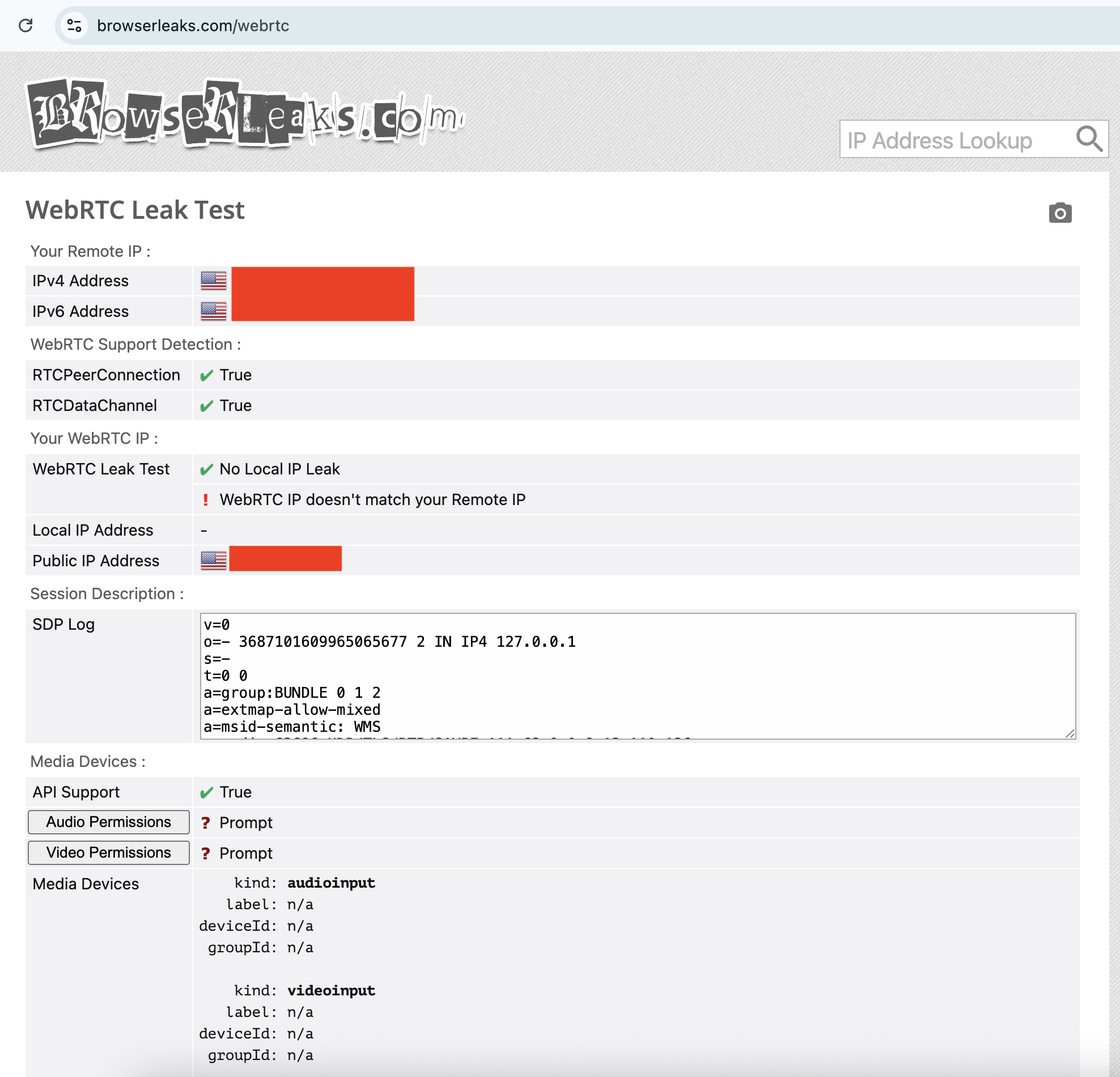
The fixes for a WebRTC leak are the usual ones: try different servers, locations and protocols, reset your VPN, device and modem, then try another VPN provider. However, if nothing is working, you can also disable WebRTC on your browser altogether. This means you won't be able to do any real-time chatting (that's Zoom, Google Meet, Teams and so on), so it's a last-resort solution.
To disable WebRTC on Firefox, type about:config in the URL bar, click the message to accept the risk, type media.peerconnection.enabled in the search bar, then double-click the word True to change it to False. To turn WebRTC back on, just double-click False again.
On Edge, you can disable WebRTC by entering edge://flags in the URL bar, scrolling down to the option "Anonymize local IPs exposed by WebRTC" and making sure the dropdown next to it is set to Enable. There's no built-in way to turn off WebRTC on Chrome, but you can install the WebRTC Control extension to switch it off and on yourself.
4. Is your IPv6 address leaking?
Next up, it's possible that your real location is leaking through your IPv6 address, not IPv4. To make a long explanation short, IPv6 is a new way of formatting IP addresses that leaves more options available for the future. Since we haven't yet hit the crisis point of IPv4 shortage, very few websites are restricted to IPv6 alone.
The problem is that most VPN apps were designed in the IPv4 era and aren't built to protect IPv6 traffic. There are some exceptions, including NordVPN, but most VPNs block IPv6 traffic completely rather than retrofit themselves to work with it. However, if a VPN of that sort isn't blocking IPv6 entirely, your IPv6 address and associated location can leak.
Any IP address checker can reveal an IPv6 leak, but you can find a specific test at test-ipv6.com. This site runs several exams that look for IPv6 readiness, but the most important line is the one that shows your current IPv6 address. This will probably say you don't have one, since most ISPs don't work through IPv6 yet — but if you do have one, it should match your active VPN's location, not your real one.
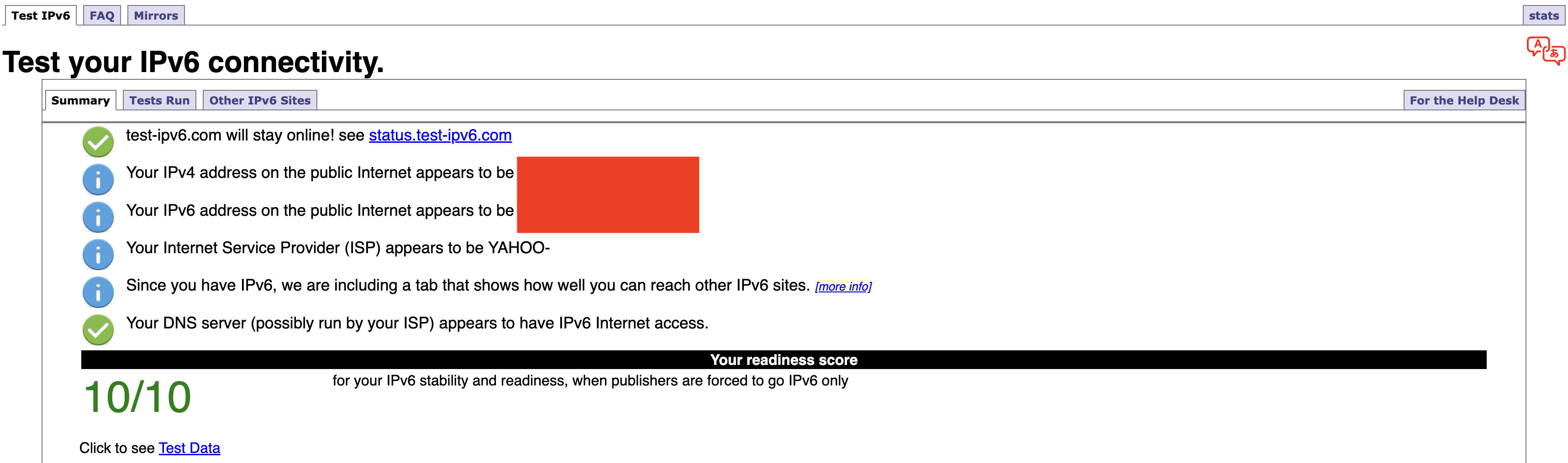
Should it turn out that you're leaking IPv6 requests, the easiest solution is to disable IPv6 on your computer. On Windows, you can do this through the network adapter options page of your control panel. Here's how to get there:
-
Windows 10: Start -> Settings -> Network & internet -> Status -> Change -> Advanced network settings -> Change adapter options.
-
Windows 11: Settings app -> Network & internet -> Advanced network settings -> Related settings -> More network adapter options.
On both OSes, finish the job by right-clicking the name of your internet connection, selecting Properties from the dropdown and unchecking the box next to Internet Protocol Version 6. Of course, you can always switch to another VPN that blocks IPv6 altogether, but you might find that to be a bigger hassle.
If you're on Mac, open System Settings, click the Network tab and then click the Details… button next to your network name. In the new window, click the TCP/IP tab on the left, find the entry labeled Configure IPv6 and set the dropdown to Link-Local Only.
5. Do streaming sites show different content?
A VPN can be working perfectly and still fail to unblock streaming sites. Netflix, HBO Max and the others block VPN traffic because VPNs can make them show material in regions where they don't hold the copyright. To avoid legal trouble, they set up their firewalls to block IP addresses known to belong to VPN servers.
If your VPN can't get into a streaming platform, it'll usually be obvious; the site will either display a proxy error message or simply refuse to load. However, in rare cases, the streaming site will load fine but show you the same shows you normally see. This indicates that you might be dealing with a VPN leak.
If that happens, follow the usual steps. Disconnect and reconnect to the same location to get a different server, then try different server locations. It's also possible that the streaming site is getting your real location from your browser cache, so if the problem persists, clear your cache and cookies and try again.
How to test a VPN kill switch
There's one more important step to make sure your VPN is working: test the kill switch. This common feature cuts off your internet connection if you lose touch with your VPN server. With your kill switch active, you shouldn't be at any risk of accidentally broadcasting your real IP address, location or online activity.
To test your kill switch, you'll need to simulate an abrupt loss of VPN connectivity. Open your VPN, make sure the kill switch is turned on, then connect to a server. Next, quit the VPN app without disconnecting. At this point, the kill switch should make it impossible for you to get online — if you can still browse the internet as normal, the switch might be faulty.
This article originally appeared on Engadget at https://www.engadget.com/cybersecurity/vpn/how-to-check-if-your-vpn-is-working-130000817.html?src=rss
What to expect at Samsung Galaxy Unpacked 2026
21 Jan 2026, 1:00 pm by Ian Carlos Campbell
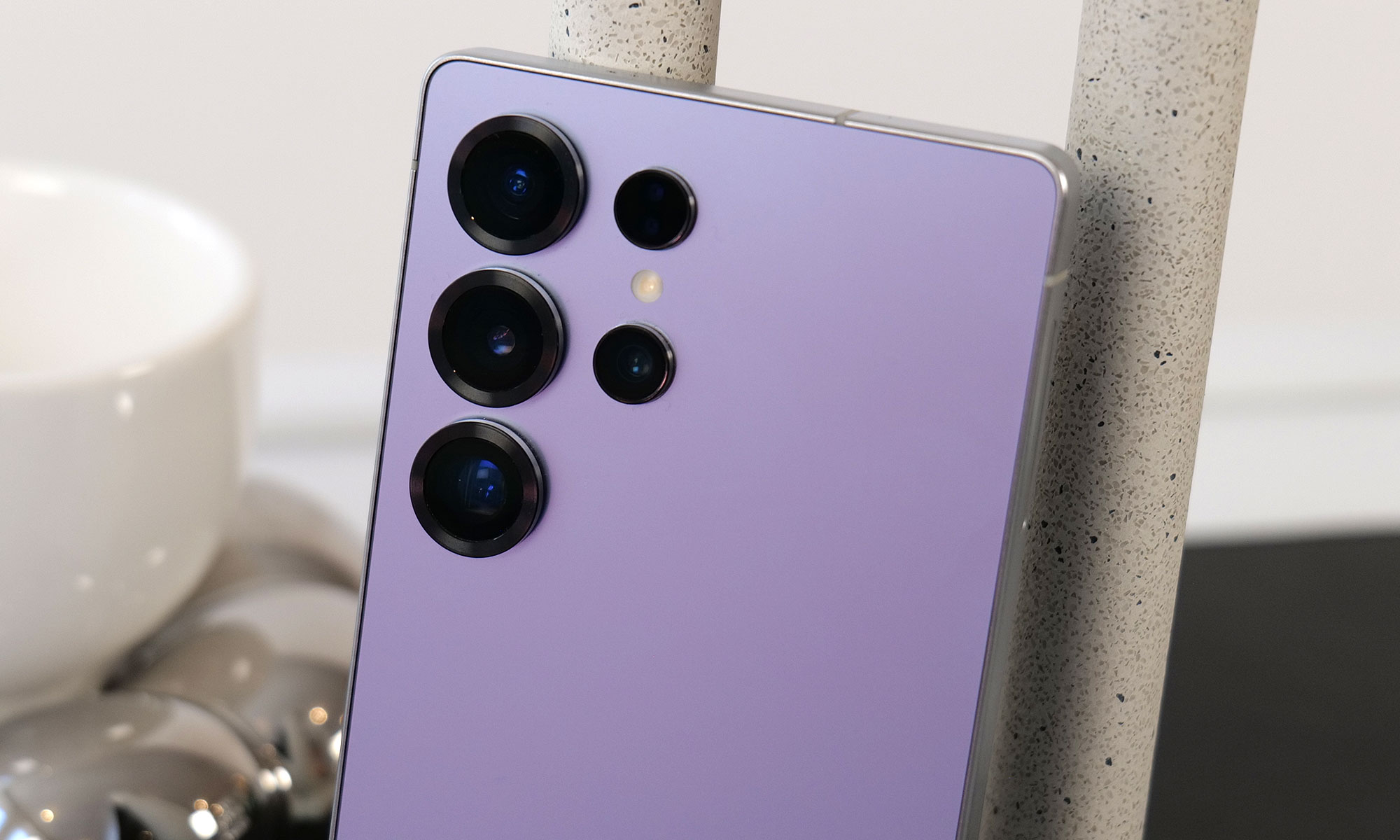
Samsung’s 2025 was filled with new foldables, an ultra-thin new form factor and the launch of Google's XR platform. After making some announcements at CES 2026, the company is expected to host its first Galaxy Unpacked of the year in February to introduce the Galaxy S26 lineup.
Engadget will be covering Galaxy Unpacked live, and we'll most likely have hands-on coverage of Samsung's new smartphones soon after they're announced. While we wait for an official invite, here's everything we expect Samsung will introduce at the first Galaxy Unpacked event of 2026.
Galaxy S26, S26+ and S26 Ultra
Samsung's restrained approach to updating its phones will likely continue with the Galaxy S26. Based on leaked images of the new lineup, the company is not expected to radically reinvent the look of the Galaxy S26, Galaxy S26+ or Galaxy S26 Ultra, and instead will stick with a similar design to what it used on the Galaxy S25. The phones will have a flat front screen and frame, with rounded corners and cameras housed in a vertical pill-shaped plateau on the back. Unlike Apple's move from the iPhone 16 Pro to the iPhone 17 Pro, the biggest difference here will likely be internal components like the screens, chips and camera sensors Samsung uses.
Qualcomm's new Snapdragon 8 Elite Gen 5 chip is expected to be in all Samsung Galaxy S26 phones, though Korean news site Yonhap News reports Samsung's relatively new Exynos 2600 chip could be used in some phones in the lineup depending on the region, a strategy Samsung has deployed in the past. Either way the new phones should be more performant than the previous generation, and in the case of the models with the Snapdragon 8 Elite Gen 5, particularly good at on-device AI processing.
I have compiled the most accurate comprehensive parameter comparison of Galaxy S25, S25+ and Galaxy S26、 S26+. Which one do you want to buy? pic.twitter.com/aQpoSvYjOz
— Ice Universe (@UniverseIce) November 29, 2025
One notable difference between the Galaxy S26 and the Galaxy S25 could be the phone's screen. The new phone will reportedly feature a 6.3-inch FHD+ display according to specs shared by leaker Ice Universe, which makes it ever so slightly larger than the 6.2-inch display used on the Galaxy S25. The S26 will also allegedly come with 12GB of RAM, either 256GB or 512GB of storage and a slightly larger 4,300mAh battery. Samsung isn't changing the cameras on the entry-level phone, though: leaks suggest it'll feature the same 50-megapixel main camera, 12-megapixel ultrawide, 10-megapixel 3x telephoto and 12-megapixel selfie camera as the previous generation. Changes appear to be even more minor on the Galaxy S26+. Other than the new Snapdragon chip, the phone will reportedly feature the same 6.7-inch FHD+ screen, 4,900mAh battery, 12GB of RAM and the same camera array used on the base Galaxy S26.
The difference between the Galaxy S26 Ultra and Galaxy S25 Ultra is reportedly a bit clearer. According to Android Headlines, the new phone's cameras will be slightly more raised, and stand out thanks to a new metallic finish. Samsung may also switch back to using an aluminum frame on the Galaxy S26 Ultra, after using titanium frames on both the Galaxy S24 and S25 Ultras. Most importantly, to make the phone actually support Qi2 rather than only technically work with the standard when a case is attached, rumors suggest Samsung will remove the S Pen digitizer layer in the phone and adopt a new method for accepting stylus input. It's not clear what that new method will actually be, but it could let the Galaxy S26 Ultra more easily work with Qi2 accessories without losing its stylus.
Galaxy Buds 4

Samsung released the Galaxy Buds 3 and 3 Pro in 2024, with a major redesign that brought them much more in line with Apple's AirPods. The Galaxy Buds 4 and Buds 4 Pro Samsung is rumored to be announcing soon won't necessarily change that, though they will feature a more compact case and less angular stems, according to leaked images from the Samsung Tips app.
Support for head gestures to accept and decline calls, a feature Apple includes on the AirPods Pro 3 and AirPods 4, is also rumored to work on both versions of the new Galaxy Buds. SamMobile reports the Galaxy Buds 4 and 4 Pro may also ship with a new Ultra Wideband chip that will make them easier to find with Google's Find Hub network.
Galaxy Z Trifold
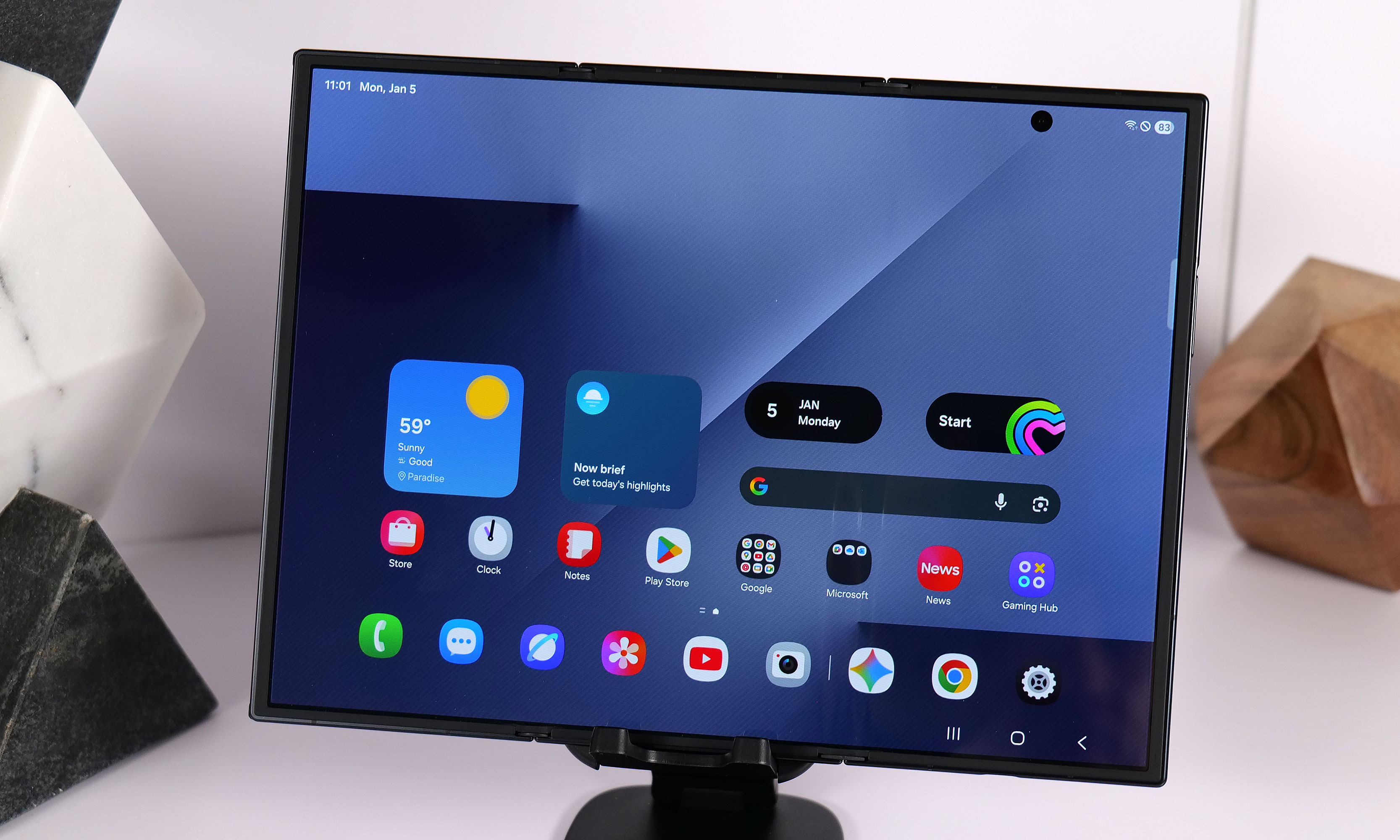
Samsung announced the Galaxy Z TriFold in late 2025 without firm details of when the new smartphone-that-folds-into-a-tablet would be available in North America. Considering the company had the new device available for hands-on demos at CES 2026, it seems possible it could share more information about when the Galaxy Z TriFold will be widely available at Galaxy Unpacked.
Galaxy S26 Edge
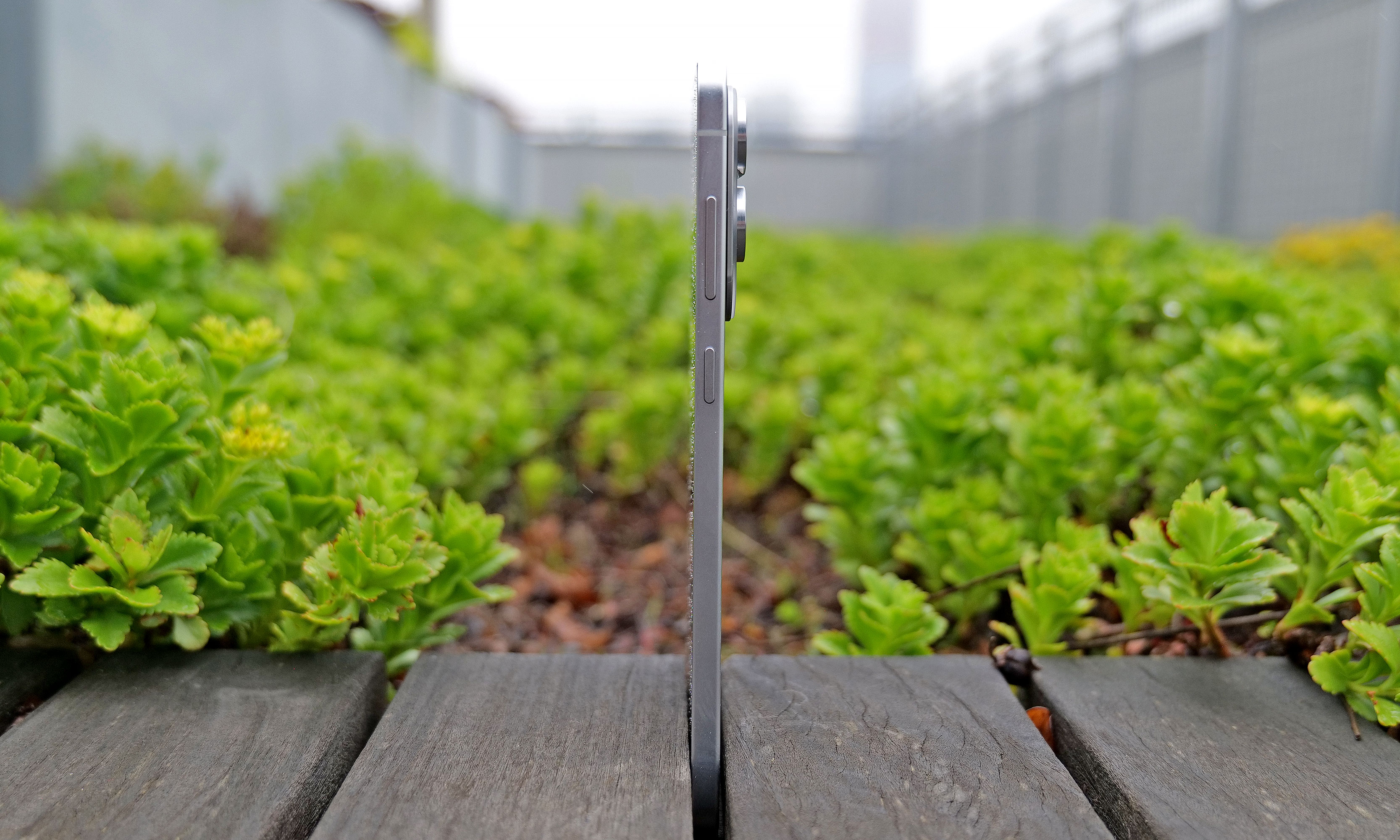
When the Galaxy S25 Edge was announced in 2025, it seemed possible that Samsung could replace its "Plus" smartphone with a unique form factor, just like Apple has opted to do with the iPhone Air. There have been conflicting reports on the matter, but it seems like Samsung will not be doing that with the Galaxy S26 Edge.
Instead, the smartphone will reportedly remain another option, much like foldables are for customers not swayed by Samsung's traditional smartphones. The Galaxy S26 Edge is rumored to feature a slightly different design than last year's model, according to Android Headlines, with a large rectangular camera plateau that's reminiscent of Google's Pixel phones, and the raised oval Apple used on the iPhone Air. Beyond that, the phone is also expected to be ever so slightly thinner at 5.5mm than the 5.8mm Galaxy S25 Edge.
Bixby and other AI features
Samsung already acts as a first place Google can show off new AI features for Android, but the company is reportedly exploring other AI partnerships, too. In June 2025, Bloomberg reported that Samsung was nearing a deal with Perplexity to integrate its AI-powered search engine across OneUI and its homegrown mobile browser. Perplexity already has a deal with Motorola on its Razr phones, so the only thing that would make a deal with Samsung unusual is the close relationship the company already has with Google.
The company also accidentally announced a new version of its Bixby AI assistant, which will likely also be integrated with Perplexity and could serve as an alternative to Google Gemini. Both a new Bixby and a deeper integration with Perplexity seem like natural new software features to show off at Galaxy Unpacked.
This article originally appeared on Engadget at https://www.engadget.com/mobile/smartphones/what-to-expect-at-samsung-galaxy-unpacked-2026-130000003.html?src=rss
Netflix mobile app redesign will offer 'deeper integration' of vertical video
21 Jan 2026, 12:00 pm by Steve Dent
After testing the feature for the last six months or so, Netflix said it will bring vertical videos to its mobile app sometime later in 2026, TechCrunch reported. So far, the feature has been used to show clips promoting Netflix films and TV shows, letting you swipe to move to the next one à la TikTok or YouTube Shorts.
Going forward, though, it could also serve as a promotion tool for new types of programs. “You can imagine us bringing more clips based on new content types, like video podcasts,” co-CEO Greg Peters said in an earnings call.
That was another subject of discussion, as Netflix is taking on YouTube with new video podcasts. The company debuted the first of those originals last week, including shows from sports commentator Michael Irvin and comedian Peter Davidson. It’s also offering hosting content like the Bill Simmons Podcast and other shows from The Ringer.
Despite increasing competition from YouTube and other social media networks, Netflix is doing all right. In 2025, the company saw $45.2 billion revenue including $1.5 billion in ad dollars from its lower tier subscriptions. The streamer counted 325 million paid subscribers around the world at the end of last year.
This article originally appeared on Engadget at https://www.engadget.com/entertainment/streaming/netflix-mobile-app-redesign-will-offer-deeper-integration-of-vertical-video-120000820.html?src=rss
The best robot vacuum for 2026
21 Jan 2026, 10:02 am by Valentina Palladino
Looking to keep your home clean without having to vacuum and mop every day, pick up dirt, the dinner your child threw on the floor or your furry friend’s endless pet hair? Join the club. Smart home gadgets have come a long way over the years, and that includes robot vacuums. With newer technology including voice controls, object detection and more automation features, investing in a robot vacuum cleaner makes more sense now than ever before. Some of the best robot vacuum cleaners even have mopping capabilities, roller brush options and self-emptying bases, too, and there are plenty that don't cost a fortune either. If you’re ready to adopt a less hands-on approach and let a robot vacuum cleaner do the hard work for you, consider our recommendations below.
Best robot vacuums 2026
Latest robot vacuum news
CES is typically a time for robovac manufacturers to unveil new innovations and this year was no different. Companies like Eufy announced new models, many of which are on the higher end of the price spectrum. Those flagship announcements are often paired with more minor ones that usher in mildly upgraded versions of midrange and entry-level machines.
Now that robot vacuums are ubiquitous, the new models that make headlines tend to have some sort of gimmick like a built-in arm for picking up clothes, or offer (supposedly) top-tier suction power and a slew of extras. They also tend to be super expensive. However, most people will be served just fine with a robot vacuum that doesn’t choke at the first sign of dust bunnies or pet hair, and maybe has mopping capabilities if you want a machine that can tackle hard floors in addition to carpet. Those other innovations are nice-to-haves, not necessities.
Arguably even bigger than CES announcements is the fact that iRobot, a name synonymous with smart cleaning robots, filed for Chapter 11 bankruptcy at the end of 2025. What does that mean for Roomba owners? Not too much immediately, as the company stated that it will continue to operate with “no anticipated disruption to its app functionality, customer programs, global partners, supply chain relationships or ongoing product support." However, this also means that buying a new Roomba in 2026 is a questionable decision.
What to look for in the best robot vacuums
TLDR
Despite companies coming out with gimmicky extras and new software perks in their robot vacuum lineups, the core competency of these devices have remained the same for years: sucking up dirt without needing your attention. You want a robot vacuum with the strongest suction power you can afford. Those with tile and hardwood floors can consider robovacs with mopping capabilities, and those who want peak convenience should opt for a model with a self-emptying base. However, both of those extra features will cost extra.
Floor type
First and foremost, we recommend considering the floors in your home: Do you have carpet throughout, or tile and hardwood floors, or a mix? Robots with stronger suction power will do a better job picking up dirt on carpets as they can get into high piles more easily. Some machines have “max” modes as well, which ups suction power, but also typically eats battery life faster than the “normal” floor cleaning mode.
Vacuum suction
Suction power is an important factor to consider. Unfortunately, there isn’t a standard power scale that all robovacs adhere to, so it’s difficult to compare among a bunch of devices. Some companies provide Pascal (Pa) levels and generally the higher the Pa, the stronger the vacuum cleaner will be. But other companies don’t rely on Pa and simply say their robots have X-times more suction than other robots. If you’re looking for the best vacuum for your needs, it’s helpful to pay attention to real-world testing and how well the machine can pick up fine dust, crumbs and pet hair in an environment similar to that of your home.
Wi-Fi connectivity
Wi-Fi connectivity is a key feature for most robot vacuums. Some of the affordable devices aren’t Wi-Fi connected, so it’s best to double check before you buy something on the low end of affordable. Wi-Fi lets a robot vacuum cleaner do things like communicate with a mobile app, which then allows you to control the device from your phone.
Mapping features and object detection
Past a certain price threshold, you’ll find advanced perks like home mapping features and improved object detection. Home mapping is exactly what it sounds like: The vacuum uses sensors to map your home’s layout as it cleans, allowing you to send it to particular rooms or avoid no-go zones where you don’t want it to roam.
Most robo-vacs have object detection, but some will be better than others at actually avoiding things like chair legs and children’s toys. High-end models even go so far as to promise obstacle avoidance to steer clear of things like pet poop that can potentially ruin your machine.
Mopping capabilities
Mopping features are much more common now in robot vacuums than they were just five years ago. Machines that support this will have a water tank either built into the robot’s chassis, the auto-empty bin or as a separate piece that you swap in for the dustbin when you want to mop your floors. It makes the robo-vac more useful if you have hard floors in your home that you like to keep squeaky clean, but it does require more work on your part.
Filling and emptying the reservoir remains a human’s job for the most part (except on the most expensive machines), as does adding cleaning solutions if the mopping robot comes with this feature to ensure it uses clean water for every cycle.
Self-empty station inclusion
Finally, for peak convenience, consider a robot vacuum that comes with a self-empty station. These are basically garbage bins attached to the machine’s docking station. At the end of each job, the robo-vac automatically empties its small dustbin into the large clean base – that means you won’t have to empty the dustbin yourself and you’ll only have to tend to the base once every few weeks.
Just keep in mind that many self-emptying bins require proprietary garbage bags – another long-term expense you’ll have to factor in (look for mentions of “bagless” to avoid this all together). Also, any vac-and-mop robot with a water tank will not dump its dirty water into the clean base, so you’ll still have to clean up that yourself.
Robot vacuum maintenance tips
First and foremost, always empty your robot vacuum’s dustbin after every cleaning job. If you have a model with a self-emptying base, there’s less work for you to do yourself. If not, simply detach and empty the dustbin as soon as the robot is done cleaning. It’s also a good idea to take a dry cloth to the inside of the dustbin every once in a while to remove any small dust and dirt particles clinging to the insides.
In addition, you’ll want to regularly examine the machine’s brush roll to see if any hair has wrapped around them, or if any large debris is preventing them from working properly. Some brushes are better than others at not succumbing to tangled hair, but it’s a good idea to check your robot’s brushes regardless — both their main brush and any smaller roller brushes or corner brushes they have. These parts are often easy to pop off of the machine (because they do require replacements eventually) so we recommend removing each brush entirely, getting rid of any tangled hair or other debris attached to them and reinstalling them afterwards.
Robot vacuums also have filters that need replacing every couple of months. Check your machine’s user manual or the manufacturer’s website to see how long they recommend going in between filter replacements. Most of the time, these filters cannot be washed, so you will need to buy new ones either directly from the manufacturer or from other retailers like Amazon or Walmart.
How we test robot vacuums
We primarily test robot vacuums by using them as they are intended to be used: in a home, across different types of flooring and in the face of all sorts of messes including pet hair, spilt coffee grounds and other food debris, dust bunnies, stairs (gasp) and more. We set up all robot vacuums according to their provided instructions and run multiple cleaning jobs during a testing period of at least one to two weeks per machine.
If the robot has mopping capabilities, we also test those as well on hardwood and tile flooring. For models with self-emptying bases, we rely on those built-in trash cans for all post-job cleaning, and we make sure to test the robot vacuum's mobile app for usability and convenience. As we're testing, we make note of things like how loud the robot and its components are, how much human attention the robot needs on a regular basis, how the robot handles large messes and big dust bunnies, if the robot gets stuck on rugs, doormats or other furniture and more.
Robot vacuum FAQs
Are robot vacuums worth it?
We tackled this question when we reviewed budget robot vacuums and the answer is yes, especially if vacuuming is one of your least favorite chores. Robots take the hard work out of cleaning your floors – just turn the thing on and watch it go. Any robot vacuum cleaner worth buying is semi-autonomous in that it will suck up dirt around your home until its battery is low and then make its way back to its charging dock. Unlike a regular vacuum, you should only have to interact with it to turn it on, empty its dustbin and untangle it if it were to get stuck somewhere.
That’s not to say robot vacuums are perfect. They’re almost always less powerful and less flexible than traditional vacuums. Since most robo-vacs are much smaller than traditional models, they often don’t have the same level of suction you’ll get in an upright machine. Plus, their dustbins are smaller, so they will need to be emptied more frequently. While Wi-Fi-connected robot vacuums give you the flexibility to start a cleaning job from anywhere using an app, targeting a small area of your home can be more complicated. Some robo-vacs have spot-cleaning features that focus the machine’s attention on a specific area, which almost – but not quite – mimics the spot-cleaning you’d be able to do yourself with a regular or cordless vacuum.
How long do robot vacuums last?
Robot vacuums can last many years, if you take care of them properly. Check out our recommendations for robot vacuum maintenance above, but in a nutshell, you should make sure that you're emptying the machine's bin after every job and periodically cleaning the interior of the bin and the brushes. It's also a good idea to check the user manual to see how often your robot vacuum's filter needs changing.
Do robot vacuums work better than handheld vacuums?
There's no straight answer to this question. Robot vacuums offer more convenience than handheld vacuums, so for those who are looking to automate a chore, that could mean one of these devices works better for them than a standard vacuum. However, handheld vacuum cleaners often have stronger suction power, and they give the user a bit more control. It ultimately depends on how you intend to use your main vacuum cleaner and what you want to prioritize most.
How often do you have to clean a robot vacuum?
Cleaning a robot vacuum isn’t too much of a chore, but you’ll want to give it a little TLC every few weeks or so, depending on how often you’re running it and how much dirt it’s picking up. The dustbin usually needs to be emptied after each cleaning run, especially if you have pets or lots of carpet where dirt can hide. Many newer models have self-emptying docks, which means you won’t have to empty the dustbin yourself after every use, but the main bin will still need a good clean once a month or so. Also, it’s a good idea to check the side brushes and main brush for any hair tangles or debris every couple of weeks to keep things running smoothly.
What are the negatives of robot vacuums?
Robot vacuums won’t work for everyone. One of the biggest drawbacks is that they usually don’t have the same suction power as a full-sized upright vacuum or even a cordless stick vacuum, so they might struggle with deep-cleaning thick carpets. They’re also designed for floors only, so if you’re looking to clean furniture, stairs or other tricky spots, you’ll still need a traditional vacuum to do that. Plus, they can sometimes get stuck or miss spots, especially if you’ve got a lot of furniture or obstacles in the way. While their sensors help, they might still bump into things or need a little help getting out of tight spots. And while most have decent dirt detection features, they’re best for keeping things tidy rather than doing heavy-duty cleaning.
Check out more from our spring cleaning guide.
This article originally appeared on Engadget at https://www.engadget.com/home/smart-home/best-robot-vacuums-130010426.html?src=rss
End of today’s Engadget roundup.