Photo by DCL "650" on Unsplash
This digest compiles the latest from Engadget.
Today’s Engadget Roundup
Netflix scores Oscar nominations for Frankenstein and KPop Demon Hunters
22 Jan 2026, 4:35 pm by Lawrence Bonk
The nominees for the 2026 Academy Awards were just announced and Ryan Coogler's vampire-adjacent period drama Sinners received a record-breaking 16 nominations. That's the highest number of Oscar nominations for a single film in the history of the awards, followed by Titanic, La La Land and All About Eve with 14 noms each.
Sinners grabbed a nomination in nearly every major category, including Best Picture, Best Director and Best Original Screenplay. The same goes for the performances, as Michael B. Jordan captured the nomination for Best Actor. Even Delroy Lindo got nominated for Best Supporting Actor, which is his very first Oscar nomination after 50 years in the business.
Paul Thomas Anderson's One Battle After Another walked away with 13 nominations and Yorgos Lanthimos' Bugonia scored four. Apple's F1 actually got nominated for Best Picture, which is unusual for a popcorn-style blockbuster. Netflix scored Best Picture noms for both Frankenstein and Train Dreams.
Netflix also got its flowers for the international animated sensation KPop Demon Hunters. It got nominated for Best Animated Feature and, of course, Best Original Song.
The 98th annual Academy Awards will take place on March 15, with Conan O'Brien returning to host. It'll be broadcast live on ABC. The awards ceremony will be moving to YouTube in 2029.
This article originally appeared on Engadget at https://www.engadget.com/entertainment/tv-movies/netflix-scores-oscar-nominations-for-frankenstein-and-kpop-demon-hunters-163521141.html?src=rss
Waymo is now available in Miami
22 Jan 2026, 4:25 pm by Matt Tate
Waymo’s fully autonomous robotaxis are now accepting passengers in Miami. The city was one of five named in expansion plans last year, and joins the likes of Phoenix, Los Angeles and the San Francisco Bay Area on Waymo’s existing network.
Waymo says that nearly 10,000 Miami residents have signed up so far, and that it will send out invites to new riders on a rolling basis" in the weeks and months to come. The autonomous ride-hailing service will initially cover a 60-square-mile area that includes neighborhoods like the Design District and Wynwood, with Waymo planning to expand to Miami International Airport soon.
Waymo started testing robotaxi rides in Miami in November, without passengers initially, which allows it to spot local potential issues and local quirks, and adjust the driving algorithm so things go smoothly once humans are involved. The company insists that autonomous vehicles are safe and reliable, claiming a "ten-fold reduction" in serious injuries caused by crashes compared to human drivers in its current areas of operation.
Waymo’s Florida expansion will move to Orlando next, with the Texas cities of San Antonio, Houston and Dallas also on the agenda for 2026.
This article originally appeared on Engadget at https://www.engadget.com/transportation/evs/waymo-is-now-available-in-miami-162515070.html?src=rss
Xbox Developer Direct 2026: How to watch and what we expect to see from Fable, Forza Horizon 6 and Beast of Reincarnation
22 Jan 2026, 4:10 pm by Kris Holt
Xbox is set to hold the fourth installment of its now-annual Developer Direct showcase on January 22. You’ll be able to watch the 2026 edition at 1PM ET on YouTube (including versions with audio descriptions and ASL), Twitch, Facebook and Steam. Xbox will stream the Developer Direct on its regional channels simultaneously, and it’ll be available on Bilibili on Friday.
The YouTube stream might be the way to go, since that one will be available in 4K and 60 fps. Because we’re so nice, we’ve embedded that stream above, so all you have to do is click the play button when the time is right.
Microsoft has confirmed that it will feature three titles at the Developer Showcase: Fable and Forza Horizon 6 from Playground Games, and Beast of Reincarnation from Game Freak, which is best known for its work on Pokémon games. We should get developer interviews, gameplay footage and (for at least one of those) a release date.
There is a chance that there will be some surprises, of course. The three previous editions of Developer Direct all featured five games — the first one showcased Hi-Fi Rush, which was released on the same day.
This article originally appeared on Engadget at https://www.engadget.com/gaming/xbox/xbox-developer-direct-2026-how-to-watch-and-what-we-expect-to-see-from-fable-forza-horizon-6-and-beast-of-reincarnation-161000242.html?src=rss
AI Mode in Google search can now pull context from your other apps
22 Jan 2026, 4:00 pm by Mariella Moon
After adding Personal Intelligence to Gemini as an opt-in experience, Google has announced that it’s also integrating the feature into AI Mode in Search. What Personal Intelligence does is pull information from your Google apps to tailor its responses based on your history and interests. For Search, in particular, you can allow Personal Intelligence to look for information in your Gmail accounts and Google Photos libraries.
If you use AI Mode to shop for clothes with the new feature enabled, for instance, Google could recommend items or models from a brand you previously purchased from. If it sees plane tickets or other reservations in Gmail, Google could also recommend specific items based on your destination and the season if you’re clothes shopping for that trip.
Personal Intelligence is powered by Google’s Gemini 3 AI model. The company says it doesn’t train its models using information from your Gmail inbox or Google Photos library, but it does use your prompts and AI Mode’s responses. Google also warned that sometimes, the feature’s recommendations could feel inaccurate because it could not fully comprehend the context or could make incorrect connections between separate topics.
At the moment, Personal Intelligence is an experimental feature that’s rolling out in Labs starting today. Google AI Pro and Ultra subscribers in the US, who use the service in English, will automatically have access to it and be able to connect AI Mode to Gmail and Google Photos. It will only be available to personal Google accounts, however, and not for Workspace accounts just yet.
This article originally appeared on Engadget at https://www.engadget.com/ai/ai-mode-in-google-search-can-now-pull-context-from-your-other-apps-160000103.html?src=rss
ExpressVPN two-year plans are up to 78 percent off right now
22 Jan 2026, 3:45 pm by Andre Revilla
ExpressVPN is back on sale again, and its two-year plans are up to 78 percent off right now. You can get the Advanced tier for $101 for 28 months. This is marked down from the $392 that this time frame normally costs. On a per-month basis, it works out to roughly $3.59 for the promo period.
We’ve consistently liked ExpressVPN because it’s fast, easy to use and widely available across a large global server network. In fact, it's our current pick for best premium VPN. One of the biggest drawbacks has always been its high cost, and this deal temporarily solves that issue.
In our review we were able to get fast download and upload speeds, losing only 7 percent in the former and 2 percent in the latter worldwide. We found that it could unblock Netflix anywhere, and its mobile and desktop apps were simple to operate. We gave ExpressVPN an overall score of 85 out of 100.
The virtual private network service now has three tiers. Basic is cheaper with fewer features, while Pro costs more and adds extra perks like support for 14 simultaneous devices and a password manager. Advanced sits in the middle and includes the password manager but only supports 12 devices.
The Basic plan is $78 right now for 28 months, down from $363, and the Pro plan is $168, down from $560. That's 78 percent and 70 percent off, respectively. All plans carry a 30-day money-back guarantee for new users, so you can try it without committing long term if you’re on the fence.
This article originally appeared on Engadget at https://www.engadget.com/deals/expressvpn-two-year-plans-are-up-to-78-percent-off-right-now-180602025.html?src=rss
Canon EOS R6 III review: A video powerhouse that's also great for photography
22 Jan 2026, 3:30 pm by Steve Dent
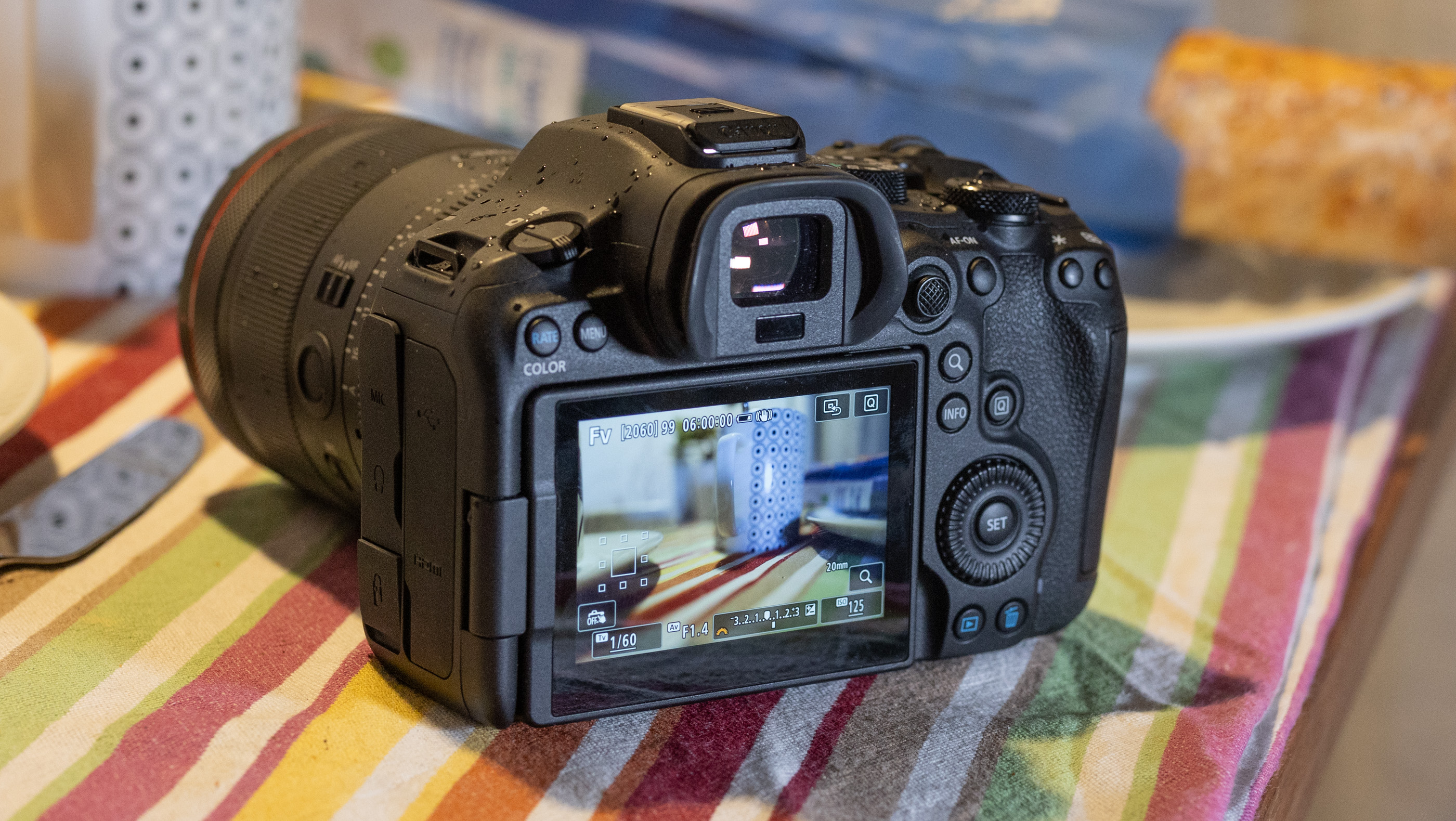
With video features like RAW now the norm on midrange mirrorless cameras, Canon decided not to mess around with its latest model, the 33-megapixel EOS R6 III. It’s a veritable cinematic beast, allowing up to 7K RAW video capture internally with fast and reliable autofocus and rock solid stabilization.
At the same time, it's a solid photo camera with high burst speeds and warm, accurate image quality. The R6 III has stiff competition with Sony’s 33MP A7 V, though, as the latter delivers higher dynamic range. The price could also be an issue for buyers, as the R6 III costs $300 more than its predecessor. Whether it’s worth that extra money depends on what you’re planning to do with it.
Handling and design
The EOS R6 III is quintessentially Canon in terms of design. It strongly resembles the R6 II and EOS R5 II, with the same button and dial layout at the rear. In terms of functionality, this is a good thing as everything falls perfectly to hand, letting you control it by feel once you’re used to it. However, the R6 III’s design is a bit bland, so if you’re looking for a stylish camera a la Fujifilm, this is not the one.
Holding the R6 III is also a pleasure thanks to the grippy, soft rubber exterior, though at 1.5 pounds it’s a bit heavier than the A7 V. It’s comfortable to hold and use all day, unlike Sony’s A7 V which felt uncomfortable after prolonged usage because of the harder material and sharp crease around the fingertip area.
The R6 III’s 3.69-million dot, 120 fps electronic viewfinder (EVF) worked fine for me to check color and focus, but falls short of the one on the much cheaper Nikon Z6 III. The flip-out 3-inch 1.65-million-dot rear touch display is on par for this category and does the job well. For storage, the R6 III supports CFexpress Type B cards for capturing RAW video, along with SD UHS II for MP4 video and photos.
Other key features include headphone and microphone ports, a full-sized HDMI input (instead of microHDMI as before, thankfully) and a USB-C port for charging and transfers. Battery life is decent for this category with a maximum 510 shots per charge or 620 shots if you engage the power saving mode or about 90 minutes of continuous 4K capture. However, you can roughly double those figures with Canon's optional $150 BG-R20 battery grip.
Performance

The R6 III offers a boost in shooting speeds over its predecessor thanks to an all-new 33MP sensor. It has a faster readout speed than the R6 II as well, allowing for faster bursts and lower rolling shutter skew. In comparison, Sony’s A7 V also has a 33MP sensor but it’s partially stacked, so it delivers less distortion when shooting fast-moving subjects.
With that new sensor and a 34 percent faster Digic X processor, the R6 III can shoot bursts at up to 40 fps in electronic and 12 fps in mechanical shutter modes (with continuous AF and AE enabled). That’s second only to the Panasonic S1 II (70 fps) in this price range. You can fill the buffer in about 3.7 seconds at that speed (150 RAW frames), which is a decent amount for a midrange camera.
You usually want to avoid the electronic shutter with fast-moving action due to rolling shutter distortion, but the R6 III’s faster sensor can handle objects that are moving reasonably quickly. I also caught a few photos of babies, bikes and dogs I might have otherwise missed by using the new pre-capture mode that records up to 15 photos before fully declencing the shutter.
The new sensor and processor also make the R6 III’s autofocus system faster and more accurate than before. When shooting bursts for fast moving action like dogs running or biking, less than five percent of my shots were out of focus. And the EOS R6 III can now track animals, birds and vehicles, on top of the faces, eyes and bodies of people.
This camera also has a couple of new autofocus tricks, including one called Register People Priority. That lets you save up to 10 individuals on camera that it can identify and automatically switch to. I found it handy in a large gathering, helping me focus on my niece enjoying her second Christmas. However, the R6 III lacks a few autofocus features found on the R5 II like “action priority” for sports, eye control AF and AI upscaling.
In-body stabilization is also excellent, keeping the sensor rock-steady for handheld shooting with 8.5 stops of shake reduction. With that enabled, I was able to nicely blur action on the streets while keeping the background sharply in focus at shutter speeds down to a full second.
Image quality
With a 33MP sensor instead of a 24MP sensor, the R6 III offers quite a bit more sharpness and a touch more dynamic range than its predecessor. When shooting RAW, I was able to coax a lot of detail out of high contrast shots on sunny days with dark shadows. However, Sony’s A7 V soundly beats the R6 III in terms of dynamic range, thanks to its innovative new sensor.
The R6 III’s high ISO performance isn’t too bad for a higher-resolution camera either, with noise staying under control up to ISO 12,800. As is typical with Canon models, skin tones are warmer and more flattering than on Sony and Nikon cameras, due to the slightly more yellow-biased pink tones. Those pleasing colors were consistent, even at high ISOs, when I shot kids and adults at a couple of indoor gatherings. If you don’t want the hassle of RAW, JPEG rendering is excellent straight out of the camera, with well balanced sharpening and noise reduction.
Note that switching to electronic shutter mode drops the sensor to a 12-bit readout, which helps burst speeds but hurts image quality. This is a pretty big downside compared to the A7 V, which maintains 14-bit quality even when shooting at the camera’s maximum rate at 30 fps. So while on paper the R6 III wins the speed race, the 10 extra fps won’t be worth the drop in quality for many photographers.
Video
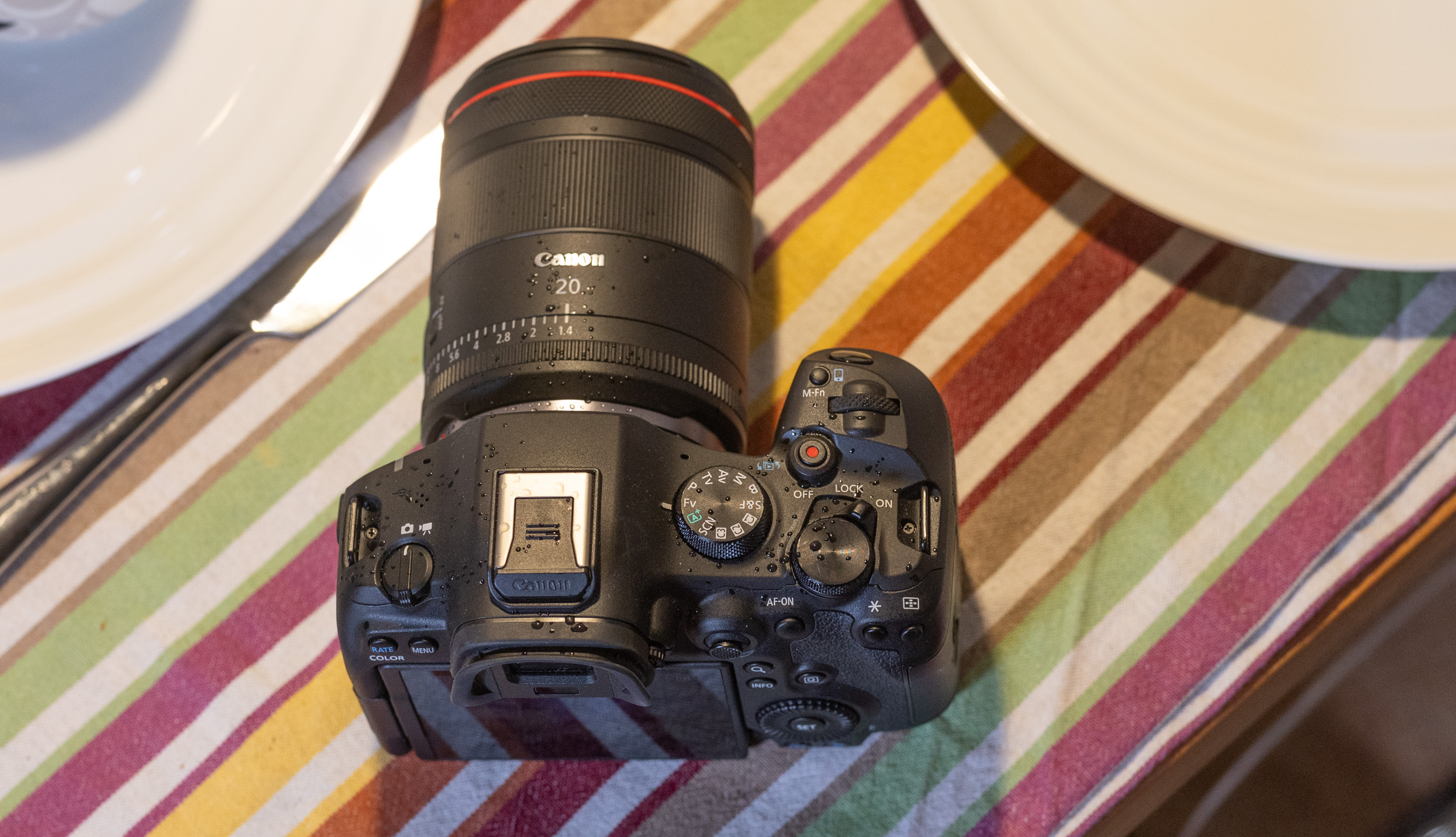
Canon has improved video on the R6 III in every way, putting it nearly on par with the more expensive R5 II. Though it can’t shoot 8K, it can handle 7K RAW video at up to 60 fps (on CFexpress only) and 4K at 120p, with less rolling shutter than the R6 II. It also supports 3:2 “open gate” video that uses the full sensor area so you can output high-res vertical video and other formats.
The R6 III supports 4K 10-bit MP4 shooting at high data rates too if you’d rather save storage space or shoot on SD cards. You also get CLog 2 on top of CLog 3 capability for improved dynamic range. Oddly though, Canon made it a bit of a pain to switch to log modes compared to past models, forcing you to slog through a bunch of menus to do so.
Video autofocus is excellent across all resolutions, with rapid subject acquisition and reliable tracking. Face and eye detection work very well, and I only occasionally noticed slight autofocus lag with fast-moving subjects, particularly when they were moving toward the camera.
As for stabilization, I could smoothly shoot handheld with no crop, provided I didn’t move the camera too aggressively. Digital stabilization allowed even more movement and the enhanced setting let me shoot smoothly while walking (7K doesn’t work in the digital stabilization modes, though). Panasonic’s S5 II is still the best in this regard with slightly smoother stabilization, but the R6 III isn’t far behind.
Video on the EOS R6 III is extremely sharp in RAW and the HQ modes, particularly with supersampled 4K HQ. Other 4K modes are subsampled, but nearly as sharp. Rolling shutter is better managed than before, but you’ll still want to avoid things like whip pans, sudden jolts or rapid subjects like propellers or golf swings.
In a variety of shooting scenarios in bright and dark conditions, Canon’s excellent color science delivered warm skin tones and accurate colors. Shooting RAW video allowed me to widely adjust shots in post, while the CLog 2 mode drastically improved dynamic range while I was shooting in contrasty conditions. For instance, I shot the famous Paris department store windows and was able to extract detail from the very bright and dark parts of the video.
Overheating has been an issue in the past on Canon’s R6 models, but the R6 III never shut down for me, even during a few tests of over 15 minutes. Overall, it reliably delivered outstanding video quality and I actually preferred it to the R5 II due to the smaller RAW file sizes.
Wrap-up

Canon’s EOS R6 III is now the best midrange camera for creators thanks to the RAW video, rapid and accurate autofocus and excellent handling. At the same time, it’s a solid camera for photography with high burst speeds, extra resolution and, again, reliable AF. If it’s mainly photography you’re interested in, though, Sony’s $2,900 A7 V is a better choice. It matches the R6 III’s resolution, price and autofocus but offers superior dynamic range and lower rolling shutter distortion.
Other video-centric options may be more attractive for other reasons — including budget. Nikon’s 24MP Z6 III offers similar capabilities, has a partially stacked sensor and retails for $2,400, but can often be found on sale for less. Panasonic’s S1 II is also a good pick due to its RAW video and creator-centric features, though it costs more at $3,200.
Which one to buy, then, depends on your budget, usage (video or photography) and whether you already have lenses in one system or another. With that said, if it’s a Canon camera you’re after and you lean toward content creation, the EOS R6 III is your best choice.
This article originally appeared on Engadget at https://www.engadget.com/cameras/canon-eos-r6-iii-review-a-video-powerhouse-thats-also-great-for-photography-153000494.html?src=rss
The Switch 2 version of Super Mario Bros. Wonder arrives on March 26
22 Jan 2026, 3:09 pm by Kris Holt
While many of us wait (im)patiently for a brand new Mario platformer for the Switch 2, Nintendo is filling the gap with an upgraded version of the tremendous Super Mario Bros. Wonder for the console. Super Mario Bros. Wonder – Nintendo Switch 2 Edition + Meetup in Bellabel Park (to give the new edition's full name) will arrive on March 26. Those who own the original Switch version of the game will be able to buy an upgrade pack, which costs $20.
There's a lot of new stuff in the Switch 2 version, including co-op and multiplayer features. Bellabel Park, a fresh area of the Flower Kingdom, will open up. You can jump into some multiplayer modes here, such as one where you compete to collect as many coins as possible.
A section that's all about local multiplayer has 17 co-op and versus modes. You can either play those on the same console or use GameShare so that up to three other people in the same physical place as you can join in on their own Switch or Switch 2. The Game Room Plaza, meanwhile, supports local and online play for six minigames — each player will need their own system for those. Up to eight people can play using the local wireless feature, and up to 12 via online multiplayer.
Along with those multiplayer minigame areas, Bellabel Park is home to Toad Brigade Training Camp. Here, you can take on challenges based on levels from the main game. You can tackle these on your own or recruit up to three friends to help (you'll only need one Switch 2 for this).
There are new things to check out in the main game as well. You can take on boss courses that feature all seven Koopalings and (finally!) play as Rosalina.
Nintendo is adding an option in which a second player can control a Luma. They can help out the main player by defeating enemies and collecting coins. You can play as the Luma by using the Switch 2 mouse control feature. That's a great idea, as it could allow, say, a parent or guardian who is not too familiar with a game controller to assist a kid who needs some extra help to get through Super Mario Bros. Wonder.
In addition, there's an assist mode. When this is enabled, you can quickly recover from falling into a pit (with a propeller flower bringing you back into the action) and avoid taking any damage.
That's not all, folks. Also on March 26, you can snag three new amiibo from the game: Elephant Mario (which I'm going to have to buy), Poplin & Prince Florian and Captain Toad & Talking Flower.
A couple of weeks earlier, on March 12, Nintendo will start selling a physical version of the Talking Flower from Super Mario Bros. Wonder. The battery-powered device will talk to you a couple of times per hour, mentioning things like the room temperature and time. It can play music as well. There's a button you can press to hear it talk (or hold to make it shut up). There's support for 11 languages and it can chatter at set times, making it a bit similar to Nintendo's Alarmo. You'll be able to buy Talking Flower from Nintendo's New York and San Francisco stores, its online store and some other retailers, with pre-orders opening today.
This article originally appeared on Engadget at https://www.engadget.com/gaming/nintendo/the-switch-2-version-of-super-mario-bros-wonder-arrives-on-march-26-150916983.html?src=rss
Spotify's Prompted Playlist lets you describe exactly what you want to hear
22 Jan 2026, 2:00 pm by Will Shanklin
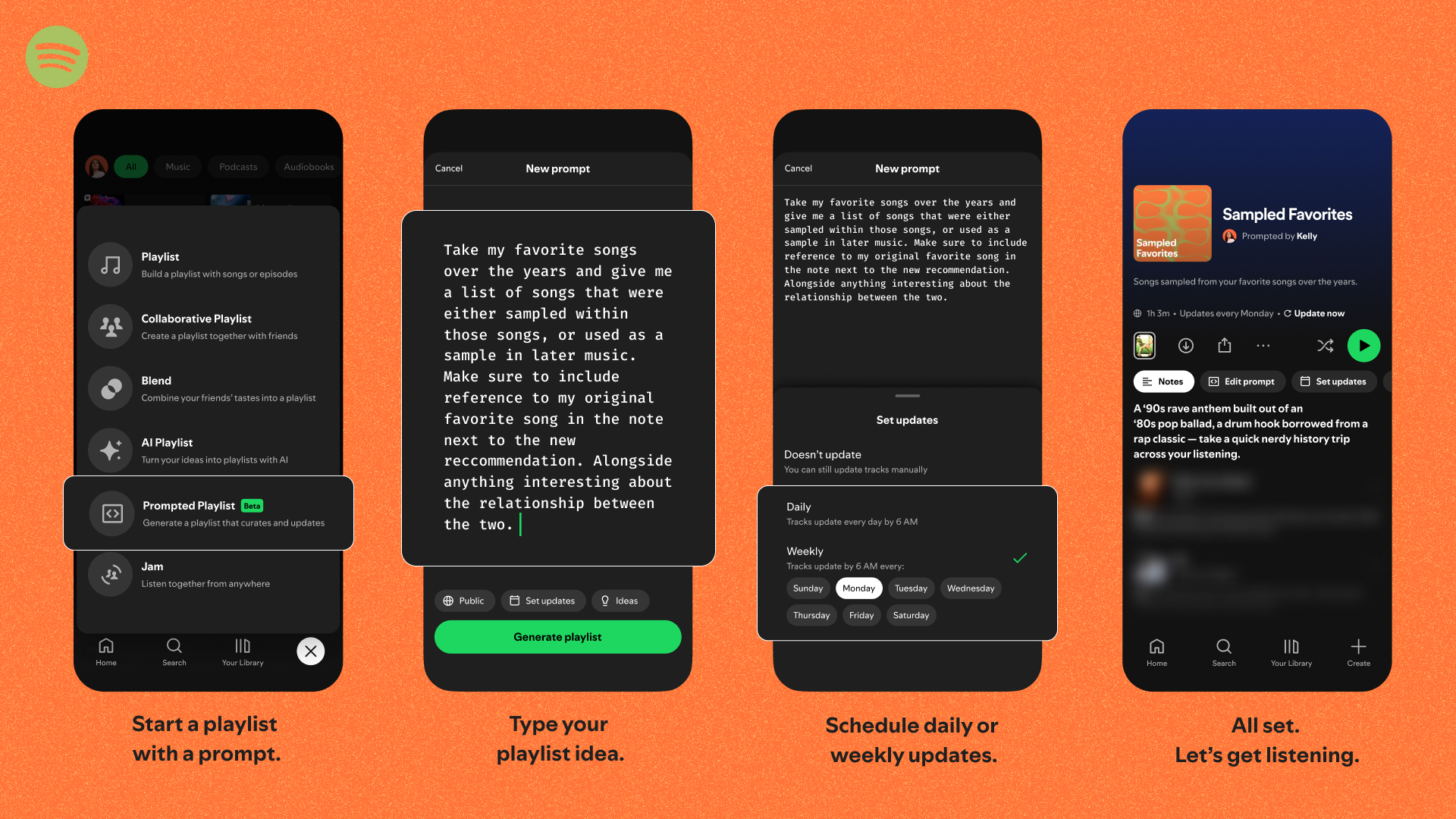
Ahead of its upcoming price hike, Spotify is rolling out a more advanced AI playlist feature in the US and Canada. Prompted Playlist, which the company trialed in New Zealand late last year, lets subscribers "control the Spotify algorithm," as the company describes it. "You're not just asking for music, you're shaping how Spotify goes about discovering it for you."
For example, you can guide it to make a playlist of songs you've saved to your Library but haven't listened to yet. (It can tap into your entire Spotify history.) Or, you can tell it to round up songs from a specific television show or movie. (It uses real-time information about pop culture, charts, and history.)
The feature includes options to refresh the playlist over time (daily or weekly). You can edit each playlist's prompt at any time. Each track will include a short note to explain why it was chosen.
Spotify says beta testers have used Prompted Playlist to revisit songs tied to specific moments and filter out tracks they've overplayed lately. "Others are asking for long, lyric-free electronic playlists to power through a workday, or mixing in artists connected to current pop culture moments and viral trends," the company wrote.
There's room for some confusion here because Spotify already has an "AI Playlist" feature. That simpler type will stick around alongside the new "Prompted" variety, which allows for finer tuning and can sift through more data.
Prompted Playlist will be available to Spotify Premium subscribers in the US and Canada "by the end of the month." Once you have access, you can try it by tapping Create, then selecting Prompted Playlist.
This article originally appeared on Engadget at https://www.engadget.com/audio/spotifys-prompted-playlist-lets-you-describe-exactly-what-you-want-to-hear-140000153.html?src=rss
A-List creatives sign up to fight AI, say it enables 'theft at a grand scale'
22 Jan 2026, 2:00 pm by Steve Dent
Scarlett Johannsson, R.E.M., Vince Gilligan and over 700 other artists are demanding that tech companies stop “stealing” their work in order to train AI models. A new campaign called “Stealing isn’t Innovation” demands that AI companies take “the responsible, ethical route” through licensing and partnerships, according to the website.
“America’s creative community is the envy of the world and creates jobs, economic growth and exports,” a statement on the website reads. “But rather than respect and protect this valuable asset, some of the biggest tech companies, many backed by private equity and other funders, are using American creators’ work to build AI platforms without authorization for copyright law.”
The group adds that the “illegal intellectual property grab” has resulted in an information ecosystem dominated by “misinformation, deepfakes and a vapid artificial avalanche of low-quality materials [‘AI slop’]… threatening America’s AI superiority and international competitiveness.”
OpenAI once argued that it’s “impossible” to train AI without copyrighted materials, since “copyright today covers virtually every sort of human expression.” However, actors, musicians and authors take issue with that idea, particularly when they see their likenesses or work repurposed as slop or worse by large language models (LLMs).
Johansson, for one, previously threatened OpenAI with legal action in 2024 over a ChatGPT voice assistant that effectively cloned her voice. More recently, Elon Musk’s Grok has been accused of creating millions of sexualized images of real people in just days, according to a report today from The New York Times.
“Big Tech is trying to change the law so they can keep stealing American artistry to build their AI businesses — without authorization and without paying the people who did the work. That is wrong; it’s un-American, and it’s theft on a grand scale,” the group proclaimed.
This article originally appeared on Engadget at https://www.engadget.com/ai/a-list-creatives-sign-up-to-fight-ai-say-it-enables-theft-at-a-grand-scale-140000475.html?src=rss
1Password adds an extra layer of phishing protection
22 Jan 2026, 2:00 pm by Will Shanklin
1Password has a new tool designed to counteract the advantages AI has given to phishing scammers. A new feature for the company's browser extension gives you a "second pair of eyes" to help you catch a bogus website before entering your login info.
Before AI, phishing attempts often included telltale signs like obvious typos or rudimentary graphic design. Now that AI makes it much easier to design and code convincingly, scams are on the rise. According to Fortune, 60 percent of companies reported an increase in fraud-related losses from 2024 to 2025. And the advent of AI browsers could make things even worse.
“Our new phishing feature adds an extra layer of protection,” 1Password says. Once the feature is activated, the extension actively watches for suspicious sign-ins. To be clear, even before this feature's arrival, 1Password wouldn't autofill saved credentials for a bogus website impersonating it. But that still left room for people to manually paste their login info, handing it over to those with the worst intentions.
That moment when you try to paste your login manually is where the new feature comes in. "The website you're on isn't linked to a login in 1Password," the feature's warning pop-up reads. "Make sure you trust this site before continuing."
1Password says that's the "breakthrough" moment that can help you avoid a major hassle. "That single moment of pause, that tiny bit of friction, is often all it takes to disrupt the attackers' entire plan."
The new feature is available today. You can enable it in the 1Password browser extension's settings. Under the Notifications section, activate the setting for "Warn about pasted logins on non-linked websites."
This article originally appeared on Engadget at https://www.engadget.com/cybersecurity/1password-adds-an-extra-layer-of-phishing-protection-140000293.html?src=rss
Get one year of access to one of our favorite budgeting apps for only $50
22 Jan 2026, 1:45 pm by Ian Carlos Campbell
A new year is the perfect time to get your spending in order, and if you're not trying to build your own spreadsheet, budgeting apps are one of the best ways to do it. To save yourself some money in the process, you can pick up a year-long subscription to Monarch Money, one of Engadget's favorite budgeting apps, for just $50 if you use code NEWYEAR2026 at checkout and you're a new subscriber. That's a 50 percent discount on the service's normal $100 price.
Monarch Money makes for a capable and detailed budgeting companion. You can use the service via apps for iOS, Android, iPadOS or the web, and Monarch also offers a Chrome extension that can sync your Amazon and Target transactions and automatically categorize them. Like other budgeting apps, Monarch Money lets you connect multiple financial accounts and track your money based on where you spend it over time. Monarch offers two different approaches to tracking budgeting (flexible and category budgeting) depending on what fits your life best, and the ability to add a budget widget on your phone so you can know how you're tracking that month.
How budgeting apps turn your raw transactions into visuals you can understand at a glance is one of the big things that differentiates one app from another, and Monarch Money offers multiple graphs and charts to look at for things like spending, investments or categories of your choice based on how you've labelled your expenses. The app can also monitor the spending of you and your partner all in one place, to make it easier to plan together.
The main drawbacks Engadget found in testing Monarch Money were the app's learning curve, and the differences in features (and bugginess) between Monarch's web and mobile versions. Still, for 50 percent off, the Monarch Money is well worth experimenting with if you're trying to save money in 2026, especially if you want to do it collaboratively with a partner.
Follow @EngadgetDeals on X for the latest tech deals and buying advice.
This article originally appeared on Engadget at https://www.engadget.com/apps/get-one-year-of-access-to-one-of-our-favorite-budgeting-apps-for-only-50-204507787.html?src=rss
Save on the Disney+ Hulu bundle: Get one month for only $10
22 Jan 2026, 1:22 pm by Valentina Palladino,Georgie Peru
The peak time for deals on streaming services — the holiday shopping season — has come and gone, but Disney is back with a fresh offer for the new year. New and eligible returning subscribers can get one month of the ad-supported Disney+ Hulu bundle for just $10. That's $3 off the usual monthly rate for the bundle, and more than 58 percent off if you consider the prices for each service individually (Disney+ at $12 per month and, separately, Hulu also at $12 per month).
We'd be remiss if we didn't mention that this isn't quite as good as the Black Friday deal we saw last year, which offered the same bundle for $5 per month for one year. However, if you missed that offer or just want to try out Disney+ and Hulu for a brief period of time, this is a good way to do so.
Disney+ and Hulu make one of the most balanced streaming pairs available, blending family-friendly favorites with acclaimed originals and network TV staples. Disney+ brings a vast library of animated classics, blockbuster franchises and exclusive content from Marvel, Pixar, Star Wars and National Geographic. It’s the place to stream nearly every Star Wars film and series, plus the full Marvel Cinematic Universe lineup and Disney’s most recent theatrical releases.
Hulu balances things out with a more adult-oriented lineup of current TV shows, next-day network episodes and a growing roster of award-winning originals. The platform hosts series like The Bear, The Handmaid’s Tale and Only Murders in the Building, alongside comedies, thrillers and documentaries that regularly feature in awards conversations. It’s also the home for next-day streaming of ABC and FX shows, making it especially useful if you’ve already cut the cable cord but still want to keep up with primetime TV.
The Duo Basic bundle ties these two services together under a single subscription, offering a simple way to expand your library without juggling multiple accounts. This tier includes ads on both platforms, but the trade-off is significant savings compared with paying for each service separately. For many households, that’s an acceptable compromise when it means access to such a wide range of content.
Follow @EngadgetDeals on X for the latest tech deals and buying advice.
This article originally appeared on Engadget at https://www.engadget.com/deals/save-on-the-disney-hulu-bundle-get-one-month-for-only-10-192814972.html?src=rss
How to find an affordable GPU during the great RAMageddon of 2026
22 Jan 2026, 1:00 pm by Igor Bonifacic

If you're thinking about upgrading to a new graphics card this year, your window for doing so at MSRP has closed. When I first reported on this at the start of December, things were looking bleak but you could still find GPUs from both AMD and NVIDIA at close to their recommended prices. That changed last week when YouTube channel Hardware Unboxed reported that ASUS had stopped producing the RTX 5070 Ti and 5060 Ti 16GB due to ongoing memory shortages.
After Engadget published the news, NVIDIA disputed the report. “Demand for GeForce RTX GPUs is strong, and memory supply is constrained. We continue to ship all GeForce SKUs and are working closely with our suppliers to maximize memory availability,” a company spokesperson told us.
The next day, ASUS walked back its previous statements. After “explicitly” telling Hardware Unboxed it had placed the 5060 Ti 16GB and 5070 Ti into "end-of-life status," the company said "certain media may have received incomplete information from an ASUS PR representative regarding these products," adding it had "no plans to stop selling these models."
Whether or not the 5060 Ti 16GB and 5070 Ti remain in production, one thing is certain: the AI boom has created a great deal of uncertainty in the GPU market. After the news, panic buying sent the price of the 5070 Ti through the roof. Right now, it's impossible to find that model priced at its MSRP of $749. As of the writing of this article, the most affordable version of the 5070 Ti I could find on Newegg was $1,199.
The bigger problem is that the 5070 Ti isn't the only GPU selling for far more than MSRP. Tom's Hardware has been tracking GPU prices for months, and there's not a single model you can buy at either AMD or NVIDIA's recommended price. That puts PC builders in a tough spot. What do you do if you want to upgrade to a new graphics card this year?
If you're sitting on an older GPU, the best advice I can give is to stick with your current hardware. If you're fine with the performance of your video card right now, it's best to wait a year or two for the market to settle down.
On the other hand, if your current GPU is not up to the task of running the games you want to play, try to buy a card with at least 12GB of VRAM — preferably 16GB if your budget allows for it. Unless you plan to play mostly older games on a 1080p monitor, it's not worth considering a model with 8GB of VRAM — it won't last you long enough to warrant the purchase price.
For the most part, the recommendations in Engadget's recent GPU guide are still as relevant today as they were a few months ago. The recommendations I provide here are pulled from that guide and are grouped from most affordable to most expensive. Where possible, I've tried to find options from both Newegg and Amazon. As you go about looking for a new GPU, your best friend is a website like PCPartPicker where you can track pricing across multiple retailers.
Recommendations
AMD Radeon RX 9060 XT 16GB
Unfortunately if you're on a tight budget, there aren't many great options under $400. For that reason, I would steer you to the Radeon RX 9060 XT as the best "entry-level" option. AMD offers two different versions of this GPU: one with 8GB of VRAM and the other with 16GB. Of the two, the latter is the better purchase, but if it's outside your budget, the more affordable model is probably the best 8GB GPU on the market right now.
While I couldn't find the 16GB variant at its recommended price of $350, I did find a few models that weren't far off. Newegg has options from ASRock and Sapphire priced at $400 and $450. At Amazon, meanwhile, you can find models from PowerColor for $400 and $430.
NVIDIA GeForce RTX 5070

I'm somewhat hesitant to recommend the RTX 5070. Don't get me wrong, it's a decent enough card, but with only 12GB of VRAM, you may end up replacing it sooner than you think. That said, it's one of the few NVIDIA GPUs that hasn't shot up massively in price, and I suspect that's because people have been passing it over in favor of other 50-series models. If you value NVIDIA's feature set over raw frames, then the 5070 is about the only GPU that makes sense to buy from the company right now.
On Newegg, I found a 5070 model from Gigabyte for $650. The retailer also has a handful of different MSI variants priced at $630. Amazon has fewer options, but it does have one 5070 from Gigabyte for $585, which is the closest to the card's $549 MSRP.
AMD Radeon RX 9070

For a card that offers better price-to-performance than the 5070, the Radeon RX 9070 is your best bet. AMD's take on NVIDIA features like DLSS aren't as polished, but the RX 9070 offers more VRAM and excellent performance across the latest AAA games.
It's unlikely you'll find one at its MSRP of $550, which was always more of an aspirational price, but I found a few models priced between $590 and $640. Both Newegg and Amazon have a PowerColor model for $590. The two also have a Gigabyte model priced at $600 after $40 rebate with coupon.
AMD Radeon RX 9070XT
For those with more to spend, the RX 9070 XT is probably where I would cap things. Beyond that, you're looking at GPUs like the 5080 that cost far more than MSRP. On Newegg, I found a model from ASRock selling for $730. Amazon, meanwhile, has options from Gigabyte and ASUS for $720. None of those are great deals, but that's to be expected with a card that's at the top of the stack.
This article originally appeared on Engadget at https://www.engadget.com/gaming/pc/how-to-find-an-affordable-gpu-during-the-great-ramageddon-of-2026-130000654.html?src=rss
Snapchat gives parents more info on who their kids are talking to
22 Jan 2026, 12:00 pm by Karissa Bell
Snapchat is updating its parental control features to give parents more detailed information about who their kids are connecting with in the app and which features they use the most. The app's Family Center already gives parents visibility into their child's friend list, but it will now surface contextual details when a new friend is added.
For example, the feature could highlight that the two share mutual friends or have each other's contact info saved in their phones. It could also indicate that they are classmates if both users have joined the same in-app “community.” If the two have no commonalities, then that could be a sign for a parent to "start a productive conversation," Snap says.
The company has long been criticized for making it too easy for teenagers to talk to strangers. The issue has come up in safety-related lawsuits, including an ongoing case brought by New Mexico's Attorney General. Snap says that adding additional "trust signals" to its parental control features "make it easier for parents to understand new connections and have greater confidence that their teen is chatting with someone they know in real life."
The update is also adding more granular stats about how exactly teens are spending their time in the app. Family Center's screen time dashboard now includes a breakdown of how much of their time spent in the app is in its messaging, camera, map or shortform video features. It will still be up to parents to decide what, if any, limits they want to put on their teens. But at a time when there's increasing conversation around banning teens from social media entirely, having access to more stats could better help parents understand their kids' relationship with Snapchat.
This article originally appeared on Engadget at https://www.engadget.com/social-media/snapchat-gives-parents-more-info-on-who-their-kids-are-talking-to-120000077.html?src=rss
The best fitness trackers for 2026
22 Jan 2026, 10:00 am by Valentina Palladino
If you're looking to get fit, sleep better or just keep a closer eye on your health, a fitness wearable is a great place to start. Whether you're into intense workouts or just want to hit your step goal each day, the best fitness trackers available today can offer loads of helpful features, from sleep tracking and resting heart rate monitoring to built-in GPS and stress tracking. Some are even subtle enough to wear 24/7, like smart rings, while others double as stylish smartwatches.
There are great options out there for beginners as well as more advanced users, and the variety of features means there’s something for every lifestyle and budget. In this guide, we’ll walk you through the best fitness trackers you can buy right now, and explain who each one is best suited for.
Best fitness trackers for 2026
What do fitness trackers do best?
The answer seems simple: Fitness wearables are best at monitoring exercise, be it a 10-minute walk around the block or that half marathon you’ve been diligently training for. Obviously, smartwatches can help you reach your fitness goals too, but there are some areas where fitness bands and smart rings have proven to be the best buy: focus, design, better battery life, durability and price.
When I say “focus,” I’m alluding to the fact that fitness trackers are made to track activity well; anything else is extra. They often don’t have the bells and whistles that smartwatches do, which could distract from their advanced health tracking abilities — things like all-day resting heart rate monitoring, stress tracking, and even detailed sleep tracker insights. They also tend to have fewer sensors and internal components, which keeps them smaller and lighter. Fitness trackers are also a better option for those who just want a less conspicuous gadget on their wrists all day.
Battery life tends to be better on fitness trackers, too. While most smartwatches last one to two days on a single charge, fitness bands offer between five and seven days of battery life — and that’s with all-day and all-night use even with sleep tracking features enabled. Many fitness trackers also slot nicely into your existing ecosystem, syncing seamlessly with your smartphone, other fitness apps and cloud storage to keep all your data in one place.
When it comes to price point, there’s no competition. Most worthwhile smartwatches start at $175 to $200, but you can get a solid smart band starting at $70. That makes them a great entry point for beginners who want to track their progress without committing to a full smartwatch. Yes, more expensive bands and smart rings exist (and we recommend a few here), but you’ll find more options under $150 in the fitness tracker space than in the smartwatch space.
When to get a smartwatch instead
If you need a bit more from your wearable and don’t want to be limited to a fitness or activity tracker, a smartwatch may be the best buy for you. There are things like on-watch apps, alerts and even more robust fitness features that smartwatches have and the best fitness trackers don’t. You can use one to control smart home appliances, set timers and reminders, check weather reports and more. Some smartwatches let you choose which apps you want to receive alerts from, and the options go beyond just call and text notifications. Just make sure your smartwatch is compatible with your Android or iPhone, however, before purchasing, as not all of them work with both operating systems.
But the extra fitness features are arguably the most important thing to think about when deciding between a fitness tracker and a smartwatch. The latter devices tend to be larger, giving them more space for things like GPS, barometers, onboard music storage and more. While you can find built-in GPS on select fitness trackers, it’s not common.
If you’re someone who’s seriously training — say for a race or an endurance challenge — a dedicated running watch may be worth considering. These often provide more in-depth cardio analytics, recovery insights, and real-time pace data that go beyond what standard trackers can deliver.
Other fitness trackers we've tested
Fitbit Inspire 3
The Fitbit Inspire 3 strips out all the luxury features from the Charge 6 and keeps only the essential tracking features. You won’t get built-in GPS tracking or Fitbit Pay or Spotify control but you do get solid activity tracking, automatic workout detection, smartphone alerts and plenty more. The updated version has a sleeker design and includes a color touch display and connected GPS, the latter of which lets you track pace and distance while you run or bike outside while you have your phone with you. When compared to the Charge 6, the Inspire 3 is more fashionable, too. Its interchangeable bands let you switch up the look and feel of your tracker whenever you want, and it’s slim enough to blend in with other jewelry you might be wearing. We were also impressed by its multi-day battery life: Fitbit promises up to 10 days on a single charge, and that checked out for us. After four days of round-the-clock use, the Inspire 3 still had 66 percent battery left to go.
Fitness tracker FAQs
How long do fitness tracker batteries last?
The battery life of fitness trackers can vary depending on the model and its features. On average, most fitness trackers last between five to seven days on a single charge. Basic models with limited features could stretch up to 10 days or more. However, more advanced trackers with features like continuous heart rate monitoring, GPS, or always-on displays may need recharging after one to three days. If you're using GPS or streaming music through your fitness tracker, you'll find that this drains the battery faster. By using these features less, or turning them off, you'll extend battery life.
This article originally appeared on Engadget at https://www.engadget.com/wearables/best-fitness-trackers-133053484.html?src=rss
The best live TV streaming services to cut cable in 2026
22 Jan 2026, 8:00 am by Amy Skorheim
Sports fans who want to catch every last game and news junkies who want to watch network news as it unfolds have two main options: cable or a live TV streaming service. Cable or satellite service often requires extra equipment and convoluted contracts. Live TV streaming services only require an internet connection and a smart TV. These plans used to be cheaper and more user-friendly, too, but price hikes, media consolidation and contract disputes are starting to change the value a bit. We tested out all the major players to compare what you get and help you make sense of the options out there. Here are the best live TV streaming services, according to our testing.
Editor’s note: YouTube TV announced in December it will start offering genre-specific plans in early 2026. We still don’t have word on the pricing or specifics, but will update this guide when we do. The blackout of NBC channels on Fubo’s service continues as negotiations drag on. That means fans hoping to catch the Super Bowl on Fubo will need to look elsewhere.
Best live TV streaming services for 2026
How to watch the 2026 Super Bowl with a streaming service
This year, the Super Bowl will take place on Sunday, February 8, 2026 at Levi's Stadium in Santa Clara, California. NBC has the rights to air the broadcast, which means you can watch it with a live TV streaming subscription to YouTube TV, Hulu + Live TV or DirecTV. Sling Blue plans include NBC in certain markets only. NBC channels are dark on Fubo as the company and NBC are still in negotiations. The traditional streaming service Peacock, which is owned by NBC, will also air the game. Those plans start at just $8 per month, which is nearly the cheapest way to watch. However, if you have a digital antenna, you can pick up the game’s broadcast signal from your local NBC affiliate for free.
How can I stream NFL games for free?
If you have a digital antenna hooked up to your TV, you can grab games that are broadcast over the airways for your region by tuning into your local CBS, Fox, NBC and ABC stations. You can buy a digital antenna for between $20 and $60.
Alternatively, you can check out your local sports bar and watch the game for the price of a soda and maybe some nachos. As it turns out, bars and restaurants that provide those games to customers have to pay a ton of cash to do so, so you may as well take advantage of the opportunity.
Will Peacock stream the Super Bowl?
Yes. Peacock is owned by NBC Universal, which holds the rights to stream the big game this year. The Super Bowl will stream on both Peacock (all tiers) and local NBC stations (Premium Plus tier). The cheapest tier of Peacock's service starts at $8 per month.
Can you stream live football on YouTube?
September 5, 2025 marked the first time YouTube was an official live NFL broadcaster when it aired the Friday night, week-one game of the 2025 NFL season from São Paulo, Brazil. It pit the Los Angeles Chargers against the Kansas City Chiefs (LA won 21-27) and aired worldwide on YouTube for free as well as for subscribers to YouTube TV.
There are no other plans for YouTube to air live NFL games for the 2025-6 season for free.
Best free live TV streaming services for 2026
There are loads of ways to get free TV these days. To start, many standard streaming apps have added live components to their lineups — even Netflix. Peacock Premium Plus subscriptions include regional NBC stations. Paramount+ Premium subscribers can watch on-air CBS programming. The new Fox One service includes multiple live Fox stations. True, if you’re already paying for a service it’s not technically “free” but at least the live content isn’t extra.
The smart TV operating system (OS) you use likely provides free live content too: Amazon’s Fire TV, Google/Android TV, Roku’s built-in Roku Channel and Samsung’s TV Plus all have hundreds of live channels and original programming. Some of the paid services we recommend above have a free version — namely Sling Freestream, Fubo Free (available after you cancel) and DirecTV’s MyFree. But if you’re looking for more, here are the best free ad-supported TV (FAST) apps with live TV that we tried:
What to look for in a live TV streaming service
How to stream live TV
Streaming live TV is a lot like using Netflix. You get access through apps on your phone, tablet, smart TV or streaming device and the signal arrives over the internet. A faster and more stable connection tends to give you a better experience. Most live TV apps require you to sign up and pay via a web browser. After that, you can activate the app on all of your devices.
Monthly Price
When I started testing these cord-cutting alternatives, I was struck by the price difference between live TV and a standard video streaming app. Where the latter cost between $5 and $20 per month, most live TV services hit the $80 mark and can go higher than $200 with additional perks, channel packages and premium extras. The higher starting price is mostly due to the cost of providing multiple networks — particularly sports and local stations. And, in the past year or so, every service has raised base plan prices.
Local channels
Only two of the services I tried don’t include full local channel coverage for subscribers and one of those makes no effort to carry sports at all. That would be Philo and, as you might guess, it’s the cheapest. The next most affordable option, Sling, only carries three local stations — and only in larger markets — but it still manages to include some of the top sports channels.
When you sign up with any provider that handles local TV, you’ll enter your zip code, ensuring you get your area’s broadcast affiliates for ABC, CBS, FOX and NBC. Of course, you can also get those stations for free. Nearly all modern television sets support a radio frequency (RF) connection, also known as the coaxial port, which means if you buy an HD antenna, you’ll receive locally broadcast stations like ABC, CBS, PBS, FOX and NBC. And since the signal is digital, reception is much improved over the staticky rabbit-ears era.
But local channel access is another area where traditional streaming services, like Netflix, are bleeding into broadcast territory. For example, you can watch your local NBC station with a Peacock subscription and you can tune into your area’s CBS station through your Paramount+ subscription. Netflix is even getting into the mix with a recently announced deal with one of France’s broadcast companies, TF1. The streaming service will now air TF1's live TV channels and on-demand content inside the Netflix app. No word if the concept will expand to other regions, but it’s an interesting move to anyone interested in the future of streaming.
Live sports coverage
One reality that spun my head was the sheer number and iterations of sports networks in existence. Trying to figure out which network will carry the match-up you want to see can be tricky. I found that Google makes it a little easier for sports fans by listing out upcoming games (just swap in NBA, NFL, MLB, NHL and so on in the search bar). When you click an event, the “TV & streaming” button will tell you which network is covering it.
That just leaves figuring out if your chosen service carries the RSNs (regional sports networks) you want. Unfortunately, even with add-ons and extra packages, some providers simply don’t have certain channels in their lineups. It would take a lawyer to understand the ins and outs of streaming rights negotiations, and networks leave and return to live TV carriers all the time. That said, most major sporting events in the US are covered by ESPN, Fox Sports, TNT, USA and local affiliates.
I should also point out that traditional streaming services have started adding live sports to their lineups. Peacock carries live Premier League matches, Sunday Night Football games and aired the 2024 Olympic Games from Paris. Thursday Night Football as well as NBA and WNBA games are on Amazon Prime and Christmas Day Football airs on Netflix. HBO Max (formerly, er, HBO Max) now airs select, regular season games from the NHL, MLB, NCAA and NBA with a $10-per-month add-on.
You can watch MLS games with an add-on through the Apple TV app, and Apple TV+ (now just called Apple TV) includes some MLB games. Roku users can watch the just-added free sports channel and those who subscribe to Paramount Plus can see many of the matches aired on CBS Sports, including live NFL games. In 2025, January's Super Bowl was live-streamed for free on Tubi. While all of these alternatives may not cover as much ground as live TV streamers, they could end up being cheaper avenues to the sports you want.
And if sports is all you’re after, there are sports-only plans that are a touch cheaper, too. The promised sports streaming service from ESPN, Fox and Warner Bros. called Venu was cancelled early this year. But on August 21, ESPN launched its own streaming service that includes all ESPN channels and costs $30 per month. Fubo Sports is $56 monthly and includes local broadcast stations from ABC, CBS and FOX plus a slew of sports networks (CBS Sport and FS1 among them) as well as all networks included with ESPN Unlimited.
Fox launched its own standalone service in August as well and it includes Fox Sports and all other Fox properties (News, Business, Weather) for $20 monthly. DirecTV also has a $70-per-month, sports-only streaming package called MySports and Comcast has a sports and news bundle for that same price (as long as you're an Xfinity customer with auto-pay, otherwise it's more expensive).
Traditional cable networks
Dozens of linear programming networks were once only available with cable TV, like Bravo, BET, Food Network, HGTV, CNN, Lifetime, SYFY and MTV. If you only subscribe to, say, Netflix or Apple TV+, you won’t have access to those. But as with sports, standard streamers are starting to incorporate this content into their offerings. After the Warner Bros. merger, Max incorporated some content from HGTV, Discovery and TLC. Peacock has Bravo and Hallmark shows, and Paramount+ has material from Nickelodeon, MTV and Comedy Central.
Other entertainment channels like AMC+ have stand-alone apps. The Discovery+ app gives you 15 channels ad-free for $10 per month (or with ads for $6 monthly). And a service called Frndly TV starts at a mere $7 per month and streams A&E, Lifetime, Game Show Network, Outdoor Channel and about 35 others. Of course, most live TV streaming options will deliver more sizable lists of cable networks, but just note that you may already be paying for some of them — and if all you need is a certain channel, you could get it cheaper by subscribing directly.
On-demand streaming
Most live TV subscriptions include access to a selection of video-on-demand (VOD) content, like you would get with a traditional streaming service. Much of this content is made up of the movies and TV series that have recently aired on your subscribed networks. This typically doesn’t cover live events and news programming, but I was able to watch specific episodes of ongoing shows like Top Chef or BET’s Diarra from Detroit. Just search the on-demand library for the program, pick an episode and hit play.
Partnerships, like Hulu’s relationship with Disney, and add-ons, such as bundling Max with your YouTube TV subscription or Starz with your Sling plan, will let you watch even larger libraries of on-demand content. But again, if VOD is all you’re after, paying for those networks directly instead of through a live TV plan will be far cheaper.
Digital video recordings (DVR) limits
Every option I tried offers some cloud DVR storage without needing a separate physical device. You’ll either get unlimited storage for recordings that expires after nine months or a year, or you’ll get a set number of hours (between 50 and 1,000) that you can keep indefinitely. Typically, all you need to do is designate what ongoing TV series you want to record and the DVR component will do all the hard work of saving subsequent episodes for you to watch later. You can do the same thing with sports events.
Aside from being able to watch whenever it’s most convenient, you can also fast-forward through commercials in recorded content. In contrast, you can’t skip them on live TV or VOD.
Simultaneous streams and profiles per account
Each plan gives you a certain number of simultaneous streams, aka how many screens can play content at the same time. And while most providers will let you travel with your subscription, there are usually location restrictions that require you to sign in from your home IP address periodically. Stream allowances range from one at a time to unlimited screens (or as many as your ISP’s bandwidth can handle). Some plans require add-ons to get more screens.
Most services also let you set up a few profiles so I was able to give different people in my family the ability to build their own watch histories and libraries, set their favorite channels and get individual recommendations.
Picture-in-picture mode and multiview
Picture-in-picture (PiP) usually refers to shrinking a video window on a mobile device or computer browser so you can watch it while using other apps. Sling, YouTube TV, FuboTV, Philo, DirecTV Stream and Hulu + Live TV all have PiP modes on computers and mobile devices.
Another feature, multiview, lets you view multiple (usually four) sports matches or other live content at once on your TV screen. YouTube TV, FuboTV and now DirecTV all let you do this. With YouTube TV, you can select up to four views from a few preset selection of streams. FuboTV offers the same feature, but only if you're using an Apple TV or Roku streaming device. DirecTV lets you do so through “mixes” which include sports, news, business and kids variants with a set four channels in each mix.
4K live streams
Right now, just FuboTV, YouTube TV and DirecTV Stream offer 4K live streams — but with caveats. YouTube TV requires a $20-per-month add-on, after which you’ll only be able to watch certain live content in 4K. DirecTV Stream has three channels that show live 4K content — one with shows and original series, and two with occasional sporting events. You don’t have to pay extra for these but you do need to have either DirecTV’s Gemini receiver, or a device from Fire TV, Apple TV or Roku. You’ll need those same streaming devices to watch the select 4K programming on Sling as well. FuboTV shows certain live events in 4K but access is limited to the Elite and Premier packages, not the base-level Pro plan.
Of course, watching any 4K content also requires equipment that can handle it: a 4K smart TV or 4K streaming device paired with a cord and screen that can handle 4K resolution.
Tiers, packages and add-ons
Comparing price-to-offering ratios is a task for a spreadsheet. I… made three. The base plans range from $28 to $85 per month. From there, you can add packages, which are usually groups of live TV channels bundled by themes like news, sports, entertainment or international content. Premium VOD extras like Max, AMC+ and Starz are also available. Add-ons cost an extra $5 to $20 each per month and simply show up in the guide where you find the rest of your live TV. This is where streaming can quickly get expensive, pushing an $80 subscription to $200 monthly, depending on what you choose.
How to stream live TV for free
I also downloaded and tried out a few apps that offer free ad-supported TV (FAST) including Freevee, Tubi, PlutoTV and Sling Freestream. These let you drop in and watch a more limited selection of live networks at zero cost. Most don’t even require an email address, let alone a credit card. And if you have a Roku device, an Amazon Fire TV or Stick, a Samsung TV, a Chromecast device or a Google TV, you already have access to hundreds of live channels via the Roku Channel, the live tab in Fire TV, through the Samsung TV Plus app or through Google TV.
How we tested live TV streaming services
When I begin testing for a guide, I research the most popular and well-reviewed players in the category and narrow down which are worth trying. For the paid plans, just six services dominate so I tried them all. There are considerably more free live TV contenders so I tested the four most popular. After getting accounts set up using my laptop, I downloaded the apps on a Samsung smart TV running the latest version of Tizen OS. I counted the local stations and regional sports coverage, and noted how many of the top cable networks were available. I then weighed the prices, base packages and available add-ons.
I then looked at how the programming was organized in each app’s UI and judged how easy everything was to navigate, from the top navigation to the settings. To test the search function, I searched for the same few TV shows on BET, Food Network, HGTV and Comedy Central, since all six providers carry those channels. I noted how helpful the searches were and how quickly they got me to season 6, episode 13 of Home Town.
I used DVR to record entire series and single movies and watched VOD shows, making sure to test the pause and scan functions. On each service with sports, I searched for the same four upcoming NHL, NBA, MLS and NCAA basketball matches and used the record option to save the games and play them back a day or two later. Finally, I noted any extra perks or irritating quirks.
All live TV streaming services we’ve tested:
Live TV Streaming FAQs
What is live streaming?
Streaming simply refers to video content that is delivered to your screen over the internet. Live streaming can be split into two categories: linear programming and simultaneous transmission. That first one is similar to what you get with cable or broadcast TV, with channels that play a constant flow of movies and shows (sort of what TV looked like before Netflix). Simultaneous streaming lets you watch live events (like a basketball game) or a program (like the evening news) as they happen.
What is the difference between streaming and live streaming?
Standard streaming, the most popular example being Netflix, lets you pick what you want to watch from a menu of choices. It’s also referred to as “video on demand.” Live streaming refers to sports and news events that you can stream as they happen in real time. It also refers to channels that show a continuous, linear flow of programming.
What streaming service is best for live TV?
FuboTV does the best job of letting you organize live channels to help you find just what you want to watch. The interface is uncluttered and when you search for something, the UI clearly tells you whether something is live now or on-demand. YouTube TV also does a good job making that info clear. Both have just over 100 live channels on offer.
What is the most cost effective TV streaming service?
Free TV streaming services like PlutoTV, Plex, Tubi and FreeVee show plenty of ad-supported TV shows and movies without charging you anything. Of course, they won’t have the same channels or content that more premium subscriptions have. Ultimately it depends on what you want to watch and finding the service that can supply that to you in the most streamlined form so you’re not paying for stuff you don’t need.
Is it cheaper to have cable or streaming?
A basic cable package used to be more expensive than the base-level live TV streaming service. But now that nearly all major providers have raised their prices to over $75 per month, that’s no longer the case. And with add-ons and other premiums, you can easily pay over $200 a month for either cable or a live TV streaming service. But those who want to cut the cord will appreciate that streaming services don't have contracts.
What streaming service has all the TV channels?
No service that we tested had every available channel. Hulu + Live TV and DirecTV Stream carry the the highest number of the top rated channels, according to Neilsen. Hulu’s service also gets you Disney+ fare, which you can’t get elsewhere. FuboTV has the most sports channels and YouTube TV gives you the widest selection of add-ons.
What is the most popular live TV streaming platform?
YouTube TV has the most paying customers. According to 2024's letter from the CEO, the service has over eight million subscribers. Disney’s 2024 third quarter earnings put the Hulu + Live TV viewer count at 4.6 million. Sling’s customer count dipped from two million to about 1.9 million in 2024 and FuboTV grew its subscriber list to 1.6 million.
How safe are free streaming services and websites?
You may have heard certain sites that provide free content can be dangerous, leading to stolen info and/or exposing you to malware. That’s likely in reference to certain peer-to-peer (P2P) networks and file-sharing sites that let people download free movies and series — which can come bundled with malicious code.
But if you’re talking about the free ad-supported streaming television (FAST) services listed here, from providers like PlutoTV, Tubi and Plex, they are just as safe as any other streaming service. Since you sometimes don’t even have to provide your email address or credit card info, they can even be more anonymous for cord cutters than apps that require login credentials.
Recent updates
December 2025: Included Fubo's channel and price adjustments. Confirmed pricing for all services
This article originally appeared on Engadget at https://www.engadget.com/entertainment/streaming/best-live-tv-streaming-service-133000410.html?src=rss
X is also launching Bluesky-like starter packs
22 Jan 2026, 5:00 am by Mariella Moon
X is rolling out a new feature called “Starterpacks” to all users in the coming weeks, the company’s head of product has announced. It’s made up of compilations of accounts new users can follow based on their interests. If that sounds familiar, it’s because Bluesky launched a very similar feature that’s also called “starter packs” back in 2024. Bluesky allows ordinary users to curate their own packs as long as each one doesn’t exceed 50 accounts. They can then share those lists broadly on the platform or directly with new users via QR code. X, on the other hand, compiled and curated its own lists.
In his announcement, X head of product Nikita Bier said the company “scoured the world for the top posters in every niche and country.” X then compiled them into Starterpacks “to help new users find the best accounts — big or small — for their interests.” Before X announced its own take on the feature, other social media services had already launched their clones of Bluesky’s tool. Threads’ version, which rolled out in late 2024, puts collections of recommended profiles as suggestions in the feeds of new users. Mastodon launched its own in 2025, which gives existing users the freedom to choose whether they can or can’t be included in the lists.
This article originally appeared on Engadget at https://www.engadget.com/social-media/x-is-also-launching-bluesky-like-starter-packs-050057033.html?src=rss
End of today’s Engadget roundup.