This digest compiles the latest from The Verge.
Today’s The Verge Roundup
Where to preorder the new iPhone 17E before it hits stores on March 11th
4 Mar 2026, 2:29 pm by Sheena Vasani

Apple’s week of product announcements kicked off with the iPhone 17E, a phone designed for those who don’t want to spend north of $700 on their next upgrade. The iPhone 16E follow-up won’t officially launch until March 11th; however, preorders are now open at Best Buy and Apple’s online storefront, as well as carriers like T-Mobile.
Like last year’s budget option, the 6.1-inch 17E starts at $599. It checks more off our wishlist than the 16E, though, with an expanded 256GB of base storage and built-in magnets, rendering it compatible with an entire range of MagSafe accessories (including Qi2 chargers). What’s more, it’s powered by the same A …
All the news about Apple’s MacBook Neo, iPhone 17E, and more
4 Mar 2026, 2:24 pm by The Verge

Apple is kicking off March with a flurry of product announcements ahead of a “special Apple experience” on March 4th in New York City, London, and Shanghai.
Apple started on March 2nd by announcing the iPhone 17E. The new $599 phone has a lot of welcome additions over the iPhone 16E, like support for MagSafe charging, doubled base storage of 256GB, and a Ceramic Shield 2 display, all for the same starting price.
The same day, Apple also revealed a new iPad Air powered by an M4 chip, a bump up from the previous version’s M3 chip. March 3rd brought announcements of MacBook Pros with M5 Pro and M5 Max chips, the MacBook Air with an M5 chip, and a Studio Display refresh, including a new Mini LED-equipped XDR model. Wednesday morning has arrived with the details of the new MacBook Neo, a $599 laptop powered by an A18 Pro chip design that first launched with the iPhone 16.
Read on for all of our coverage of Apple’s March 2026 announcements.
- Where to preorder the new iPhone 17E before it hits stores on March 11th
- iPhone 17e hands-on: nothing more, nothing less
- Apple launches budget-friendly MacBook Neo powered by an iPhone chip
- Our first hands-on look at Apple’s MacBook Neo
- Apple’s website leaks MacBook ‘Neo,’ which could be its new cheaper laptop
- Apple’s new Studio Display XDR adds a Mini LED upgrade
- Apple launches M5 Pro and M5 Max chips
- Apple announces M5 MacBook Air and updated MacBook Pro
- How the new iPhone 17E stacks up against Apple’s pricier phones
- Apple announces the iPhone 17E
- Apple launches a new iPad Air with an upgraded M4 processor
- Apple’s doing something on March 4th
iPhone 17e hands-on: nothing more, nothing less
4 Mar 2026, 2:23 pm by Nilay Patel

Apple announced the $599 iPhone 17e earlier this week, and we just got a chance to play with one for a few minutes at the company’s “experience” for media in New York City.
The 17e is more or less exactly what you’d expect – a cheaper, simpler riff on the iPhone 17 that replaces the similarly stripped down iPhone 16e in Apple’s lineup. It comes in black, white, and pink, and the main compromise is really the display: it’s a very basic 6.1-inch display 60Hz screen that doesn’t have the Dynamic Island or ProMotion or anything. The only real upgrade to the screen is that is now has Apple’s Ceramic Shield 2 coating for improved scratch resistan …
Apple launches budget-friendly MacBook Neo powered by an iPhone chip
4 Mar 2026, 2:19 pm by Stevie Bonifield

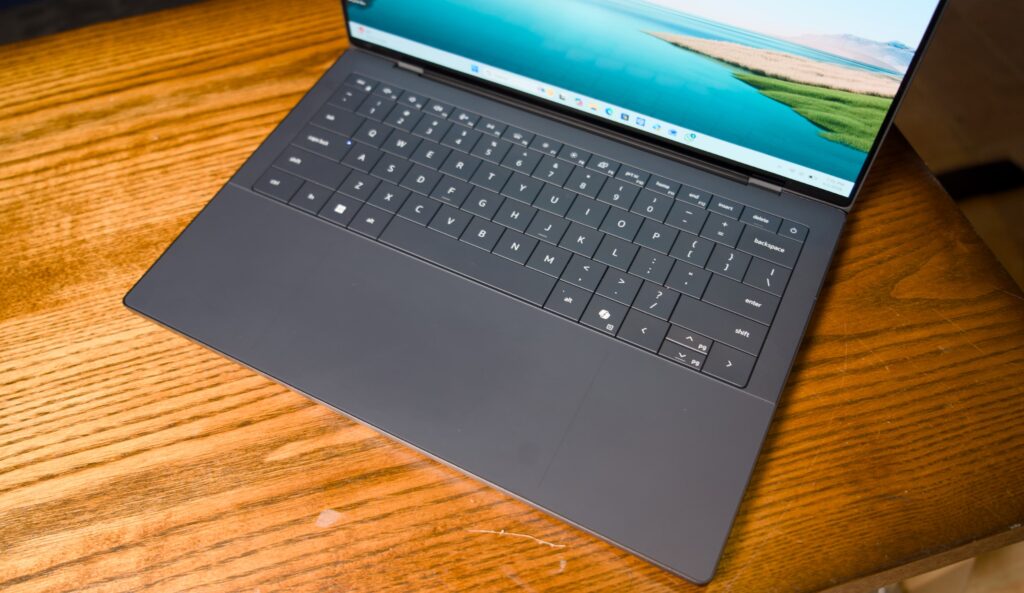
Apple just announced a new entry-level MacBook that runs on the same A18 Pro chip that launched two years ago in its iPhone 16 lineup and starts at $599. With older M-series MacBooks being phased out, it’s a cheaper alternative that competes with Windows and ChromeOS models, while using hardware that was already in mass production for other devices. It’s available to pre-order starting today and will ship starting on March 11th.
The Neo also features a 13-inch (2408 x 1506) display, 8GB of RAM (with no option to upgrade), 256GB or 512GB of storage, a Magic Keyboard, multi-touch trackpad, 1080p camera, two USB-C ports (one USB 3 and one USB …
Our first hands-on look at Apple’s MacBook Neo
4 Mar 2026, 2:15 pm by Antonio G. Di Benedetto

Here is the MacBook Neo, Apple’s new entry-level Mac laptop. Its colorful chassis options easily set it apart from current MacBook Air and Pro models. But the biggest difference is that inside the Neo is an A18 Pro iPhone chip instead of an M-series processor Apple typically uses in its laptops and recent desktops.
The first thing you notice, touching the device, is obviously the colors. They’re not quite as vibrant as the orange iPhone 17 Pro, but the blush and citrus colors (which are more like chartreuse-ish and purple-ish) do look pretty nice. Apple says the keyboards are color-matched, but the effect is pretty subtle, and was a bit har …
AI is now part of the culture wars — and real wars
4 Mar 2026, 2:15 pm by Tina Nguyen

Hello and welcome to Regulator, the newsletter for Verge subscribers that goes inside Washington’s increasingly existential clashes between tech and politics. If this was forwarded to you, can I interest you in a full-fledged subscription to The Verge for only $40 a year? You’ll get so much more than doomer scenarios. We cover non-existential fun stuff like Legos, too.
Do you work somewhere involving government, technology, and existential threats? Send all tips to tina.nguyen+tips@theverge.com, or to my Signal account @tina.nguyen19.
This was, to put it mildly, not a chill weekend.
For a few hours on Saturday, I thought that the Anthro …
PlayStation is reportedly moving away from PC ports
4 Mar 2026, 2:03 pm by Andrew Webster

It sounds like PlayStation is putting its focus back on console exclusives. According to a report in Bloomberg, Sony’s gaming division is moving away from porting PS5 games to PC, which reportedly includes cancelling plans for a PC port of Ghost of Yōtei.
It’s a big change from a few years ago, when Sony said it wanted half of its games available on PC and mobile by 2025. As part of that goal some of the brand’s biggest franchises, including The Last of Us, Horizon, and God of War, made their way to PC. This month alone will see the launch of PlayStation-backed PC titles including the multiplayer shooter Marathon and Kojima Productions’ Dea …
Raycast’s Glaze is an all-in-one vibe coding app platform
4 Mar 2026, 1:08 pm by David Pierce

AI tools like Claude Code have made it possible for users to build software with no coding knowledge whatsoever. That’s not to say the process is easy, though: You may not need to write code directly, but you need to understand how your computer’s terminal works, how to deploy and maintain software, and deal with lots of other associated tasks. Raycast, the launcher app that has been particularly popular among Mac users, thinks it can make the process even simpler. The company is launching a new product called Glaze that attempts to make it easy to build, use, share, and discover new vibe-coded software. Right now it’s only available for Mac …
How a prize-winning cartoonist brings hand-drawn comics to the web
4 Mar 2026, 12:00 pm by Kristen Radtke

Jailed during the 2021 coup in Myanmar, American journalist Danny Fenster spent six months as a political prisoner. For much of his incarceration he battled boredom and fear, subsisting on meditation and podcasts on an SD card smuggled in by mail, sent by his girlfriend, Juliana.
Now, nearly five years after his release, he collaborated with his cousin Amy Kurzweil, a celebrated New Yorker cartoonist and graphic memoirist, on a long-form interactive comic for The Verge about his imprisonment. I chatted via email with Kurzweil about her role as an illustrator and storyteller in this ambitious long-form project, the responsibilities inherent …
I’m not ashamed to admit the Kobo Remote is the best gadget I’ve bought this year
4 Mar 2026, 11:30 am by Andrew Liszewski

Does anyone really need a remote for a device you’re already either holding or using at arm’s length? E-readers have saved us from the risk of paper cuts and the burden of physically turning pages, but Kobo is making it even easier by releasing a wireless page-turning remote. The Kobo Remote might be indulgent and basic, but it’s all about maximizing convenience, and at the end of the night when I’m looking to unwind with a good book, that’s exactly what I want.
Wireless remotes for e-readers aren’t a new idea, but none of them just directly connect to Kindles and Kobos, despite recent versions of those e-readers now supporting Bluetooth. You either need to jump through hoops to modify the software on your e-reader to make it connect to specific third-party remotes, or settle for a remotely operated accessory that attaches to an e-reader and physically taps the screen to turn the page.
Clip-on page turners have always felt too cumbersome and complicated to me. I’m probably not alone, because shortly after it launched last November, the $30 Kobo Remote quickly sold out and remained out of stock for several months. It wasn’t until late January that I was finally able to buy one, and while I think Kobo could have squeezed in a little more functionality, both my wife and I have readily embraced the remote.

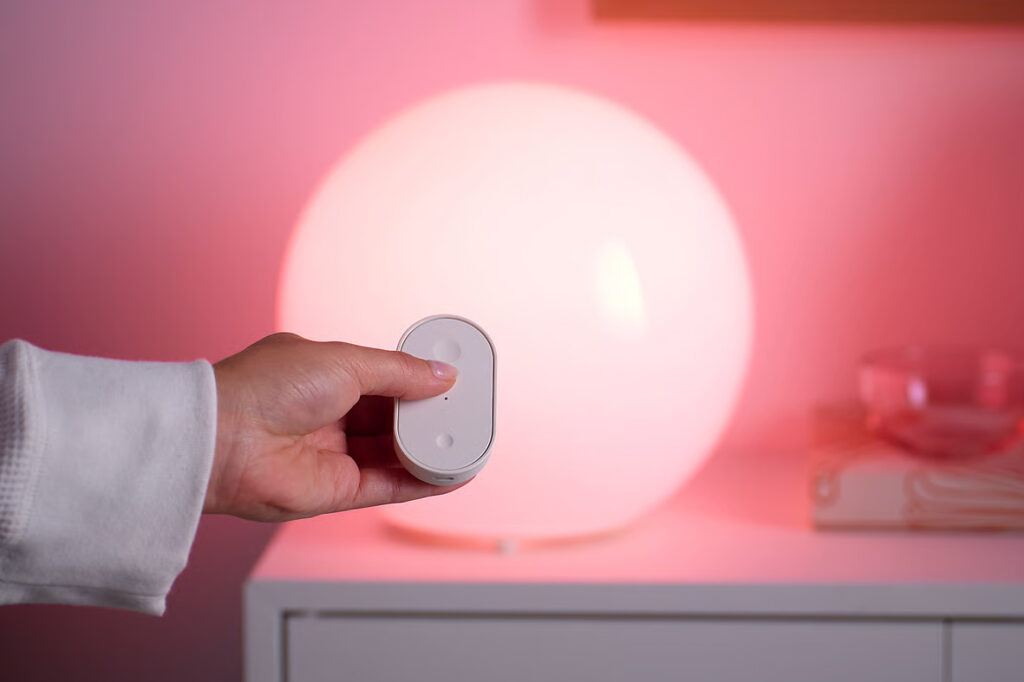
At just shy of 4 inches long and about the size of a pack of Juicy Fruit, the Kobo Remote is a lot smaller than I was expecting. It feels even smaller in my large hands, but at the same time big enough to comfortably hold and operate, and to not get lost in the bedsheets if dropped. The remote includes an optional wrist lanyard, which on more than one occasion has prevented it from going missing when I’ve fallen asleep reading.

There’s no rechargeable battery, but Kobo says the included AAA should last for months. The remote will only connect to Kobo devices that support Bluetooth for audiobooks, but the pairing process is as painless as connecting headphones. Once paired, the remote automatically reconnects when your Kobo wakes, requiring just a second or two before it’s ready to go. If you want to connect it to a different e-reader, a button on the front edge of the remote manually activates pairing mode.

The remote has two clicky buttons. The larger one goes to the next page, and the smaller one flips back. They’re easy to differentiate by touch — in addition to the size difference, one button is concave, while the other is convex — but you can’t customize their functionality. It would be nice to be able to press and hold either button to increase or decrease screen brightness, or make font size adjustments. And my wife, a voracious consumer of audiobooks, was disappointed to find she couldn’t use the remote’s buttons to adjust the volume or pause playback — they only skip forward or back 30 seconds at a time.

Is the Kobo Remote a must-have accessory for every Kobo user? Probably not, but we’ve already found several scenarios where it’s been a welcome upgrade. My wife, who uses her Kobo mounted to a bedside stand, can now read books while staying completely cocooned under the covers. I prefer reading while laying on my side and can now prop my Kobo up on my nightstand and flip pages without having to awkwardly reach over.

The remote has also made reading on the treadmill easier. And for Kobo e-readers lacking buttons, it can facilitate page turns while wearing gloves during a chilly morning commute, or save your screen from greasy fingerprints while snacking. It’s an accessory that’s all about comfort, ease, and convenience, and these days I’ll take about as much of all of those as I can get.
Photography by Andrew Liszewski / The Verge
End of today’s The Verge roundup.